
Windows Vista Forums

Disk Cleanup - Correct Shortcut for Vista 64 bit

  1. #1
    <!-- google_ad_section_start -->Disk Cleanup - Correct Shortcut for Vista 64 bit<!-- google_ad_section_end -->

    Disk Cleanup - Correct Shortcut for Vista 64 bit
    How to Correct the Disk Cleanup Shortcut for Vista 64 bit
    Published by Brink is online now
    25 Aug 2007
    Disk Cleanup - Correct Shortcut for Vista 64 bit

    How to Correct the Disk Cleanup Shortcut in Vista 64 bit

    information   Information
    By default in Vista 64 bit (x64), the shortcut in the Start Menu points to the 32-bit (x86) executable for Disk Cleanup. While Disk Cleanup will work fine from this shortcut for most things, there is one function that does not work correctly – the cleaning of System Restore points, Shadow Copies, and Previous Versions. This will show you how to fix this error in the Start menu Disk Cleanup shortcut.

    CREDIT TO: Kristan Kenney: Confessions of a Windows Enthusiast


    Here's How:
    1. Open the Start Menu.

    2. Click on All Programs, Accessories, and then on System Tools.

    3. Right click on Disk Cleanup and click on Properties.
    NOTE: All other Disk Cleanup shortcuts are correct. Just this one has is incorrect.

    4. In the Target: area, change it from: (See screenshot below step 5)
    %SystemRoot%\SysWOW64\cleanmgr.exe

    TO:

    %SystemRoot%\system32\cleanmgr.exe
    5. Click on Apply.
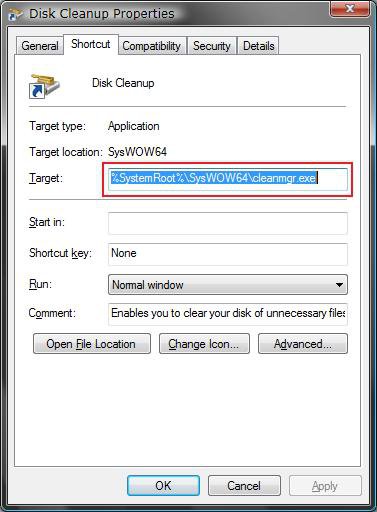
    incorrect_target.jpg
    6. Click on Continue in the Access Denied prompt. (See screenshot below)
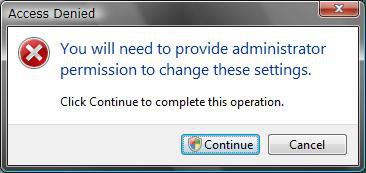
    access_denied.jpg
    7. Click on Continue in the UAC prompt.

    8. You should now see this below for the properties. (See screenshot below step 9)

    9. Click on OK.
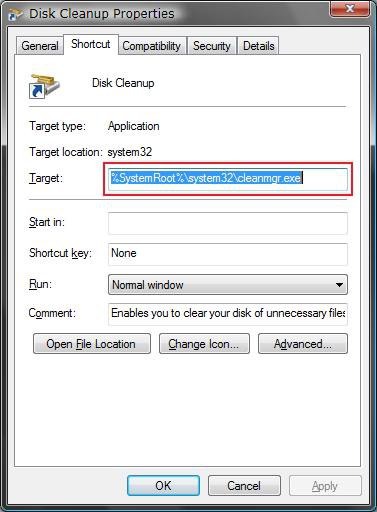
    correct_target.jpg
    That's it,
    Shawn


    Published by


    Brink's Avatar
    Administrator

    Join Date: Apr 2007
    Location: Texas, USA
    Posts: 30,591
    Array

    Tutorial Tools


    Applies to

    All Vista Versions
    64 Bit

  2. #1


    Newbie
    Join Date : Dec 2009
    Posts : 1
    Vista Home Premium x64.
    Local Time: 06:54 PM

    Re: Disk Cleanup - Correct Shortcut for Vista 64 bit

    I know my question may sound stupid - but it appears that the new shortcut will do the opposite of what is recommended - the fix seems to be directing the Disk Cleanup shortcut to the 32-bit (x86) executable, which appears not to be x64. The original pointed into the folder SysWOW64 - What is SysWOW64?
    Thanks for all the valuable tips and info


    Last edited by madbill; 18 Dec 2009 at 12:14 PM. Reason: spelling
      My System SpecsSystem Spec

  3. #2
    Brink's Avatar

    Administrator


    Join Date : Apr 2007
    Texas, USA
    Posts : 30,591
    64-bit Vista Ultimate SP2, Windows 7 Ultimate SP1, Windows 8 Enterprise
    Local Time: 06:54 PM
    usa us texas

      Thread Starter

    Re: Disk Cleanup - Correct Shortcut for Vista 64 bit

    Hello Bill, and welcome to Vista Forums.

    The 32-bit and 64-bit Vista should run out of the System32 folder instead. The WoW64 folder is to allow 32-bit applications to run in a 64-bit Vista, but you can read more in details about it in the link below.

    WoW64 - Wikipedia, the free encyclopedia

    Hope this helps,
    Shawn

      My System SpecsSystem Spec

Disk Cleanup - Correct Shortcut for Vista 64 bit

Similar Threads
Tutorial Tutorial Starter Category Comments Last Post
Vista Disk Cleanup SchraDAS Vista General 1 04 Mar 2009
Vista disk cleanup button? RuffRider Vista hardware & devices 2 16 Oct 2008
Running Disk Cleanup in Vista Premium. JJ Vista General 2 21 Oct 2007
Temp files?-Disk cleanup misses them in Vista Jeff Vista file management 5 12 Dec 2006
Hibernate gone after disk cleanup on Vista RC2 ictiosapiens Vista General 3 15 Oct 2006