
How to Boot to the Advanced Boot Options in Vista
 Information
This will show you how to boot into the Advanced Boot Options screen to select options to start Vista in advanced troubleshooting modes.
Here's How:
1. Start or restart the computer.
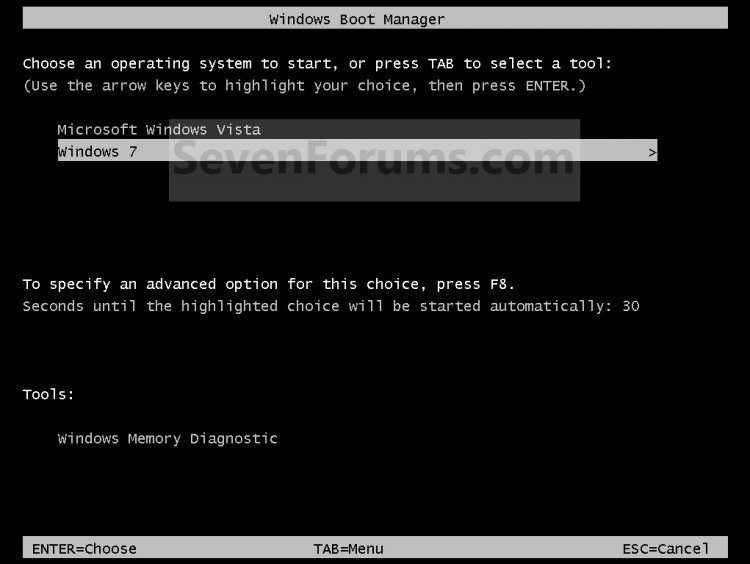
2. If you Multi Boot with more than One Operating System
A) At the Windows Boot Manager screen, select the OS you want to use the Advanced Boot Options for, then press F8. (see screenshot below)
3. If you Only Boot with One Operating System (ex: Vista)
A) Press (tap) F8 on your keyboard about every second as soon as you turn the computer on until you see
the screenshot below.
NOTE: If the Windows logo appears, you will need to repeat steps 1 and 3 again. If you dual boot, then you will need to select the OS you want to use the Advanced Boot Option for and then press F8.
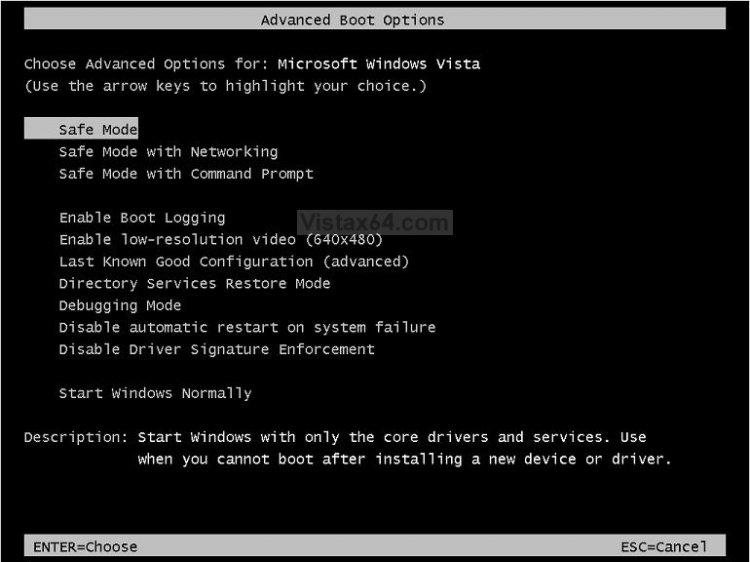
4. Use the arrow keys to select an advanced option to start Vista into and press Enter.
[TABLE=class:-grid,-width:-750][TR][TD]Advanced Option
[/TD]
[TD]
Description
[/TD][/TR]
[TR][TD]
Repair Your Computer
[/TD]
[TD]
This options will only be available if you have a OEM computer with a recovery partition on your hard drive. Otherwise, you will need to use the System Recovery Options from your retail Vista installation disk. Repair Your Computer shows a list of system recovery tools that you can use to repair startup problems, run diagnostics, or restore your system.
[/TD][/TR]
[TR][TD]
Safe Mode
[/TD]
[TD]
This starts Vista with a minimal set of drivers and services.
[/TD][/TR]
[TR][TD]
Safe Mode with Networking
[/TD]
[TD]
This starts Vista in safe mode and includes the network drivers and services needed to access the Internet or other computers on your network.
[/TD][/TR]
[TR][TD]
Safe Mode with Command Prompt
[/TD]
[TD]
This starts Vista in safe mode with a command prompt window instead of the usual Windows interface. To exit from here, press Ctrl+Alt+Delete or type Exit and press Enter.
[/TD][/TR]
[TR][TD]
Enable Boot Logging
[/TD]
[TD]
Creates a file named ntbtlog.txt, that lists all the drivers that are installed during startup.
[/TD][/TR]
[TR][TD]
Enable Low Resolution Video (640 X 480)
[/TD]
[TD]
Starts Vista using your current video driver and using low resolution and refresh rate settings. You can use this mode to reset your display settings, or to use a television monitor with your computer if needed.
[/TD][/TR]
[TR][TD]
Last Know Good Configuration (advanced)
[/TD]
[TD]
Starts Vista with the last registry and driver configurations that worked successfully. For more information, see: Windows Help and How-to: Using Last Known Good Configuration
[/TD][/TR]
[TR][TD]
Directory Services Restore Mode
[/TD]
[TD]
Starts Vista's domain controller running Active Directory so that the directory service can be restored. This option is intended for IT professionals and administrators.
[/TD][/TR]
[TR][TD]
Debugging Mode
[/TD]
[TD]
Starts Vista in an advanced troubleshooting mode intended for IT professionals and system administrators.
[/TD][/TR]
[TR][TD]
Disable Automatic Restart on System Failure
[/TD]
[TD]
Prevents Vista from automatically restarting if an error causes Vista to fail. Choose this option only if Vista is stuck in a loop where Vista fails, attempts to restart, and fails again repeatedly.
[/TD][/TR]
[TR][TD]
Disable Driver Signature Enforcement
[/TD]
[TD]
Allows drivers containing improper signatures to be installed.
[/TD][/TR]
[TR][TD]
Start Windows Normally
[/TD]
[TD]
Starts Vista in its normal mode to the logon screen or user desktop.
[/TD][/TR][/TABLE]
That's it,Shawn
Related Tutorials
- How to Start the Memory Diagnostics Tool in Vista
- How to Do a Startup Repair in Vista
- How To Perform a Repair Installation For Vista
- How to Do a System Restore in Vista
- How to Run Check Disk at Startup in Vista
- How to Check and Change the Startup Programs in Vista
- How to Repair and Verify the Integrity of Vista System Files with System File Checker
- How to Get Out of Reduced Functionality Mode in Vista
- How to Turn DEP On or Off for a Program
- How to Troubleshoot the Computer with Reliability Monitor in Vista
- How to Generate a System Health Report in Vista
- How to Use the DirectX Diagnostic Tool in Vista
- How to Use the Resource Monitor in Vista
- How to Start Vista in Safe Mode
- How to Open a Command Prompt at Startup in Vista
Last edited:


 )pls can u guys help me as it is vista takes some time to load and besides that this black screen

