
How to Fix Recent Programs Not Being Remembered in Vista
 Information
When you logon to your user account, the Frequently Used Programs list in the Start menu may get reset with the factory default listing. This will leave the list empty and not have your recent programs remembered.
This happens if the StartMenuInit registry value is not set correctly in the registry. During the first logon to a user account, Vista is supposed to set the StartMenuInit value automatically. If this fails for some reason, then Vista resets the Frequently Used programs list with the default programs list automatically at every logon, and pops up the Start menu automatically.
This happens if the StartMenuInit registry value is not set correctly in the registry. During the first logon to a user account, Vista is supposed to set the StartMenuInit value automatically. If this fails for some reason, then Vista resets the Frequently Used programs list with the default programs list automatically at every logon, and pops up the Start menu automatically.
 Note
NoteRecent Items - Shows list of your recently used files on the right side of the Start menu.
Recent programs - A list of recently used programs displayed on the right white side of the Start Menu under the pinned programs separator line.
Recent programs - A list of recently used programs displayed on the right white side of the Start Menu under the pinned programs separator line.
 Tip
TipThe Recent Programs folder is located at:
NOTE: You will need to have Show hidden files and folders checked in Folder Options.
C:\Users\(User-Name)\AppData\Roaming\Microsoft\Windows\Recent Items
You can also open this location by typing shell:recent and in the white line (Start Search) area of the Start Menu and pressing Enter.
NOTE: You will need to have Show hidden files and folders checked in Folder Options.
C:\Users\(User-Name)\AppData\Roaming\Microsoft\Windows\Recent Items
You can also open this location by typing shell:recent and in the white line (Start Search) area of the Start Menu and pressing Enter.
 Warning
When you open this location and you have a yellow folder named Recent instead of the default Recent Items folder with a icon, then right click on the Recent folder and click Delete. Type shell:recent in the search box of the Start Menu and press Enter. Logoff and logon, or restart the computer to rebuild the folder back to the default Recent Items folder.
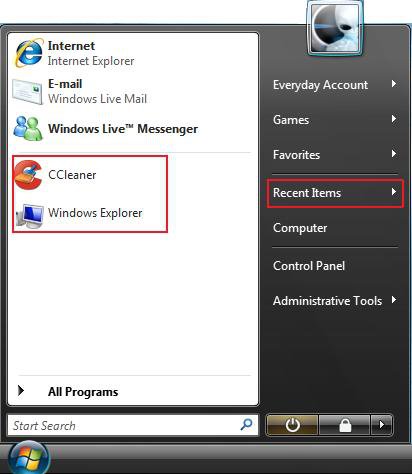
NOTE: Recent items are boxed in red.
 STEP ONE
1. Make sure that Recent Items is turned on in the Start menu.
2. Make sure that you have the number of recent programs to display set to at least 5.
STEP TWO To Use a REG File Download:
1. Click on the Download button below to download the file below.
Fix_Recent_Programs.reg

2. Click on Save, and save the .reg file to the Desktop
3. Right click on the downloaded .reg file and click on Merge.
4. Click on Run, Continue (UAC), Yes, and then OK when prompted.
5. Log off and log on, or restart the computer to apply the changes.
6. When done, you can delete the downloaded .reg file if you like.
To do so Manually in Registry Editor
1. Open the Start Menu.
2. In the white line (Start Search) area, type regedit and press Enter.
3. Click on Continue in the UAC prompt.
4. In regedit, go to: (See screenshot below step 5)
HKEY_CURRENT_USER\Software\Microsoft\Windows\CurrentVersion\Explorer\Advanced
5. In the right pane, right click StartMenuInit and click on Modify.
NOTE: If you do not have StartMenuInit, then click on New and DWORD (32-bit) Value. Type StartMenuInit and press Enter.
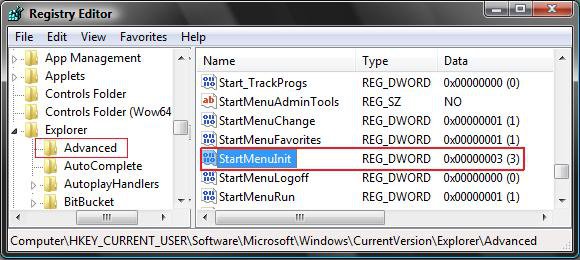
6. Type 3 and click on OK. (See screenshot below)
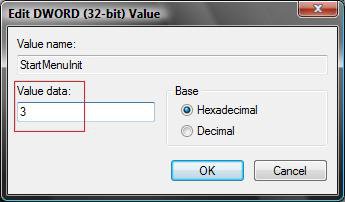
7. Close regedit.
8. Log off and log on, or restart the computer to apply the changes.
That's it,Shawn
Attachments
Last edited:


 You can attempt to run Check Disk (chkdsk) to see if it can repair the corruption so SFC can complete when ran again. See Method Two here for how.
