Vista Forums
Vista Forums Home Join Vista Forums Donate Vista Tutorials Tags

Welcome to Vista Forums we are your forum to discuss Windows Vista x64 and x86 systems. Whether you need help or just want to post an idea you have on Vista, this is the forum for you.
Register at Vista forums...the world biggest Windows Vista resource Join Vista Forums

Go Back   Vista Forums > Vista Forums > Tutorials

Logon with Username and Password

Poll: Did this Tutorial help and work for you?
Poll Options
Did this Tutorial help and work for you?

Comment
 
Tutorial Tools Display Modes
<!-- google_ad_section_start -->Logon with Username and Password<!-- google_ad_section_end -->
Logon with Username and Password
How to Make Vista Require a Username and Password at Logon
Published by Brink
09-04-2007

How to Make Vista Require a Username and Password at Logon

INFO: This will change the logon procedure in Vista to require all users to type in their username and password instead of selecting their user icon and typing in just their password to logon their user account. This is like the old classic Windows logon screen.

NOTE: You must do this from within an Administrator account or provide the Administrator password when prompted by UAC.

RELATED LINKS:
1. How to Logon Automatically at Startup in Vista

2. How to Enable or Disable Ctrl+Alt+Delete Secure Logon in Vista

3. How to Display Information About Previous Logons During User Logon in Vista

4. How to Change the Logon Screen in Vista

5. How to Hide a User Account in Vista

6. How to Change or Stop Password Expiration in Vista

7. How to Disable or Enable Password Protection on Wakeup in Vista

8. How to Display a Logon Message Title and Text in Vista

9. How to Change the Computer Name in Vista

10. How to Change the Number of Logon Entries Allowed to be Saved in the Logon Cache in Vista

11. How to Reset a User Account Password in Vista

12. How to Create a Password for a User Account in Vista

13. How to Turn Password Protected Sharing On or Off in Vista


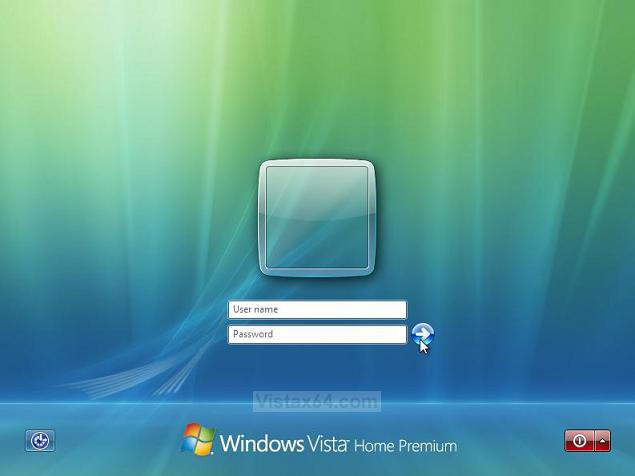
EXAMPLE: Username and Password Logon Screen
NOTE: For the username, you can type your Username, or to logon to a domain, type Domain Name (Computer Name)/Username instead. (EX: My Computer/Moderator) If you have no password, just leave it empty. You can press TAB or SHIFT+TAB to move between Username and Password if you entered something incorrectly.

Example.jpg


METHOD ONE:
Through a Download:
1. To Enable Username and Password Logon -
Enable_Username&Password_Logon.reg < Click To Download

2. To Restore the Default Logon
- Restore_Default_Logon.reg < Click To Download
3. Click on Save, and save the .reg file to the Desktop.

4. Right click the .reg (On Desktop) file and click Merge.
5. Click on the Run button for Security Warning pop-up.
6. Click on Continue (UAC), Yes, and then OK when prompted.
7. When done, you can delete the .reg file (On Desktop).
NOTE: The next time you go to a logon screen, you will be required to enter your username and password to logon
to Vista in your user account.


METHOD TWO:
The Manual Way:
1. Open the Start Menu.
2. In the white line (Start Search) area, type regedit and press Enter.
3. Click Continue for UAC prompt.
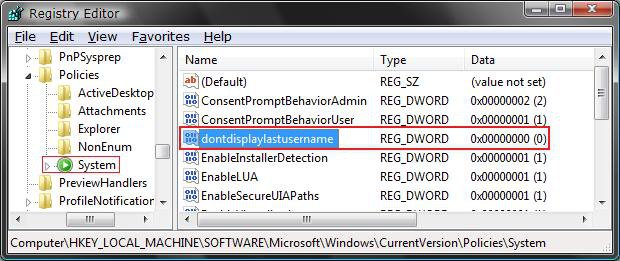
4. In regedit, go to: (See screenshot below)
HKEY_LOCAL_MACHINE\SOFTWARE\Microsoft\Windows\CurrentVersion\Policies\System
5. In the right pane, right click on dontdisplaylastusername and click Modify.

Reg.jpg

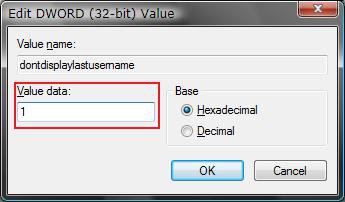
6. To Enable Username and Password Logon -Type 1 and click OK. (See screenshot below)

7. To Restore the Default Logon - Type 0 (number zero) and click OK.

Modify.jpg

8. Close regedit.
NOTE: The next time you go to a logon screen, you will be required to enter your username and password to logon to Vista for your user account.


That's it,
Shawn
Published by
Brink's Avatar
Administrator
Join Date: Apr 2007
Location: Texas, USA
Posts: 12,941
Rep Power: 200
Brink has a reputation beyond reputeBrink has a reputation beyond reputeBrink has a reputation beyond reputeBrink has a reputation beyond reputeBrink has a reputation beyond reputeBrink has a reputation beyond reputeBrink has a reputation beyond reputeBrink has a reputation beyond reputeBrink has a reputation beyond reputeBrink has a reputation beyond reputeBrink has a reputation beyond repute

Tutorial Tools

Applies to
All Vista Versions
64 Bit & 32 Bit

Rating
Skill Level
20%20%20%
1

Page copy protected against web site content infringement by Copyscape

Old 01-14-2008  
Mikhayah
Newbie
Mikhayah is on a distinguished road
 
Join Date: Jan 2008
Vista Ultimate
Posts: 9

Re: Logon with Username and Password

i tried this and it errored out when i clicked okay. i did this from a user account that is not the admin. Any suggestions? i need this TO get Vista to prompt for the username so i can type in the correct username for the admin account.
Mikhayah is offline   Reply With Quote
Old 01-14-2008  
Brink
Administrator
Brink has a reputation beyond reputeBrink has a reputation beyond reputeBrink has a reputation beyond reputeBrink has a reputation beyond reputeBrink has a reputation beyond reputeBrink has a reputation beyond reputeBrink has a reputation beyond reputeBrink has a reputation beyond reputeBrink has a reputation beyond reputeBrink has a reputation beyond reputeBrink has a reputation beyond repute
 
Brink's Avatar
 
Join Date: Apr 2007
Vista x64 Ultimate SP1
Posts: 12,941

Location: Texas, USA
Re: Logon with Username and Password

Hi Mikhayah,

Yes, this is normal. You will need to do this tutorial in a Administrator account or provide the Administrator password when prompted by UAC.

Shawn

There are no dumb questions, just the people that do not ask them.
Please post feedback to help others.
Brink is offline   Reply With Quote
Old 01-15-2008  
Mikhayah
Newbie
Mikhayah is on a distinguished road
 
Join Date: Jan 2008
Vista Ultimate
Posts: 9

Re: Logon with Username and Password

Man, that's really rough. It's hard to believe that MS never thought that someone might put in a wrong Username and need to type it in correct; as there is no way to type in a correct password for a wrong Username. That's really a HUGE flaw of Vista. People type things in wrong and need to be able to change it without reinstalling the entire OS.
Mikhayah is offline   Reply With Quote
Old 01-15-2008  
Brink
Administrator
Brink has a reputation beyond reputeBrink has a reputation beyond reputeBrink has a reputation beyond reputeBrink has a reputation beyond reputeBrink has a reputation beyond reputeBrink has a reputation beyond reputeBrink has a reputation beyond reputeBrink has a reputation beyond reputeBrink has a reputation beyond reputeBrink has a reputation beyond reputeBrink has a reputation beyond repute
 
Brink's Avatar
 
Join Date: Apr 2007
Vista x64 Ultimate SP1
Posts: 12,941

Location: Texas, USA
Re: Logon with Username and Password

LOL Mikhayah,

I thought you were talking about doing the tutorial. LOL

You can press Tab or Shift+Tab to go back to Username to re-enter it.

Shawn

There are no dumb questions, just the people that do not ask them.
Please post feedback to help others.
Brink is offline   Reply With Quote
Old 01-15-2008  
Mikhayah
Newbie
Mikhayah is on a distinguished road
 
Join Date: Jan 2008
Vista Ultimate
Posts: 9

Re: Logon with Username and Password

Nah, the tutorial seems fine, but it's just not working in my case.

Also, i just tried tab and tab-shift and it just moved around to everything (as tab does), but didn't open a field for Username.
Mikhayah is offline   Reply With Quote
Old 01-15-2008  
Brink
Administrator
Brink has a reputation beyond reputeBrink has a reputation beyond reputeBrink has a reputation beyond reputeBrink has a reputation beyond reputeBrink has a reputation beyond reputeBrink has a reputation beyond reputeBrink has a reputation beyond reputeBrink has a reputation beyond reputeBrink has a reputation beyond reputeBrink has a reputation beyond reputeBrink has a reputation beyond repute
 
Brink's Avatar
 
Join Date: Apr 2007
Vista x64 Ultimate SP1
Posts: 12,941

Location: Texas, USA
Re: Logon with Username and Password

Mikhayah,

Strange. After I entered a wrong username and password on purpose, I got the error like you. I clicked OK, then was able to press Tab to move back and forth between the Username and Password field.

Shawn

There are no dumb questions, just the people that do not ask them.
Please post feedback to help others.
Brink is offline   Reply With Quote
Old 01-15-2008  
Mikhayah
Newbie
Mikhayah is on a distinguished road
 
Join Date: Jan 2008
Vista Ultimate
Posts: 9

Re: Logon with Username and Password

Crap. That stinks man. It's just not happening on my end.
Mikhayah is offline   Reply With Quote
Old 01-15-2008  
Brink
Administrator
Brink has a reputation beyond reputeBrink has a reputation beyond reputeBrink has a reputation beyond reputeBrink has a reputation beyond reputeBrink has a reputation beyond reputeBrink has a reputation beyond reputeBrink has a reputation beyond reputeBrink has a reputation beyond reputeBrink has a reputation beyond reputeBrink has a reputation beyond reputeBrink has a reputation beyond repute
 
Brink's Avatar
 
Join Date: Apr 2007
Vista x64 Ultimate SP1
Posts: 12,941

Location: Texas, USA
Re: Logon with Username and Password

Mikhayah,

I would just go back to the default of just typing in the password for the user account.

Is it not showing your Administrator account display picture asking for the password using the default logon?

Shawn

There are no dumb questions, just the people that do not ask them.
Please post feedback to help others.
Brink is offline   Reply With Quote
Old 01-15-2008  
Mikhayah
Newbie
Mikhayah is on a distinguished road
 
Join Date: Jan 2008
Vista Ultimate
Posts: 9

Re: Logon with Username and Password

Yeah, it's super weird man... i type in the password and it says it's denied and that it is "either" a wrong password "or" a wrong username...

Well the thing is that under users, there is the ORIGINAL name and not the saved one, AND the password hint is the original password hint.

The image is the image that was used for the original username. Only the typed in name for the username is different... a name my wife was trying to change it to, but it said it didn't happen (and again, under users it is not listed). i just can't get it to prompt me for a different username.
Mikhayah is offline   Reply With Quote
 
Comment

Tags
password, username, logon

Tutorial Tools
Display Modes


Vistax64.com is an independent web site and has not been authorized,
sponsored, or otherwise approved by Microsoft Corporation.
"Windows Vista", the Start Orb, and related materials are trademarks of Microsoft Corp.
© Designer Media 2005-2008
Tutorial powered by GARS 2.1.8m ©2005-2006

1 2 3 4 5 6 7 8 9 10 11 12 13 14 15 16 17 18 19 20 21 22 23 24 25 26 27 28 29 30 31 32 33 34 35 36 37 38 39 40 41 42 43 44 45 46 47 48