Windows Vista Forums

Start Menu - Customize Context Menu

  1. #1
    <!-- google_ad_section_start -->Start Menu - Customize Context Menu<!-- google_ad_section_end -->

    Start Menu - Customize Context Menu
    How to Customize the Start Menu Context Menu in Vista
    Published by Brink is online now
    04 Sep 2007
    Start Menu - Customize Context Menu

    How to Customize the Start Menu Context Menu in Vista

    information   Information
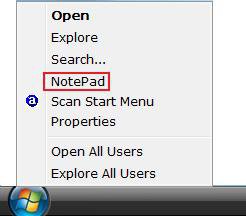
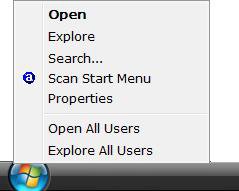
    When you right click on the Start Menu button (orb) or in the Start menu, you will see the context menu with it's default menu options. This will let you add your own shortcut items to this context menu.

    EXAMPLE: Before and After Start Menu Button (Orb) Context Menu
    Name:  Start_Menu_Before.jpg
Views: 22138
Size:  8.0 KBName:  Start_Menu_After.jpg
Views: 22327
Size:  9.8 KB

    Here's How:
    NOTE: For an example, I will add NotePad to the Start Menu context menu. You can add whatever program shortcuts you like and as many program shortcuts you would like.
    1. Open the Start Menu.

    2. In white line (Start Search) area, type regedit and press Enter.

    3. Click on Continue in the UAC prompt.

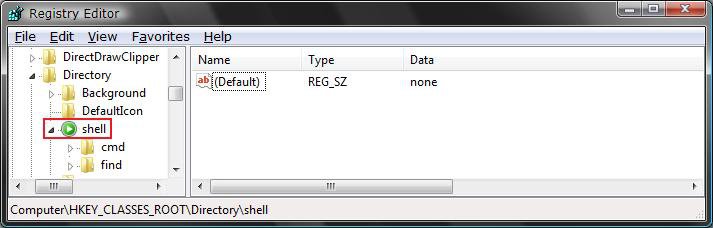
    4. In regedit, go to: (See screenshot below)
    NOTE: It's there, you just have to scroll past all the file extensions.
    HKEY_CLASSES_ROOT\Directory\Shell
    5. In left pane, right click on Shell and click on New and Key.
    shell_reg.jpg
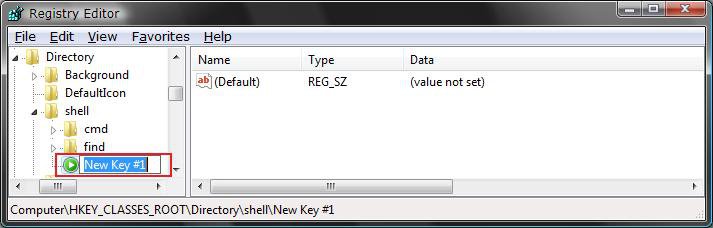
    6. Type the name you want to appear in the context menu and press Enter. (See screenshot below)
    NOTE: This will usually be the name of the program. For example: NotePad.
    new_key_shell.jpg
    7. In left pane, right click on the program name (Ex: NotePad) from step 6and click on New and Key. (See screenshot below)
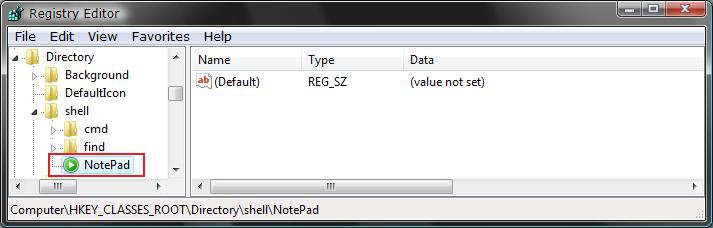
    notepad_key.jpg
    8. Type Command and press Enter. (See screenshot below)
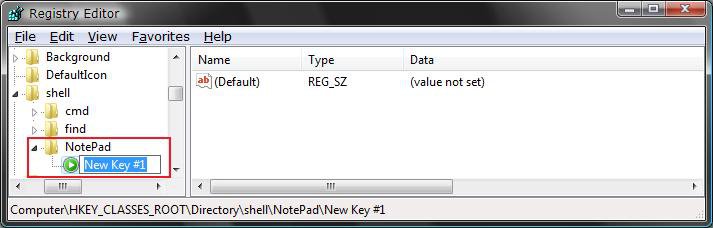
    new_key_notepad.jpg
    9. In the right pane of the Command Key, right click on (Default) and click on Modify. (See screenshot below)
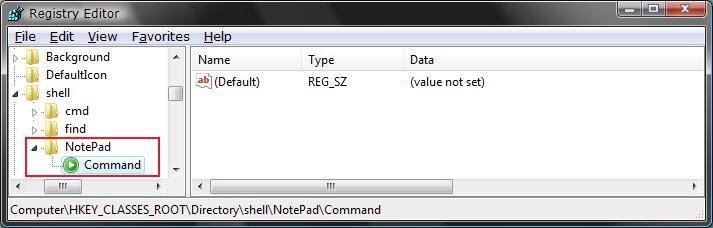
    command.jpg
    10. Type in the full path of the program you want to add a shortcut for and click on OK. (See screenshot below)
    NOTE: For the NotePad example, you would type: C:\Windows\System32\notepad.exe
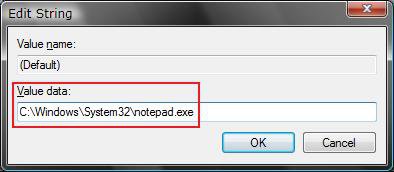
    modify_command_default.jpg
    11. The registry should now look similar to this, with the NotePad example.
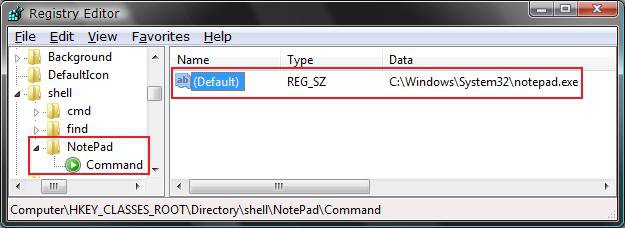
    command2.jpg
    12. Close regedit.

    13. Right click on the Start Menu button (orb) and see the item in the Context Menu. (See screenshot below)
    NOTE: You may need to click on a empty space on the desktop and press F5 to refresh the desktop first.
    Name:  Start_Menu_After.jpg
Views: 22327
Size:  9.8 KB
    That's it,
    Shawn


    Published by


    Brink's Avatar
    Administrator

    Join Date: Apr 2007
    Location: Texas, USA
    Posts: 30,594
    Array

    Tutorial Tools


    Applies to

    All Vista Versions
    64 Bit & 32 Bit

  2. #1


    Newbie
    Join Date : Jun 2008
    Posts : 2
    Vista Ultimate x64
    Local Time: 02:11 PM

    Re: Start Menu - Customize Context Menu

    I am trying to get the windows explorer shortcut to show up here, but cannot find the location of explorer.exe. %SystemRoot% does not seem to work. Any idea where Windows Explorer can be found? I want to do this since it is impossible to configure the right-click -> Explore option to open to a desired folder. Thanks.


      My System SpecsSystem Spec

  3. #2


    Newbie
    Join Date : Jun 2008
    Posts : 2
    Vista Ultimate x64
    Local Time: 02:11 PM


    Re: Start Menu - Customize Context Menu

    I also want to find out how to add a program to the right click menu within windows explorer, and to open the folder that I right clicked on within windows explorer.
    e.g. I use a music file tagging utility that used to have a right click menu in XP, but has problems with this in Vista 64 bit. It used to open the folder in the program when I right clicked on a folder and chose this program. Any idea how to do this now in Vista 64? Please let me know.

      My System SpecsSystem Spec

  4. #3
    Brink's Avatar

    Administrator


    Join Date : Apr 2007
    Texas, USA
    Posts : 30,594
    64-bit Vista Ultimate SP2, Windows 7 Ultimate SP1, Windows 8 Enterprise
    Local Time: 03:11 PM
    usa us texas

      Thread Starter

    Re: Start Menu - Customize Context Menu

    Hello Supsuper.

    Welcome to Vista Forums.

    Q1) The location for the Windows Explorer EXE is at C:\Windows\explorer.exe .

    Q2) You can right click on the file and use Open With to have that file open in a selected program that supports the file extension type. This tutorial will show you how to if needed.

    Hope this helps,
    Shawn

      My System SpecsSystem Spec

  5. #4


    Newbie
    Join Date : May 2009
    Posts : 2
    vista 32
    Local Time: 04:11 AM


    Re: Windows Explorer Default Opening

    Despite what most people say I have discovered a way to right click - start - explore to open where you want however it does require a registry edit.

    1. open registry editor and go to HKEY_CLASSES_ROOT\Folder\Shell\Explore\Command
    2. rename DelegateExecute to Old-DelegateExecute (or something similar just in case)
    3. I added new string value and left the defaults but this step is probably not neccesary
    4. Change the value of (Default) REG_EXPAND_SIZE to the path you want as in instuctions above. Mine was %SystemRoot%\Explore.exe /e, c:\

    works great!

      My System SpecsSystem Spec

  6. #5
    Brink's Avatar

    Administrator


    Join Date : Apr 2007
    Texas, USA
    Posts : 30,594
    64-bit Vista Ultimate SP2, Windows 7 Ultimate SP1, Windows 8 Enterprise
    Local Time: 03:11 PM
    usa us texas

      Thread Starter

    Re: Start Menu - Customize Context Menu

    Great find Steve, and welcome to Vista Forums.

    Shawn

      My System SpecsSystem Spec

Start Menu - Customize Context Menu

Similar Threads
Tutorial Tutorial Starter Category Comments Last Post
Start Menu - Customize Brink Tutorials 19 02 Jul 2010
Customize Context Menu wedge40 General Discussion 1 12 Sep 2009
Customize start menu Marco55 Vista General 3 26 Nov 2008
How to customize context menu? David Mayerovitch Vista General 4 10 Feb 2008
Start Menu "right" click context menu vegaspat Vista General 1 16 Jan 2008