
How to Disable or Enable the Security Center Alert Warning Notification in Vista
 Information
Security Center alerts you when your security software is out of date, turned off, or when your security settings should be strengthened. Security Center monitors the following: Firewall, Automatic updating, Antivirus, Antispyware (EX: Windows Defender), Internet security settings, and UAC (User Account Control).
 Note
NoteTo enable or disable a specific Security Center Alert Warning Notification for a type of security programs, see: How to Disable or Enable a Specific Security Center Alert Notification in Vista instead.
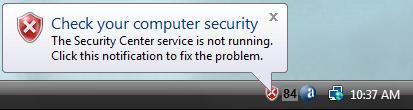
EXAMPLE: Security Center Alert Warning Notification
Here's How:
1. Open the Control Panel. (Classic View)
2. Click on the Security Center icon.
NOTE: If Security Center is turned off (disabled), then
see: How to Disable or Enable the Security Center in Vista to enable it again so you can perform the steps below.
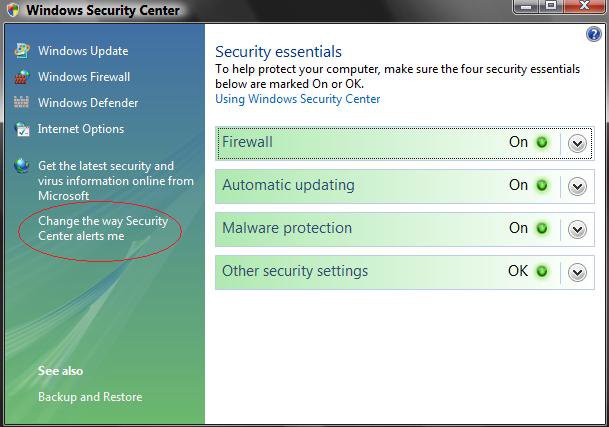
3. Click on the Change the way Security Center alerts me option. (See screenshot below)
4. To Disable All Security Center Notifications Completely
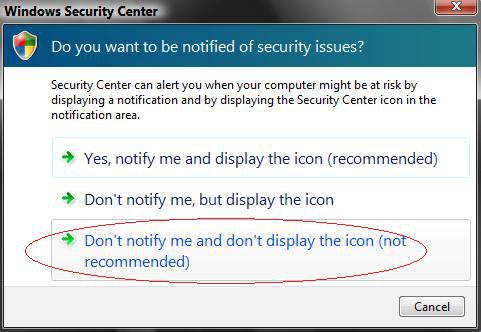
A) Click on Don't notify me and don't diplay the icon (not recommended). (See screenshot below step 6)
B) Go to step 7.
5. To Partially Disable Security Center Notifications
NOTE: You will only be notified with the Security Center icon on the notification area system tray.
A) Click on Don't notify me, but display the icon. (See screenshot below step 6)
B) Go to step 7.
6. To Enable Security Center Notifications
A) Click on Yes, notify me and display the icon (recommended). (See screenshot below)
7. Close Security Center.
That's it,Shawn
Related Tutorials
- How to Disable or Enable the Security Center in Vista
- How to Change Windows Defender Notification Options
- How to Turn UAC On or Off in Vista
- How to Disable or Enable Low Disk Space Warning in Vista
- How to Turn Pop-up Descriptions On or Off in Vista
- How to Change How Long a Notification Dialog Box Will Stay Open in Vista
- How to Turn DEP On or Off for a Program
- How to Enable or Disable DEP in Vista
- How to Restore or Remove the Security Tab in Vista
- How to Enable or Disable Notification Area Balloon Tips in Vista
- How to Enable or Disable Windows Update Start Menu Power Button Alert in Vista
- How to Disable or Enable a Specific Security Center Alert Notification in Vista
- How to Fix the Vista Security Center Reporting Incorrect Information
Attachments

Last edited by a moderator:


