
How to Change the Desktop Background Wallpaper in Vista
 Information
The desktop background wallpaper is the image on the desktop from your personal collection or one that comes with Vista. You can also select a color for your desktop background or use a color to frame your background picture.
 Note
NoteThe default Wallpaper folder is located at: C:\Windows\Web\Wallpaper
 Tip
TipYou can download a ton of free wallpapers at: Free wallpapers, wallpaper download at Jurko.net
Here's How:
1. Right click on a empty area of your desktop and click on Personalize. (See screenshot below)
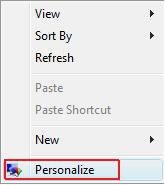
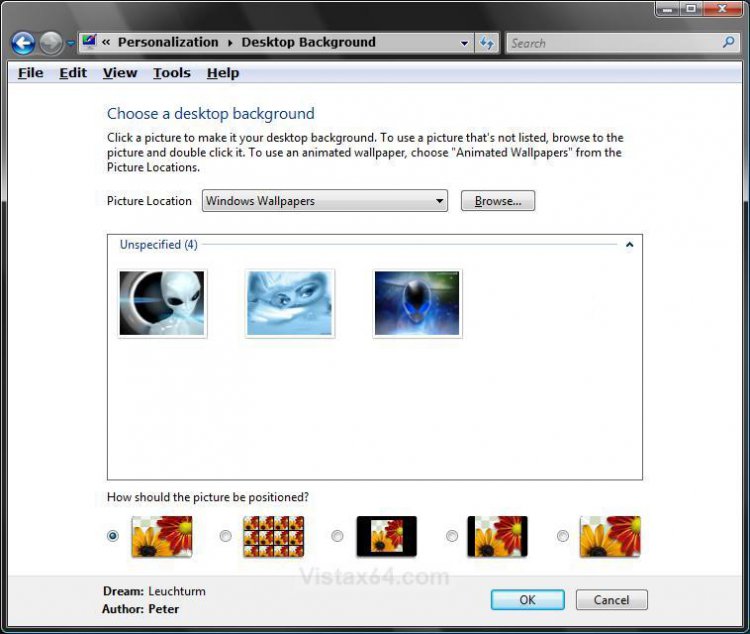
2. Click on Desktop Background. (See screenshot below)

3. To select a Image that is Displayed for the Wallpaper
A) Highlight the image. (See screenshot below step 4)
NOTE: If you highlight the image, you can see a preview of it on your desktop.
4. To Select a Image from Another Location for the Wallpaper
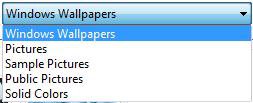
A) Click the drop down arrow under Picture Location.
B) Select a folder that has your image in it.
NOTE: You can edit this Picture Location list from within the registry location below to remove any listed location from the list here:
OR
C) Click on Browse and navigate to the location of the image.
5. Choose how the picture should be positioned on the desktop.
NOTE: Only Fit to screen, Tile, and Center are available for the Vista Home Basic and Home Premium editions. You will need to install DreamScene in Vista Ultimate before you see the Fit to screen keeping aspect ratio and Fit To Screen with cropping options.
6. Click on OK.
That's it,
Shawn
Related Tutorials
- How to Change the Desktop Theme in Vista
- How to Change the Logon Screen in Vista
- How to Use and Change a Screen Saver in Vista
- How to Enable the Hidden Aurora Boot Screen in Vista
- How to Change the Default Boot Screen in Vista SP1
- Clear the Desktop Background Picture Location History
- How to Add or Remove a Desktop Toolbar in Vista
- How to Enable or Prevent the Desktop Background Wallpaper from being Changed in Vista
- How to Install and Use DreamScene in Vista
- How to Enhance Windows Vista DreamScene with Stardock DeskScapes
- How to Change the Visual Effects Options for Appearance and Performance in Vista
- How to Change the Advanced Appearance Settings in Vista
- How to Create a Change "Desktop Background" Shortcut in Vista and Windows 7
Attachments
Last edited by a moderator:



 Still doesn't want to work. I don't know. Thanks anyway for your help.


