
How to Do a Startup Repair in Vista
 Information
Startup Repair is a Vista recovery tool that can fix certain problems, such as missing or damaged system files, that might prevent Vista from starting correctly. When you run Startup Repair, it scans your computer for the problem and then tries to fix it so your computer can start correctly.
For more information, see: Windows Help and How-to: Startup Repair FAQs
For more information, see: Windows Help and How-to: Startup Repair FAQs
 Note
NoteStartup Repair Process
Startup Repair will try to repair computers that are unbootable because of the following reasons:
Startup Repair will not repair unbootable systems caused by the following issues:
After Startup Repair has run, a text log with diagnostic information and repair results is generated. The log file is located at: C:\Windows\System32\Logfile\Srt\SrtTrail.txt
For more information, see: How Windows RE Works
Startup Repair will try to repair computers that are unbootable because of the following reasons:
- Registry corruption
- Missing or damaged system and driver files
- Disk metadata corruption (MBR, partition table, and boot sector)
- File system metadata corruption
- Installation of problematic or incompatible drivers
- Installation of incompatible Windows service packs and patches
- Corrupt boot configuration data
- Bad memory and hard disk hardware (detection only)
Startup Repair will not repair unbootable systems caused by the following issues:
- Malfunctioning firmware and other hardware components
- Problems with clean Windows installations or Windows upgrades (for example, from Windows XP to Windows Vista)
- Windows logon errors
- Viruses and malicious software
After Startup Repair has run, a text log with diagnostic information and repair results is generated. The log file is located at: C:\Windows\System32\Logfile\Srt\SrtTrail.txt
For more information, see: How Windows RE Works
 Tip
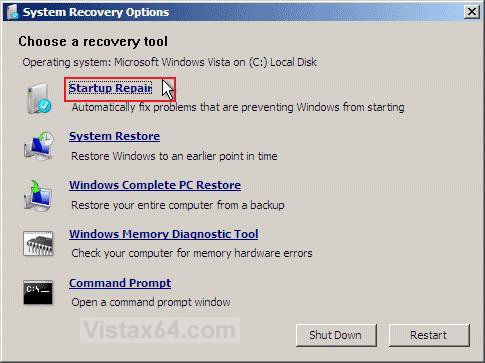
TipIf you only have a OEM Recovery DVD or Recovery Partition, then you can also create a recovery disc that will let you boot into the System Recovery Options screen (see screenshot below step 6 below) to run a Startup repair with the download from here: How to Create a Vista Recovery Disc. It cannot be used to reinstall Vista.
Here's How:
1. Boot into the System Recovery Optionsscreen.
2. Click on the Startup Repair option. (See screenshot below)
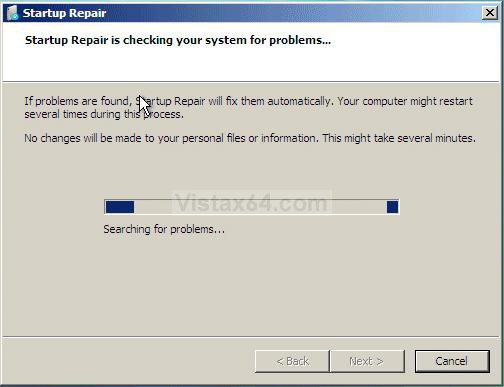
3. The Startup Repair tool will attempt to fix your computer and get it booting up again. (See screeshot below)
NOTE: Startup Repair might prompt you to make choices as it tries to fix the problem, and if necessary, it might restart your computer as it makes repairs. If repairs are not successful, you'll see a summary of the problem and links to contact information for support. Your computer manufacturer might include additional assistance information.
NoteSometimes it may take running Startup Repair up to 3 times with a restart after each time to fully repair startup issues.
Note
That's it,Shawn
Related Tutorials
- How To Perform a Repair Installation For Vista
- How to Do a Clean Install of Vista with a Upgrade Version
- How to Start the Memory Diagnostics Tool in Vista
- How to Check and Change the Startup Programs in Vista
- How to Repair and Verify the Integrity of Vista System Files with System File Checker
- How to Reset a User Account Password in Vista
- How to Run Check Disk at Startup in Vista
- How to Boot Up in and Use Advanced Boot Options in Vista
- How to Do a System Restore in Vista
- 1How to Get Out of Reduced Functionality Mode in Vista
- How to Start Vista in Safe Mode
- How to Fix the "The User Profile Service failed the logon. User profile cannot be loaded." Error
- How to Fix the Error "Your user profile was not loaded correctly! You have been logged on with a temporary profile." in Vista
- How to Create a Vista Recovery Disc
Last edited by a moderator:


