
How to Unassociate a File Extension Type in Vista and Windows 7
 Information
This will show you how to set a file extension to be associated with nothing for all users instead of some default program without having to delete the file extension unless you wanted to.
 Note
NoteThis is a standalone EXE program that does not install to your computer.
CREDIT TO:
Ramesh Srinivasan -www.winhelponline.com/articles/231/1/
CREDIT TO:
Ramesh Srinivasan -www.winhelponline.com/articles/231/1/
Here's How:
1. Download the free unassoc.zip file and save it to your desktop.
2. Right click on unassoc.zip (On Desktop) and click Open.
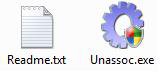
3. Extract both files to the desktop. (See screenshot below)
4. Click on the Unassoc.exe icon to run the program.
NOTE: I would recommend that you put these two files in a new folder and save them in your C:\Program Files folder, then make a shortcut for the Unassoc.exe to use.
5. Click on Continue in the UAC prompt.
6. To Unassociate a File Extension Type
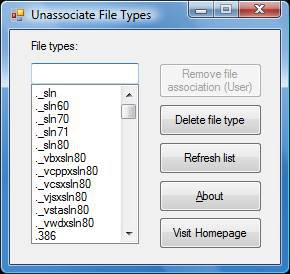
A) Click on a file extension type from the list in the left pane to select it. (See screenshot below step 7)
B) Click on Remove file association (User).
7. To Delete a File Extension Type
A) Click on a file extension type from the list in the left pane to select it. (See screenshot)
B) Click on Delete file type.
8. Close program when done.
That's it,Shawn
Related Tutorials
- How to Associate a Individual File Extension Type With a Program in Vista
- How to Set Default Associations For a Program in Vista
- How to Show and Change a File Name Extension in Vista
- How to Add a Program to Open With in Vista
- How to Change a File Extension Type Icon in Vista
- Restore Default Vista File Extension Type Associations
- How to Add "Show/Hide Known File Extensions" to Context Menu in Vista and Windows 7
Attachments

Last edited by a moderator:


