Vista Forums
Vista Forums Home Join Vista Forums Donate Vista Tutorials Tags

Welcome to Vista Forums we are your forum to discuss Windows Vista x64 and x86 systems. Whether you need help or just want to post an idea you have on Vista, this is the forum for you.
Register at Vista forums...the world biggest Windows Vista resource Join Vista Forums Now

Go Back   Vista Forums > Vista Forums > Tutorials

Vista Tutorial Categories Network & Internet Tutorials File & Folder Settings Tutorials Taskbar & Start Menu Tutorials Performance & Maintenance Tutorials General Tips Tutorials Programs & Features Tutorials Context Menu Tutorials Shortcut Tutorials Security & System Tools Tutorials Parental Controls Tutorials User Account Tutorials Hardware & Drivers Tutorials Appearance & Personalization Tutorials Backup & Restore Tutorials Music, Photo, Video and Media Tutorials Power Management Tutorials

Zip File Compressed Folders

Update your Vista Drivers Update Your Drivers Now!!
Poll: Did this Tutorial help and work for you?
Poll Options
Did this Tutorial help and work for you?

Comment
 
Tutorial Tools Display Modes
<!-- google_ad_section_start -->Zip File Compressed Folders<!-- google_ad_section_end -->
Zip File Compressed Folders
How to Turn Compressed Folders On or Off in Vista
Published by Brink
05-30-2007

How to Turn Compressed Folders On or Off in Vista

Information
  This will show you how to turn on or off the ability for Windows Explorer to treat Compressed Folders like a normal folder and open and view it the same way (on), or like a file (off). Vista handles ZIP files like folders. For example, ZIP files show up under the folder tree (like folders) in Windows Explorer. Vista will look inside of the ZIP files when doing searches, causing it to take longer to finish the search sometimes. If you have another 3rd party ZIP program (WinZip, 7-Zip, etc.), then this can be an annoyance to you and you may want to turn this feature off.
NOTE
  Compressed Folders is turned on by default on Vista.
WARNING
  If you are not using a 3rd party ZIP program, that may or may not support Compressed Folders in Windows Explorer below, then you will also need to make sure that you have the default ZIP handler enabled. For how see: How to Restore the Built-in ZIP File Support in Vista
RELATED LINK:
EXAMPLE: Compressed Folders On
NOTE
  When on, ZIP folder contents show in the folder tree and window pane. Windows Explorer will still offer to Extract All files on the toolbar at the top.
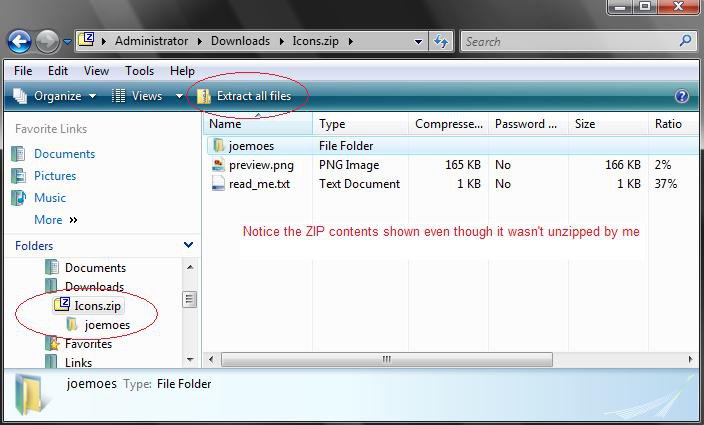
Click the image to open in full size.


OPTION ONE:
How to Turn Compressed Folders Off
1. Click on the Download button below this and save the file Vistaunzip.reg file to your DESKTOP.



2. Right click on the vistaunzip.reg file (on Desktop) and click on Merge.
3. Click on the Run button in the Security Warning pop-up.
4. Click on Continue (UAC), Yes, and then OK when prompted.
5. Restart the computer to apply the changes.
6. You can delete the vistaunzip.reg file after you have confirmed Compressed Folders is off if you like.


OPTION TWO:
How to Turn Compressed Folders On
1. Click on the Download button below this and save the file vistazip.reg to your DESKTOP.


2. Right click on the vistazip.reg file (on Desktop) and click on Merge.
3. Click on the Run button in the Security Warning pop-up.
3. Click on Continue (UAC), Yes, and then OK when prompted.
4. Restart your computer to apply changes.
5. You can delete the vistazip.reg file when you have confirmed Compresed Folders is on if you like.
That's it,
Shawn

Published by
Brink's Avatar
Administrator
Join Date: Apr 2007
Location: Texas, USA
Posts: 16,573
Rep Power: 150
Brink has a reputation beyond reputeBrink has a reputation beyond reputeBrink has a reputation beyond reputeBrink has a reputation beyond reputeBrink has a reputation beyond reputeBrink has a reputation beyond reputeBrink has a reputation beyond reputeBrink has a reputation beyond reputeBrink has a reputation beyond reputeBrink has a reputation beyond reputeBrink has a reputation beyond repute

Tutorial Tools
Show Printable Version Show Printable Version
Email this Page Email this Page

Applies to
All Vista Versions
64 Bit & 32 Bit

Comment

Tags
compressed, file, file & folder settings, folders, zip

Tutorial Tools
Display Modes


Update your Vista Drivers Update Your Drivers Now!!

Similar Threads
Tutorial Tutorial Starter Category Comments Last Post
Compressed files/folders DebM448 Vista General 3 06-06-2008 12:19 PM
Compressed (zipped) folders error Ralph Vista file management 1 12-14-2007 01:15 PM
Compressed Folders and Passwords Refresher Vista General 1 08-24-2007 02:48 PM
Compressed Folders Error Websken Vista General 1 07-03-2007 08:16 AM
Compressed Folders Roy Vista file management 1 11-21-2006 09:00 AM


Vistax64.com is an independent web site and has not been authorized,
sponsored, or otherwise approved by Microsoft Corporation.
"Windows Vista", the Start Orb, and related materials are trademarks of Microsoft Corp.
© Designer Media 2005-2008
Tutorial powered by GARS 2.1.8m ©2005-2006