
How to Disable or Enable a User Account in Vista
 Information
This will show you how to hide (disable) or unhide a user account from being accessed or seen in Vista. For example, from the Logon screens, Parental Controls, UAC, User Accounts, etc...
 Note
NoteAn administrator account will still be able to navigate to and access the contents of the C:\Users\(user-name) folder of a disabled user account using Windows Explorer.
 Warning
Do not disable your only administrator account. Always leave one enabled so that you are able to make changes to Vista or other users. If you did this by mistake, then boot into Safe Mode and enable your Administrator account.
 METHOD ONE
1. Open the Local Users and Groups manager.
2. In the left pane click on the Users folder. (See screenshot below)
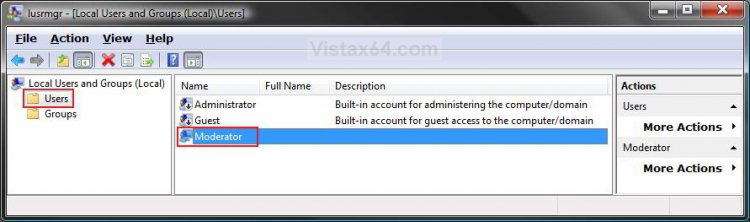
3. In the middle pane, right click on the user account's name that you want to hide or unhide and click Properties. (See screenshot above)
NOTE: The accounts with the arrow pointing down in the user icon are hidden. The ones without a arrow are unhidden.
4. To Hide a User Account
A) Check the Account is disabled box. (See screenshot below step 5)
B) Go to step 6.
5. To Unhide a User Account
A) Uncheck the Account is disabled box. (See screenshot below)
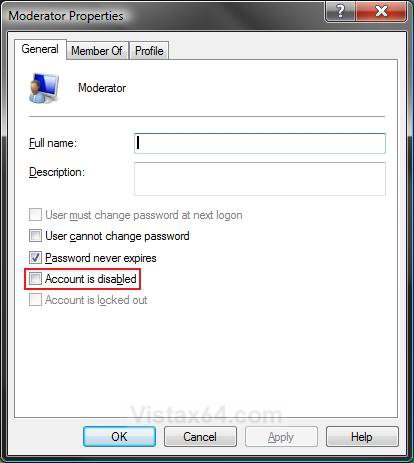
6. Click on OK. (See screenshot above)
7. Close the Local Users and Groups window.
METHOD TWO 1. Open the Start Menu, then type regedit in the search box and press Enter.
2. If prompted by UAC, then click on the Continue.
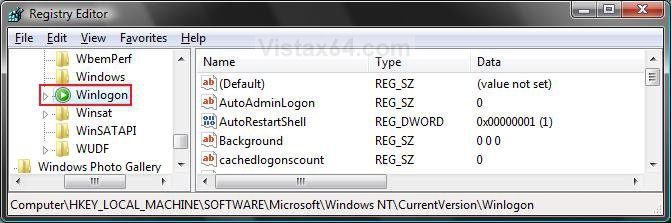
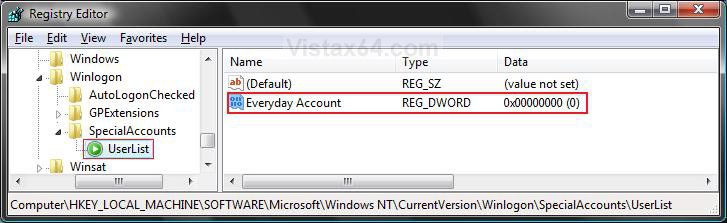
3. In regedit, navigate to the location below. (see screenshot below)
HKEY_LOCAL_MACHINE\Software\Microsoft\WindowsNT\CurrentVersion\Winlogon
4. In the left pane, right click on Winlogon and click on New and Key.
5. Type SpecialAccounts and press Enter. (See screenshot below)
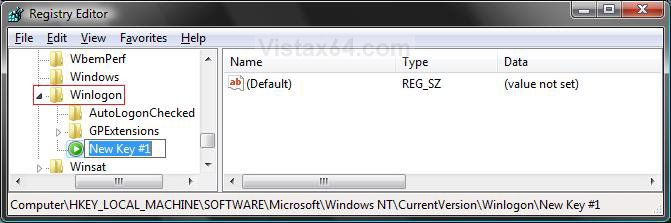
6. In the left pane, right click on SpecialAccounts and click on New and Key. (See screenshot below)
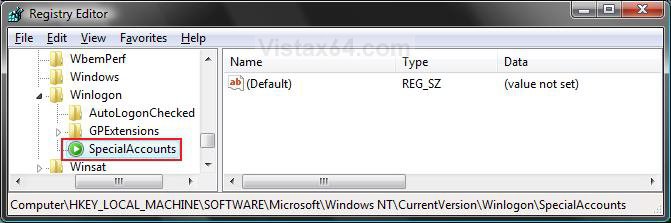
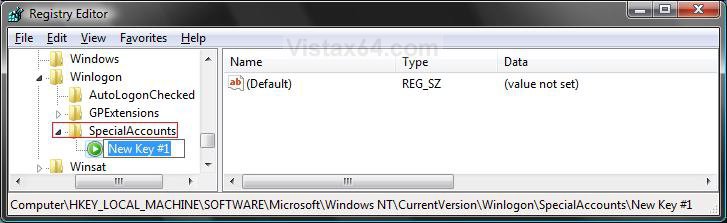
7. Type UserList and press Enter. (See screenshot below)
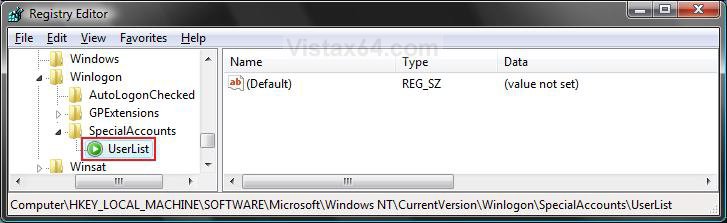
8. In right pane of UserList, right click on a empty area and click on New and DWORD (32bit) Value.
(See screenshot below)
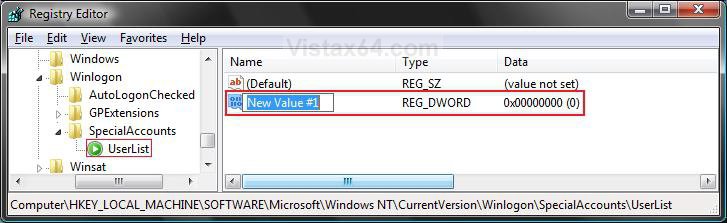
9. Type in the name of the user account that you want to hide and press Enter. (See screenshot below)
NOTE: For example: My user account name is Everyday Account.
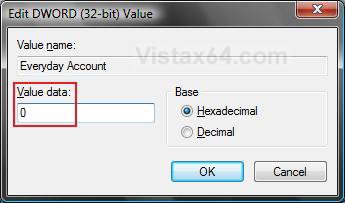
10. In the right Pane, right click on the user account name and click on Modify. (See screenshot below)
NOTE: For example: My user account name is Everyday Account.
11. To Hide the User Account
A) Type 0 (number zero) and click on OK. (See screenshot below)
WARNING: Do not hide your only Administrator account. Always leave one unhidden so you can make changes to Vista. If you did this by mistake, then boot into Safe Mode and unhide your Administrator account.
B) Go to step 13.
12. To Unhide the User Account
A) Type 1 and click on OK.
NOTE: You can also delete the SpecialAccounts key from step 7 above to unhide it.
WARNING: You will need to delete the SpecialAccounts key from step 7 to unhide the user account for Parental Controls to see it though. This is not necessary for just the logon screens.
13. Close regedit.
That's it,Shawn
Related Tutorials
- How to Create a New User Account in Vista
- How to Make Vista Require a Username and Password at Logon
- How to Enable or Disable the Real Built-in Administrator Account in Vista
- How to Delete a User Account in Vista
- How to Turn UAC On or Off in Vista
- How to Remove or Change a Password for a User Account in Vista
- How to Create a Password Reset Disk in Vista
- How to Reset a User Account Password in Vista
- How to Change a User Account Display Picture in Vista
- How to Change a User Account Name in Vista
- How to Change a User Account Type in Vista
- How to Create a Password for a User Account in Vista
Attachments

Last edited:


