Windows Vista Forums
Vista Forums Home Join Vista Forums Windows 7 Forum Vista Tutorials Tags
Welcome to Windows Vista Forums. Our forum is dedicated to helping you find solutions with any problems, errors or issues you are experiencing with Windows Vista. The Vista forum also covers news and updates and has an extensive Windows Vista tutorial section that covers a wide range of tips and tricks.

Go Back   Vista Forums > Vista Forums > Tutorials

Vista - Parental Controls - Time Limits

Comment
 

Parental Controls - Time Limits

How to Setup Windows Vista Time Limits in Parental Controls
Published by Brink
09-27-2007

How to Setup Windows Vista Time Limits in Parental Controls
Information
  You can use Parental Controls to set time limits to control when Standard users are allowed to log on to the computer. Time limits prevent users from logging on during the specified hours and, if they are already logged on, they will be automatically logged off. You can set different logon hours for every day of the week.
NOTE
  Parental Controls is only availble to the Vista Home Basic, Home Premium, and Ultimate editions. Parental Controls can only be applied to Standard user accounts. If your computer is connected to a domain, Parental Controls are not available.
RELATED LINKS:EXAMPLE: Time Limit Restriction Message
NOTE: When a standard user attempts to log on to the computer when they are restricted they will receive the error shown below.

logon_restriction.jpg

Here's How:
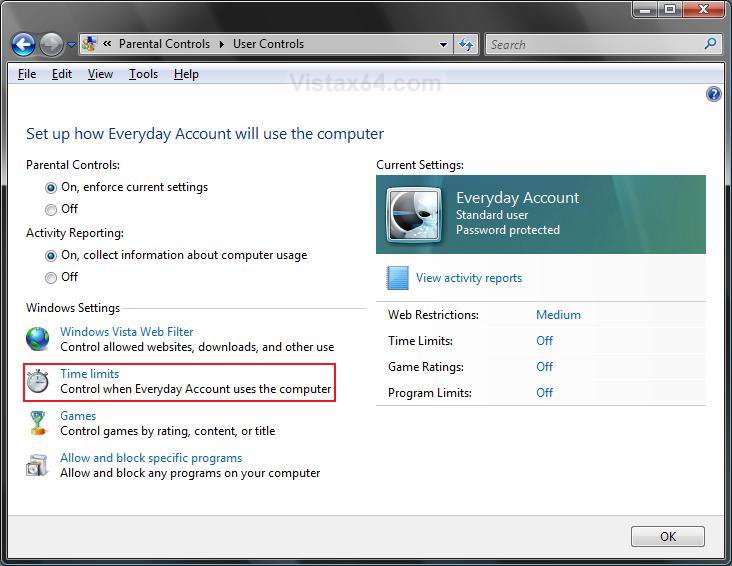
1. If you have not already, then setup and turn on Parental Controls for the standard user account that you want to set time limits on.

2. Click on Time Limits. (See screenshot below)
3. To Block a Time -
A) Click a white box, or select a group of white boxes, to highlight it blue for each hour of every day you want blocked. (See screenshot below step 6)
4. To Allow a Time -
A) Click a blue box, or select a group of blue boxes, to turn it back to white.
5. Click on OK when done.
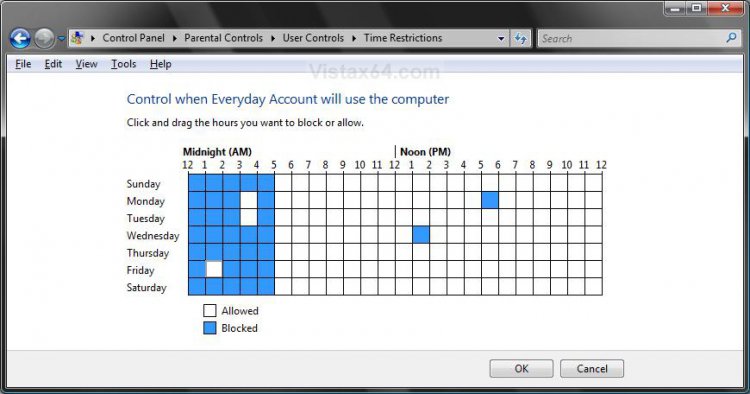
6. Click on OK. (See screenshot below step 2)
That's it,
Shawn

Published by
Brink's Avatar
Administrator

Join Date: Apr 2007
Location: Texas, USA
Posts: 25,932
Rep Power: 150
Brink has a reputation beyond reputeBrink has a reputation beyond reputeBrink has a reputation beyond reputeBrink has a reputation beyond reputeBrink has a reputation beyond reputeBrink has a reputation beyond reputeBrink has a reputation beyond reputeBrink has a reputation beyond reputeBrink has a reputation beyond reputeBrink has a reputation beyond reputeBrink has a reputation beyond repute

Tutorial Tools

Applies to
Home Basic,Home Premium,Ultimate
64 Bit & 32 Bit

Old 02-27-2008  
neocyprinus


Vista Home Premium 32bit


Re: Parental Controls - Time Limits

I really like this feature and have it enabled on all the childrens accounts. Combined with other functions you can control and monitor their behaviour without being to obtrusive.

My System SpecsSystem Spec
Old 07-02-2008  
ggbib


Vista Ultimate x64 SP1


Re: Parental Controls - Time Limits

Yes, I don't have children, so I don't use it, but yet another nice feature in Vista.

My friend wanted me to come over and set it up, but i referred them here.

I vow to make a tutorial when there is something I can do that has not been covered here, .

Jerry
My System SpecsSystem Spec
Old 07-02-2008  
Brink


Vista x64 Ultimate SP2, Windows 7 Ultimate x64


Re: Parental Controls - Time Limits

LOL Jerry,

Your are more than welcome to create a tutorial when you like.

Shawn
My System SpecsSystem Spec
Comment

Tutorial Tools


Similar Threads
Tutorial Category
parental controls - managing time Vista account administration
Parental Time Controls for Internet Access Vista account administration
time limits parental controls Vista security
Time limits on MSN Vista security
Parental control time limits Vista account administration


Vista Forums is an independent web site and has not been authorized,
sponsored, or otherwise approved by Microsoft Corporation.
"Windows Vista", the Start Orb, and related materials are trademarks of Microsoft Corp.
© Designer Media Ltd
Tutorial powered by GARS 2.1.8m ©2005-2006

1 2 3 4 5 6 7 8 9 10 11 12 13 14 15 16 17 18 19 20 21 22 23 24 25 26 27 28 29 30 31 32 33 34 35 36 37 38 39 40 41 42 43 44 45 46