![]() |
![]() | ![]() | ![]() | ![]() | ![]() | ![]() | ![]() |
| Welcome to Windows Vista Forums. Our forum is dedicated to helping you find solutions with any problems, errors or issues you are experiencing with Windows Vista. The Vista forum also covers news and updates and has an extensive Windows Vista tutorial section that covers a wide range of tips and tricks. |
| |||||||
![]() |
| |
| | #1 (permalink) |
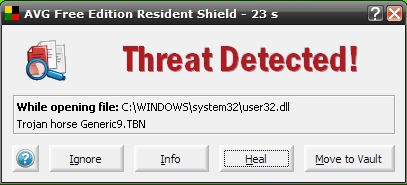
| Windows 7 Ultimate 32 bit Beta, Vista Ultimate x86 | Urgent for AVG Users "The popular virus scanner AVG released an update yesterday that caused their software to mark user32.dll as a virus. Since this is a rather critical file, AVG's suggestion to remove it caused problems for users around the world who are now advised to restore the file through the Windows Recovery Console. AVG just posted an update about this (FAQ item 1574) in the support section of their site. Their forums are full of complaints." View article... |
My System Specs![]() |
| | #2 (permalink) |
| Vista Ultimate 64bit SP2/ | Re: Urgent for AVG Users That's just wrong. |
My System Specs![]() |
| | #3 (permalink) |
| Windows 7 Ultimate 32 bit Beta, Vista Ultimate x86 | Re: Urgent for AVG Users |
My System Specs![]() |
| | #4 (permalink) |
| Vista Ultimate 64bit SP2/ | Re: Urgent for AVG Users That it was detecting the dll as a virus. |
My System Specs![]() |
| | #5 (permalink) |
| Windows 7 Ultimate 32 bit Beta, Vista Ultimate x86 | Re: Urgent for AVG Users ![]() On AVG Website :- In case you are not able to run your Windows XP operating system after AVG virus definition update, it may be caused by a false positive on a specific "user32.dll" system file. The file was moved to the AVG Virus Vault and deleted. Therefore it is not possible to start Windows. Please follow the steps below to rectify this situation: 1. Please insert the Windows XP installation CD and boot computer from this CD. 2. Choose and run Recovery Console. 3. Choose Windows operating system you want to repair. 4. Disable AVG Resident Shield from loading. You can disable loading services/drivers with "disable" command, i.e. you have to type the following commands (some of them might not be present in all AVG editions): disable avgMfx86 disable avgMfa86 disable avgldx86 disable avglda86 5. Restore the User32.dll file from the Windows XP installation CD (instead "D:" use letter of your CD-ROM drive): expand D:\i386\user32.dl_ c:\windows\system32\ In case the command fails, please use the following command to rename original user32.dll and repeat the command above. ren user32.dll user32.bak 6. Restart computer and boot Windows normally. 7. In order to re-enable the AVG Resident Shield services we recommend that you perform the AVG repair installation as follows: - Download the latest AVG installation package from the following webpage and save it on your hard disk: AVG Antivirus and Security Software - Download products (AVG Anti-Virus 8.0) AVG Antivirus and Security Software - Download products (AVG Internet Security 8.0) AVG Antivirus and Security Software - Download products (AVG Anti-Virus plus Firewall 8.0) - When you are prompted, please do not open this file directly from the internet, but click the Save button and choose a location, where the installation file should be stored. We recommend saving the file to the Desktop. - Restart your computer. - Locate the downloaded AVG installation file (it has a four color square icon and its name starts with AVG_...) and launch the installation by double-clicking on it. - Follow the installation wizard. - When prompted, please select the Repair installation option. - Enter your license number when you are asked (we recommend that you use the copy&paste* method to enter this license number into the installation form). - Restart your computer and update AVG. |

My System Specs![]() |
| | #6 (permalink) |
| Microsoft® Windows Vista™ Ultimate x64 SP2 Windows 7 7127 x64 | Re: Urgent for AVG Users Seems I changed to Avast just in time. |
My System Specs![]() |
| | #7 (permalink) |
| Vista Ultimate 64bit SP2/ | Re: Urgent for AVG Users Just hope avast doesn't have this problem. |
My System Specs![]() |
| | #8 (permalink) |
| Windows 7 Professional 64-bit | Re: Urgent for AVG Users I stopped using avg and now use nod32 smart security 64-bit edition |
My System Specs![]() |
| | #9 (permalink) |
| Windows 7 Ultimate x64 | Re: Urgent for AVG Users Now could this possibly get past the testing stage and make it into a release ffs. Very very poor. |
My System Specs![]() |
| | #10 (permalink) |
| Vista Home Premium SP2 32bit / Windows 7 Home Premium 32 bit | Re: Urgent for AVG Users I only have AVG on my WinME machine and I've been seriously deciding to move to another one, especially as it's out of support now. |
My System Specs![]() |
![]() |
| Thread Tools | |
| |
Similar Threads | ||||
| Thread | Forum | |||
| Help Run Dll C:\Users\ Users name\AppData\local\temp\axdeqxgo.dll | Vista security | |||
| Compare users in AD with an SQL table and insert the missing users | VB Script | |||
| Preventing guest users or other users seeing your files | Vista file management | |||
| Access All Users & Default Users Start menu | Vista file management | |||
| C:\Users\all users\start menu - DENIED | Vista file management | |||