![]() |
![]() | ![]() | ![]() | ![]() | ![]() | ![]() | ![]() |
| Welcome to Windows Vista Forums. Our forum is dedicated to helping you find solutions with any problems, errors or issues you are experiencing with Windows Vista. The Vista forum also covers news and updates and has an extensive Windows Vista tutorial section that covers a wide range of tips and tricks. |
| |||||||
![]() |
| |
| | #1 (permalink) |
| Ultimate 32bit / OS/2 Warp 4.0 | SP1 installed failed and now can't boot Vista Hello all, Here is my sad story. I tried to install SP1 on Ultimate 32bit and it seemed to work -- got to configuring 3 of 3 100% then it said it failed and it proceeded to "revert changes". After this I re-booted and the Desktop came up, but because I had to disable all startup items and Microsoft services before I tried to install, I wanted to restore all this, so I clicked "Normal startup" in MSCONFIG. I re-booted and now Vista won't boot. The screen is dark for a couple seconds and the system re-boots to the BIOS screen. I have tried to use the Recovery DVD (which is OEM), and issue the "repair option" but it doesn't recognize Vista even after I load the drivers for the hard disk, hopwever, when I go to the command prompt, I can see the windows directory and issuing a "bootrec /scanos" returns c:\windows. About the only option that will work on the repair menu is "repair". I have not tried this yet. Does this "fix" it or just return the system to factory (Vista)? Anyway, I was hoping to be able to fix the boot problem without a re-install. Jordan Krim |
My System Specs![]() |
| | #2 (permalink) |
| Windows 7 RC x64 Vista HP x86 | Re: SP1 installed failed and now can't boot Vista Hi jkrim, welcome to the vista forums, ![]() if you have a look at the tutorial here this will explain the process for you, if you post back with any specific questions before you go ahead I'm sure someone will be able to help |
My System Specs![]() |
| | #3 (permalink) |
| Ultimate 32bit / OS/2 Warp 4.0 | Re: SP1 installed failed and now can't boot Vista Hey, So, quoting the article: If you have a OEM Recovery installation DVD that came with your computer instead, then it will most likely only be a clone of the hard drive with Vista allowing you to only do a clean install with it instead. I take it from this that I basically have to re-install Vista. So, let me ask another question which might lead in another direction. If the boot sector is corrupted I supposedly can type: bootrec /fixboot But when I do this I get: "The volume does not contain a recognized file system please make sure that all required file system drivers are loaded and that the volume is not corrupted" What is wrong here? Do I need to do a "bootrec /fixmbr"? Jordan |
My System Specs![]() |
| | #4 (permalink) |
| Windows 7 RC x64 Vista HP x86 | Re: SP1 installed failed and now can't boot Vista Hi jordan, first we need to clarify exactly what dvd you have .. the OEM disk that Shawn refers to in his tutorial is of the manufacturers recovery disk type, which will restore the system to an exact clone of how it left the factory including the manufacturers free software and trials etc. is that the disk you have? the alternative would be a genuine Microsoft Vista install disk with an OEM type licence, which basically means it can only be installed onto the original PC it was sold with. with the first type of disk you will not be able to get to the recovery console to perform the boot sector repairs you mention. with the second type you would be able to get to the console and perform the repairs but also should be able to perform a repair install. Will try to see if Shawn is available to have a look at your problem and advise further |
My System Specs![]() |
| | #5 (permalink) |
| Ultimate 32bit / OS/2 Warp 4.0 | Re: SP1 installed failed and now can't boot Vista Hi Barman58, The DVD is form Dell. It is labeled with: Operating system already installed on your computer Windows - reinstallation DVD Vista Ultimate 32 bit Jordan |
My System Specs![]() |
| | #6 (permalink) |
| Windows 7 RC x64 Vista HP x86 | Re: SP1 installed failed and now can't boot Vista Hi Jordan, That does look like a recovery disk of the first type i mentioned before so the only real option with that disk is to restore the system to the state it was when it left the factory. although if you can get to the recovery console then it can't be! its confusing ![]() have spoken to Shawn and he confirms that unless you have personal files that you need then the total re-install option would be the best considering the problem If you want to try and recover the system anyway before you go down that route then you could try this method Create a Recovery Disc which will provide you with a disk to attempt the repair with if you need one. For your information Microsoft's explanation of Bootrec.exe is here including options How to use the Bootrec.exe tool in the Windows Recovery Environment to troubleshoot and repair startup issues in Windows Vista hope this helps you to at least decide which route to follow if you want to try to recover your MBR etc. I would suggest you consider the options and decide if it's worth a try |
My System Specs![]() |
| | #7 (permalink) |
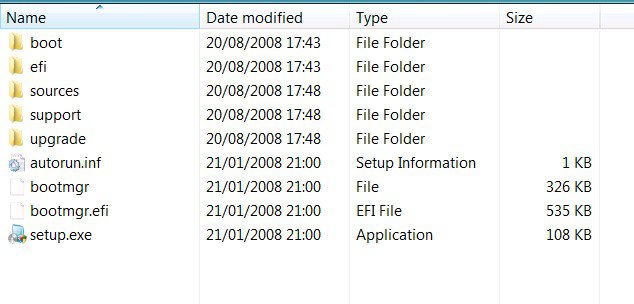
| VISTA HOME PREMIUM X64/ 7 x64 / 7x86 | Re: SP1 installed failed and now can't boot Vista Hi jkrim., To find out what is on your dvd, place it in the dvd drive, click start orb ,click computer, right click the dvd drive and click open. A window will open showing the files on the dvd , something like this ![]() Take a jpeg screenshot and post it back. How to use the Snipping Tool in Vista If it turns out not to be the right type of dvd - it is possible to download and create a special recovery dvd, as per barman's post above. SIW2 Last edited by SIW2; 09-29-2008 at 05:58 PM.. Reason: as per barman's post above |
My System Specs![]() |
| | #8 (permalink) |
| Ultimate 32bit / OS/2 Warp 4.0 | Re: SP1 installed failed and now can't boot Vista Regarding the article: How to do a startup repair in Vista The screenshots look exactly the same as when I run my DVD with one glaring exception. In step 5, it is supposed to list your OS, but in my case it is blank. So, I am hesitant to hit the "Startup Repair" because how does it know what to repair if no OS was listed on the previous screen in the "System Recovery Options" window. (Again, the disk is accessible from the command prompt with dir c: ). I will post a screenshot of the DVD contents later. I have to LOL though because the instructions *assume* one is doing it from inside Vista and since I can't boot I can't do this. I do, thank goodness, have another working system (W2K) that I can get it from. Jordan Last edited by jkrim; 09-29-2008 at 06:48 PM.. |
My System Specs![]() |
| | #9 (permalink) |
| VISTA HOME PREMIUM X64/ 7 x64 / 7x86 | Re: SP1 installed failed and now can't boot Vista Hi Jordan LOL - wasn't sure what system you were using to make these posts. Interesting to see what is on that dvd - could you also let us know how big i.e. how many gb the contents are. Those files may be inside one folder, which you will also need to open to view the contents. Thanks SIW2 |
My System Specs![]() |
| | #10 (permalink) |
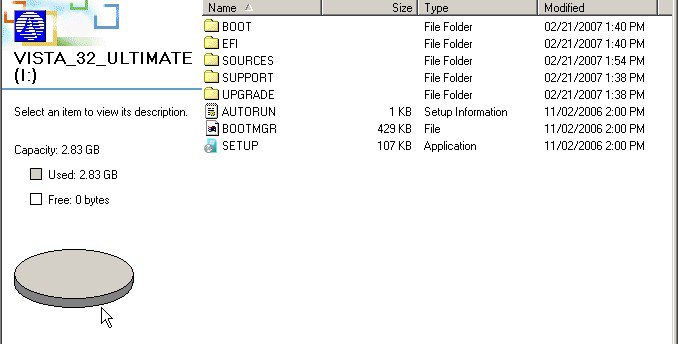
| Ultimate 32bit / OS/2 Warp 4.0 | Re: SP1 installed failed and now can't boot Vista I am having trouble inserting a jpg image in the reply. I have to manually do it until I can get some guidance on how to do it. EFI file folder 2/21/2007 SOURCES file folder 2/21/2007 SUPPORT file folder 2/21/2007 UPGRADE file folder 2/21/2007 AUTORUN 1 KB setup information 11/02/2006 BOOTMGR 429 KB File 11/02/2006 SETUP 1 KB Application 11/02/.2006 Jordan |
My System Specs![]() |
![]() |
| Thread Tools | |
| |
Similar Threads | ||||
| Thread | Forum | |||
| pc won't boot after vista installed | Vista General | |||
| Installed on workstation, works fine first boot,bsod every boot af | Vista General | |||
| XP installed, can I add Vista as a dual boot? | Vista installation & setup | |||
| Vista Beta 2 failed to get installed on Virtual Server R2 | Vista installation & setup | |||