Windows Vista Forums
Vista Forums Home Join Vista Forums Windows 7 Forum Vista Tutorials Tags
Welcome to Windows Vista Forums. Our forum is dedicated to helping you find solutions with any problems, errors or issues you are experiencing with Windows Vista. The Vista forum also covers news and updates and has an extensive Windows Vista tutorial section that covers a wide range of tips and tricks.

Go Back   Vista Forums > Vista Forums > Windows Updates

Vista - KB955839 will not install.

Reply
 
Old 12-03-2008   #1 (permalink)


Vista Home Premium 32 Bit SP1


KB955839 will not install.

Have tried 4 times to install this update, which refers to updating the clock functions(?), in Windows Vista Home premium. I ran the validation routine, then the legit check, then back to continue, and still the update will not install. Shifted from firefox to I.E., and still no joy. Even though i can see all the required dll's in their proper location, the update still fails? Any hints on how to validate in order to install.?
Windows Vista Home premium (os), with firefox and internet explorer.
thanks

My System SpecsSystem Spec
Old 12-04-2008   #2 (permalink)


Vista Ultimate SP2 x64 Windows 7 Ultimate x64 TECHNET


Re: KB955839 will not install.

Hi Jakeers,

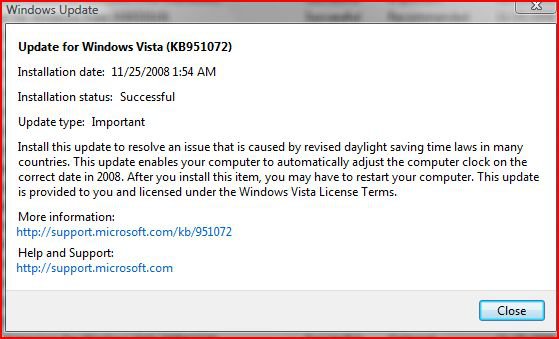
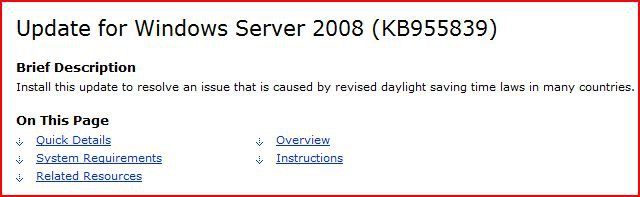
Are you getting that straight from windows update or are you going directly to the microsoft site and trying to download it from there? KB955839 is not for Vista Home Premium, it is for Windows Server 2008. The one for Vista is KB951072. You may already have it installed on your computer. Look in your View Update History folder in Windows Update. It's best just to stick with windows update offering you the needed updates.


time.jpg


wrong.jpg
My System SpecsSystem Spec
Old 12-04-2008   #3 (permalink)


Vista Home Premium 32 Bit SP1


Re: KB955839 will not install.

Quote  Quote: Originally Posted by jakeers View Post
Have tried 4 times to install this update, which refers to updating the clock functions(?), in Windows Vista Home premium. I ran the validation routine, then the legit check, then back to continue, and still the update will not install. Shifted from firefox to I.E., and still no joy. Even though i can see all the required dll's in their proper location, the update still fails? Any hints on how to validate in order to install.?
Windows Vista Home premium (os), with firefox and internet explorer.
thanks
Calendar Of Updates Calendar

is where i got the data to even update this KB. And as you see it lists Windows Home Premium as one of the required os's to update....sorry for confusion about all this. Also did find the kb you mentioned, and was installed about 3 days ago....hmmm, now wondering if i just should quit using that site for update info. Thanks for you help airbot, as that was the quickest problem i have ever had solved.
My System SpecsSystem Spec
Old 12-04-2008   #4 (permalink)


Vista Ultimate SP2 x64 Windows 7 Ultimate x64 TECHNET


Re: KB955839 will not install.

no problem jakeers,

yeah you should definetly get you window updates straight from the source and at least be really sure it's the right one for your machine.
My System SpecsSystem Spec
Old 12-10-2008   #5 (permalink)


Vista Home Premium 32bit OEM


Re: KB955839 will not install.

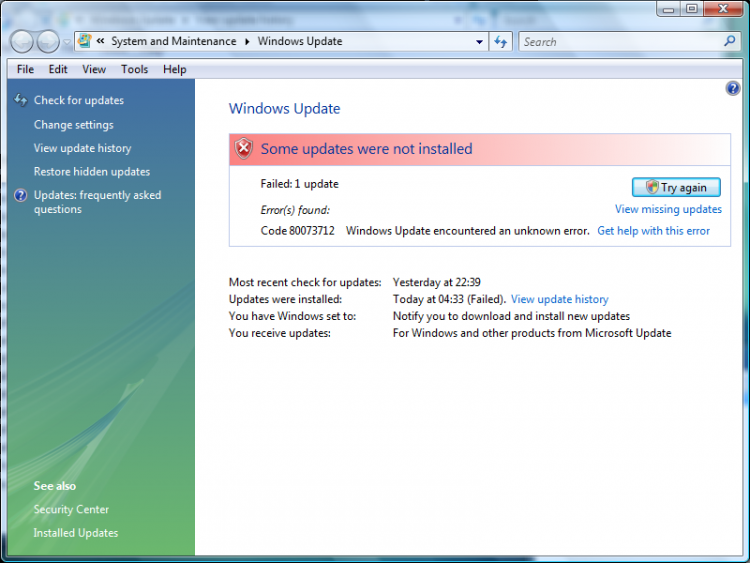
I'm having the same problem, and I'm using the Windows Automatic Updates feature!!

Edit:
I have never used anything other than the Windows Automatic Updates feature to get my Windows Updates on this laptop.
Attached Images
File Type: png Screenshot - 10_12_2008 , 05_30_08.png (178.2 KB, 220 views)

Last edited by J2897; 12-10-2008 at 12:49 AM.. Reason: Clarification
My System SpecsSystem Spec
Old 12-10-2008   #6 (permalink)


Vista Home Premium 32bit / Linux ubuntu intrepid 8.10


Re: KB955839 will not install.

Hello jakeers

Referring to the update KB955839 I was just prompted by windows update to install this myself even though I am running Vista Home Premium 32bit. Upon trying to install the update and after the reboot my computer would NOT restart, not sure why. Anyway I ran the Vista repair option as prompted to do so and restored to just before i got the update. This was the auto update that prompted me to proceed with this update.
My System SpecsSystem Spec
Old 12-10-2008   #7 (permalink)


Vista Home Premium 32 Bit SP1


Re: will not install.

Strange, my auto update just completed, and this was among the updates????? and after reboot, no problem. All this update is for a clock adjustment, (last time i read it), to the os. Sorry you had to do a re-load, not an easy task if your at work or home....

quote: from ms help and support:
Important This update supersedes and replaces update 951072, which was released in August 2008. This update also includes additional time zone changes that were signed in to law after update 951072 was created.

If you have already deployed update 951072, read the descriptions of the specific time zone changes that are addressed in this article to determine whether you must deploy this update immediately. If systems are not directly affected, you can schedule deployment at the next available opportunity.

We recommend that you deploy the most current Windows cumulative time zone update to guarantee the consistency of the time zone database on all systems.

Important Before you apply the update that is described in this article, be aware of potential issues that may affect Microsoft Outlook.

For more information about these issues, click the following article number to view the article in the Microsoft Knowledge Base:
931667 (How to address time zone changes by using the Time Zone Data Update Tool for Microsoft Office Outlook ) How to address the daylight saving time changes in 2007 by using the Time Zone Data Update Tool for Microsoft Office Outlook
Important

* If you are running Microsoft Exchange Server in an Information Technology (IT) environment, you must take additional measures to guarantee the correct operation of Exchange Server. For more information about the Exchange daylight saving time (DST) update, click the following article number to view the article in the Microsoft Knowledge Base:
941018 (How to address daylight saving time by using the Exchange Calendar Update Tool ) How to address daylight saving time by using the Exchange Calendar Update Tool
* Cumulative time zone updates contain only data that has changed for a specific region or that was added to maintain parity with other operating system versions. Therefore, if a time zone key has been deleted, some original values may not be restored after you apply the cumulative zone update.

We do not recommend that you delete any registry keys that are related to time zones. On a computer that has incomplete time zone keys, first restore the time zone keys from a known good backup. Then, apply the update.

end quote:

Dont know what to tell you to do....i.e., keep it or dump it....
jakeers

My System SpecsSystem Spec
Old 12-10-2008   #8 (permalink)


Vista Ult 64bit Windows 7 64 bit Server 2008 RC2


Re: KB955839 will not install.

Well, I just had my first problem ever with window update. Tried to install all 8 and the comp wouldn't get past 19% even after an hour. Also had to do a sys. restore to before the updates. Found this thread and then went to WU and deselected KB955839 and the rest installed fine. I don't use exchange or outlook, so guess I'll skip the clock until I have time to research.

Gary
My System SpecsSystem Spec
Old 12-10-2008   #9 (permalink)


Vista Ult 64bit Windows 7 64 bit Server 2008 RC2


Re: KB955839 will not install.

My System SpecsSystem Spec
Old 12-10-2008   #10 (permalink)


Vista Home Premium 32-bit & Vista Ultimate 64-bit both Service Pack 2 W7 Pro RTM 7600 32 & 64


Re: KB955839 will not install.

Just had the updates automatically installed. No problems on my system with any of them, including KB955839.
My System SpecsSystem Spec
Reply

Thread Tools


Similar Threads
Thread Forum
Vista SP2 will not Install(error 0x80070002),In Place Upgrade Repair Install General Discussion
RE: Remote control applet wont install or even prompt to install-vista Virtual Server
Re: Vista Home Premium Install Hangs At Completing. (Clean Install) Vista installation & setup
Can't Install Vista Home premium upgrade - "can't install a file and quits Vista installation & setup
Promise FastTrak S150 TXplus Install Vista B2 install success!(do Vista General


Vista Forums is an independent web site and has not been authorized,
sponsored, or otherwise approved by Microsoft Corporation.
"Windows Vista", the Start Orb, and related materials are trademarks of Microsoft Corp.
© Designer Media Ltd

1 2 3 4 5 6 7 8 9 10 11 12 13 14 15 16 17 18 19 20 21 22 23 24 25 26 27 28 29 30 31 32 33 34 35 36 37 38 39 40 41 42 43 44 45 46