![]() |
![]() | ![]() | ![]() | ![]() | ![]() | ![]() |
| Welcome to Windows Vista Forums. Our forum is dedicated to helping you find solutions with any problems, errors or issues you are experiencing with Windows Vista. The Vista forum also covers news and updates and has an extensive Windows Vista tutorial section that covers a wide range of tips and tricks. |
| | |||||||
| | Vista - Windows Update doesn't notify |
| |
| 01-16-2009 | #1 |
| Vista Home Premium 32bit SP1 | Windows Update doesn't notify I don't want completely automatic Windows updates and have always had Windows Updates set to notify me of available updates so that I can choose what to update, and when to do it. This worked fine until a few months ago, when such notifications came no more. This may or may not have coincided with my installation of SP1. I've tried changing the setting to automatically download updates and notify me so that I can choose what to install and when - but again, no notifications, even though updates had been downloaded and were waiting for me to do something about them. I've done an Internet search on this problem, and it appears to be common, BUT all the instances that I've found of this were for people who got no notifications on a standard account but did get them on an administrator account. Great! I could solve it by logging into an admin account, then! -- Except that I can't change anything that way because I simply do not use a standard account - I work as 'administrator' all the time, because it's simply too much hassle to have to keep switching accounts or getting annoying pop-ups. Yes, I know there are security issues about being 'full time admin', but I'm well aware of the security downside of that, and consequently am pretty hot on security generally. So, I use an Administrator account all the time and I still don't get Windows Update notifications. Any ideas, please, anyone? Many thanks. |
| My System Specs |
| 01-16-2009 | #2 |
| Vista Ultimate SP2 x64 Windows 7 Ultimate x64 TECHNET | Re: Windows Update doesn't notify Hi Philip, Have you tried running SFC and see if it helps at all? System Files - SFC Command You can try and reregister WU to see if it fixes the problem. Type cmd in the start menu search bar to open Command Prompt and right click on it and click Run as Administrator. Then enter this. NET STOP WUASERV then enter. REGSVR32 %WINDIR%\SYSTEM32\WUPS2.DLL then enter. NET START WUASERV then enter. You might have to reboot. Last edited by Airbot; 01-16-2009 at 08:48 AM.. |
| My System Specs |
| 01-16-2009 | #3 |
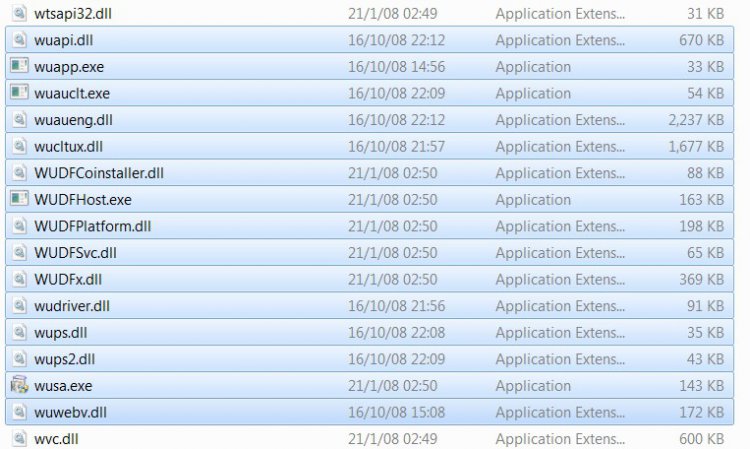
| Vista Home Premium 32bit SP1 | Re: Windows Update doesn't notify Thank you, Airbot. I'm probably no further forward, however, though I can't be sure until there are more Windows updates available, so I can see whether I'm being notified or not. I really don't know about SFC. I ran it, and a cmd window flashed up and was gone in a fraction of a second, so I have no idea whether it was doing anything useful or not. I looked at CBS.log and it was huge (some 38MB), full of (to me) very confusing and pretty unintelligible lines. I assumed that this must be a cumulative log, and deleted it then ran SFC again, so that at least I'd know I was looking at only relevant data, and was miffed to find that SFC didn't re-create the file. Even when I created a blank CBS.log file, SFC wrote nothing to it. As for the other matter, the NET STOP WUASERV and NET START WUASERV commands elicited error messages because WUASERV isn't a recognised or installed service on my computer. The dll was reported as successfully registered anyway. Later... Now I think I smell a rat (or something!). I have no wuaserv.dll on my system, and I suspect I should have. Maybe this is the problem? If so, what do I need to do to get it installed with least system disturbance? Last edited by Philip Goddard; 01-16-2009 at 11:00 AM.. Reason: New information |
| My System Specs |
| 01-16-2009 | #4 |
| Vista Ultimate SP2 x64 Windows 7 Ultimate x64 TECHNET | Re: Windows Update doesn't notify Did you try running SFC in safe mode as the tutorial suggests? It should run for at least a while. You can try running checkdisk and maybe a startup repair. It's pretty weird though. Check Disk - chkdsk Startup Repair |
| My System Specs |
| 01-16-2009 | #5 |
| Vista Home Premium 32bit SP1 | Re: Windows Update doesn't notify Ah, thank you. You pointed me to an omission - the SFC page you pointed to me was visually confusing, and I didn't notice that there was a tutorial to be found by scrolling below the notes at the top. Thus I didn't know to enter "scf /scannow" rather than just "sfc". So, I now have a log of sfc's scan and repair operations. A few system files were replaced or restored in that operation, and no further problems are indicated. And yes, I did (eventually) run sfc in Windows Safe Mode. One annoyance is that SFC restored all the Windows desktop wallpaper files that I'd deleted from the wallpaper folder - but I'll set things up so that I use another folder for my automatically regularly changed wallpapers, so that I shan't get unwanted images coming up on my desktop after Windows has done some sort of system repair job. I also did a chkdsk /f (had to restart for it to run), but was not given any report from that, so I don't know if any problems were found or fixed in that operation. As there has been some repair, I think I'll hang on before doing a startup repair and see if the problem has been fixed yet - though I somehow doubt whether a startup repair would be relevant for this particular issue. Any thoughts about the absence of wuaserv.dll on my system? Might its absence relate to my non-notification problem? |
| My System Specs |
| 01-16-2009 | #6 |
| Vista Ultimate SP2 x64 Windows 7 Ultimate x64 TECHNET | Re: Windows Update doesn't notify Yes, the SFC will replace lost/corrupted system files or at least attempt to. Yeah, I don't know if the startup repair would be totally relevant, just another way to replace missing files. I don't know about the WU, maybe just give it some time like you say and set it to notify and see if it does when updates are available. Do you perhaps use cleaner programs/registry cleaners a lot. Sometimes this is a cause of lost or corrupted files. Also, do you have an antivirus program actively monitoring all the time and have you done an extensive scan? |
| My System Specs |
| 01-16-2009 | #7 |
| VISTA HOME PREMIUM X64/ 7 x64 / 7x86 | Re: Windows Update doesn't notify |
| My System Specs |
| 02-01-2009 | #8 |
| Vista Home Premium 32bit SP1 | Re: Windows Update doesn't notify Thank you belatedly for attempts to be of assistance. I've been silent for a bit, waiting for something more to become available at Windows Updates to see if that would trigger the requisite notification. There is now an update pending, and I still wasn't notified. I guess that this is something where on balance it's going to be better use of my time and thinking resources just to set WU to automatic download / install, and not pursue the notification issue further, for I guess that it would take a lot of protracted detective work to find out why that's happening. I do have a slight puzzle, in that a file search on my C drive doesn't turn up either wuauserve.* or wuaueng.* - but I'd have thought that without those WU just wouldn't work at all, and in fact it works fine apart from not notifying me of available updates. |
| My System Specs |
| 02-01-2009 | #9 |
| Vista Ultimate SP2 x64 Windows 7 Ultimate x64 TECHNET | Re: Windows Update doesn't notify You might try these methods and see if it helps. http://www.vistax64.com/software-too...air-tools.html |
| My System Specs |
| 02-03-2009 | #10 |
| Vista Home Premium 32bit SP1 | Re: Windows Update doesn't notify Thank you for the suggestion. Coincidentally I'd just reinstalled Windows Update Agent, freshly downloaded from Microsoft, and there appears to be no difference in function. Unfortunately the AUReset & AUCheck utility linked to from the page you linked to is no longer available, so I couldn't use that option. I've no wish to spend time on detailed further work on this now, so I'm drawing a line under it. Actually, for a few days now I've had WU set to automatically download and install updates, even though that's not really what I want, and even that isn't resulting in the download and installation of the current .NET Framework 3 update (which I'd not manually downloaded as I was wanting to test AU). I actually have a very simple practical workaround that shouldn't be a significant trouble to me - to have WU scheduled to open every day at a normally convenient time, to remind me to do the updates check and download manually (after all, it involves only clicking on a button). For that purpose I'm using a small 3rd party scheduler / reminder program, because I'm one of the lucky multitude of people for whom the Windows Vista scheduler doesn't work, displaying a cryptic error message when one attempts to run it - a problem that, according to my Internet search, is common and to which nobody's found a solution. Roll on Windows 7 SP1! (Sigh!) |
| My System Specs |
![]() |
| Thread Tools | |
| |
| Similar Threads for: Windows Update doesn't notify | ||||
| Thread | Forum | |||
| notify my ansences | Vista mail | |||
| Need to notify MSN of RSS feed. | Live Messenger | |||
| Windows Firewall was unable to notify the user | Vista security | |||
| Windows Update doesn't notify Standard User of new updates | Vista security | |||
| Notify me? | Vista mail | |||