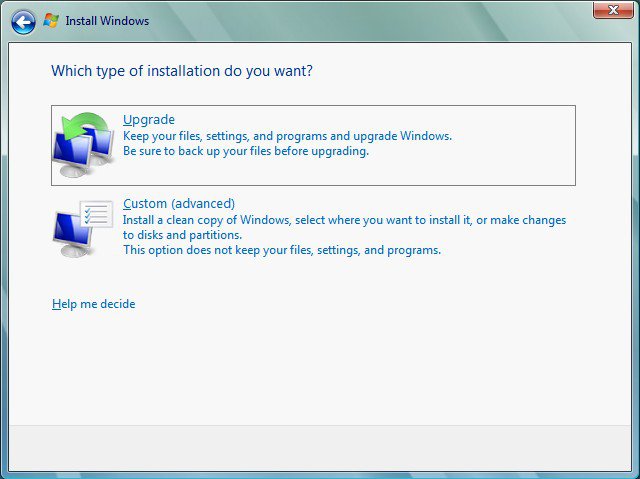
I have a question. I just bought a computer with Vista Basic (32-bit) and I want to upgrade it to Ultimate (32-bit). If I buy a Vista Ultimate CD and install it, will it wipe my HD clean? Is there any way to avoid that?

As long as you don't buy the OEM version your fine, the upgrade and full retail version will perform an upgrade, but the OEM will not.
Err...whether you buy upgrade, OEM, or full version, Vista will wipe your hard drive in that you will have to reinstall all your programs and stuff.
Basically what will happen is that the old system will be backed up in a folder called "windows.old" as the new system is installed. Once the system is installed, you will have access to this folder so that you can copy, move, or delete files of your choosing. Once that's done, you can then delete this folder by going to "Disk Cleanup" and choosing "Remove previous windows" or something to that effect – I forget the correct name.
Warning - Once you delete the windows.old, there's no turning back, it's gone!!!
Why delete this folder? - it takes up the space - the same space that was used before your upgrade. i.e., if you system was 30gigs, that's what the windows.old folder will be - 30gigs
Why keep it? - see here - Uninstalling Vista Ultimate Upgrade
And as always, do a backup of your critical files and folder before doing an OS upgrade!!!
Hope that answers your question
I plan to do this on my recently bought Dell pc and when I say recent, I mean I got it a wk ago. I would have bought ultimate from Dell but the issue was that, it would have cost me $150 more, whereas I can get the ultimate CD from my school for $15-16. A lot cheaper don't you think. Now the big concern that I have is, is doing the reinstall hard? I have a 500gb HD, so it shouldn't be that bad and I also have all of the drivers CDs from Dell. Do I need anything else? Will other Dell essentials be destroyed that were not on that drivers CD? This won't violate my warranty, right?
Don't know why you have that idea in your head but it's not correct.
Installing and reinstalling Windows - Windows Vista Help
Is the described installation process different if the version that I purchase OEM. Do I first need to delete my OS and then install Vista Ultimate or do I install Ultimate and then delete my OS. Is there a special protocol for doing this?
"Important: Use the following procedure only when upgrading from a 32-bit version of Windows XP to a 32-bit version of Windows Vista."
Hmmm...had a question about this, but further research produced this table: Upgrade to another edition of Windows Vista - Windows Vista Help (click the link "What Installation choices are available to you")
In my experience, when I first attempted the "upgrade" from XP to Vista, I had to wipe my drive. During another upgrade from Vista Ultimate 32 to Vista Ultimate 64 I also had to wipe my drive.
I can understand why I had to wipe my drive when upgrading from Vista 32 to 64 as this isn't supported as seen here:
"Can I upgrade from a 32-bit version of Windows to a 64-bit version of Windows?
No. If you are currently running a 32-bit version of Windows, you can only perform an upgrade to another 32-bit version of Windows. Similarly, if you are running a 64-bit version of Windows Vista, you can only perform an upgrade to another 64-bit version of Windows Vista."
In my case I went with my experience since I hadn't done another 32 -32 bit upgrade, thus I stand corrected.
Thanks. Rep+1
PS - The clean install procedure still stands - the windows.old folder creation.
Last edited by SIW2; 21 Jan 2009 at 03:44 PM.
Windows Anytime Upgrade is probably the best option for a Vista to Vista upgrade, if not the most cost effective.
It may require multiple reboots, but does not wipe the disk or remove user settings or files.
Microsoft: Get Windows Vista: Windows Anytime Upgrade FAQ
Wikipedia: Windows Anytime Upgrade - Wikipedia, the free encyclopedia
| Similar Threads | ||||
| Thread | Thread Starter | Forum | Replies | Last Post |
| Upgrade from Basic to Ultimate | Bill-LV | Vista General | 6 | 26 Jul 2008 |
| upgrade from vista home basic to ultimate! | leonel | Vista installation & setup | 2 | 26 May 2008 |
| Upgrade from home basic to ultimate issues | G.Kinner | Vista installation & setup | 2 | 22 Aug 2007 |
| Basic Upgrade Question | JJ | Vista installation & setup | 5 | 25 Jun 2007 |
| Basic upgrade question | History Fan | Vista installation & setup | 3 | 29 Jan 2007 |