
Windows Vista Forums

Windows update messed up programs

  1. #1


    Newbie
    Join Date : Apr 2009
    Posts : 7
    32bit
    Local Time: 06:08 PM

    Windows update messed up programs

    I'm using windows vista 32bit and have just installed quite a lot of updates from windows update which I've never done before. Once they had been installed I restarted the computer and now when I try to open anything such as IE, publisher, media player, msn etc it says The application failed to intialize properly.

    Also I cant watch videos on youtube because it says I either have java script turned off, or I need the latest flash player which I already have.

    Not sure how windows update could do this but would greatly appreciate any help.


      My System SpecsSystem Spec

  2. #2


    Senior Member
    Join Date : May 2008
    Posts : 1,823
    Vista x64 Ultimate
    Local Time: 08:08 PM


    Re: Windows update messed up programs

    Run Malwarebytes. It could be a Trojan Horse like Vundo causing Windows Updates to fail.

      My System SpecsSystem Spec

  3. #3
    delphin's Avatar

    Eager to learn

    Join Date : Nov 2008
    Chennai
    Posts : 636
    Windows 7
    Local Time: 05:38 AM
    india


    Re: Windows update messed up programs

    Quote Originally Posted by Arthur l View Post
    I'm using windows vista 32bit and have just installed quite a lot of updates from windows update which I've never done before. Once they had been installed I restarted the computer and now when I try to open anything such as IE, publisher, media player, msn etc it says The application failed to intialize properly.

    Also I cant watch videos on youtube because it says I either have java script turned off, or I need the latest flash player which I already have.

    Not sure how windows update could do this but would greatly appreciate any help.
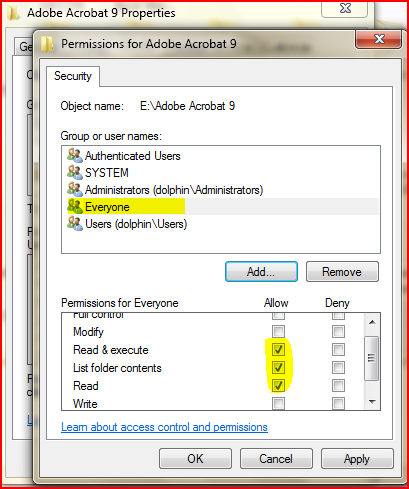
    Navigate to c:\windows\system32\MSVBVM60.DLL, right click on the msvbvm60.dll and select security tab, click on edit>add type everyone and click ok. follow the screen shot to give read and execute permission. Click apply and OK.

    capture.png

    Restart your system. Let me know the result

      My System SpecsSystem Spec

  4. #4


    Member
    Join Date : Jan 2009
    stockton, ca
    Posts : 133
    Vista Home Premium 64 bit
    Local Time: 07:08 PM
    usa


    Re: Windows update messed up programs

    Not Vista, but XP Pro. Bought new HP laptop, clean, booted and ran perfectly. First thing I did was MS update which was 37 patches. Reboot to blinking cursor. Nothing worked--not last known configuration, not safemode, not even repair mode. Entered bios, checked hard drive, memory, all good.

    Called HP tech help and they said, "it happens on occasion." Formatted and reinstalled and all has been perfect since.

      My System SpecsSystem Spec

  5. #5


    Newbie
    Join Date : Apr 2009
    Posts : 7
    32bit
    Local Time: 06:08 PM


      Thread Starter

    Re: Windows update messed up programs

    Quote Originally Posted by delphin View Post
    Quote Originally Posted by Arthur l View Post
    I'm using windows vista 32bit and have just installed quite a lot of updates from windows update which I've never done before. Once they had been installed I restarted the computer and now when I try to open anything such as IE, publisher, media player, msn etc it says The application failed to intialize properly.

    Also I cant watch videos on youtube because it says I either have java script turned off, or I need the latest flash player which I already have.

    Not sure how windows update could do this but would greatly appreciate any help.
    Navigate to c:\windows\system32\MSVBVM60.DLL, right click on the msvbvm60.dll and select security tab, click on edit>add type everyone and click ok. follow the screen shot to give read and execute permission. Click apply and OK.

    Click image for larger version. 

Name:	Capture.PNG 
Views:	1753 
Size:	75.6 KB 
ID:	11652

    Restart your system. Let me know the result
    I've navigated to c:\windows\system32\MSVBVM60.DLL and I forgot to right click and edit, I just left clicked it and it asked me which program I wanted to open it with. I have no idea so I just selected microsoft word and it comes up with a load of text, not what is in the screen shot.

    Now when I right click and click edit it just comes up with the word document with all the text.

    Any ideas?

      My System SpecsSystem Spec

  6. #6
    delphin's Avatar

    Eager to learn

    Join Date : Nov 2008
    Chennai
    Posts : 636
    Windows 7
    Local Time: 05:38 AM
    india


    Re: Windows update messed up programs

    Quote Originally Posted by Arthur l View Post
    Quote Originally Posted by delphin View Post
    Quote Originally Posted by Arthur l View Post
    I'm using windows vista 32bit and have just installed quite a lot of updates from windows update which I've never done before. Once they had been installed I restarted the computer and now when I try to open anything such as IE, publisher, media player, msn etc it says The application failed to intialize properly.

    Also I cant watch videos on youtube because it says I either have java script turned off, or I need the latest flash player which I already have.

    Not sure how windows update could do this but would greatly appreciate any help.
    Navigate to c:\windows\system32\MSVBVM60.DLL, right click on the msvbvm60.dll and select security tab, click on edit>add type everyone and click ok. follow the screen shot to give read and execute permission. Click apply and OK.

    Click image for larger version. 

Name:	Capture.PNG 
Views:	1753 
Size:	75.6 KB 
ID:	11652

    Restart your system. Let me know the result
    I've navigated to c:\windows\system32\MSVBVM60.DLL and I forgot to right click and edit, I just left clicked it and it asked me which program I wanted to open it with. I have no idea so I just selected microsoft word and it comes up with a load of text, not what is in the screen shot.

    Now when I right click and click edit it just comes up with the word document with all the text.

    Any ideas?
    Do not click edit, right click and select properties. In the properties window select security tab. there u can find the screen shots.

      My System SpecsSystem Spec

  7. #7


    Newbie
    Join Date : Apr 2009
    Posts : 7
    32bit
    Local Time: 06:08 PM


      Thread Starter

    Re: Windows update messed up programs

    Quote Originally Posted by delphin View Post
    Quote Originally Posted by Arthur l View Post
    Quote Originally Posted by delphin View Post

    Navigate to c:\windows\system32\MSVBVM60.DLL, right click on the msvbvm60.dll and select security tab, click on edit>add type everyone and click ok. follow the screen shot to give read and execute permission. Click apply and OK.

    Click image for larger version. 

Name:	Capture.PNG 
Views:	1753 
Size:	75.6 KB 
ID:	11652

    Restart your system. Let me know the result
    I've navigated to c:\windows\system32\MSVBVM60.DLL and I forgot to right click and edit, I just left clicked it and it asked me which program I wanted to open it with. I have no idea so I just selected microsoft word and it comes up with a load of text, not what is in the screen shot.

    Now when I right click and click edit it just comes up with the word document with all the text.

    Any ideas?
    Do not click edit, right click and select properties. In the properties window select security tab. there u can find the screen shots.
    Not having much luck mate, I got the box up and went to security, mine looks abit different to the screen shot but its similar, at the top it has...

    Group or user names:

    SYSTEM
    Administrators
    Users
    Trusted installer

    "Everyone" is not there, neither is "Authenticated users".

    I clicked edit on Users, and a window pops up, "Can't open access control editor.(null) "

    And then another window pops up saying, "Consent UI for administrative applications has stopped working".
    And underneath that it just has close or check online for a solution which does nothing.

    Would it help if I got a screen shot so you can see? (not sure how to upload on to forums but can try)

      My System SpecsSystem Spec

  8. #8
    delphin's Avatar

    Eager to learn

    Join Date : Nov 2008
    Chennai
    Posts : 636
    Windows 7
    Local Time: 05:38 AM
    india


    Re: Windows update messed up programs

    Quote Originally Posted by Arthur l View Post
    Quote Originally Posted by delphin View Post
    Quote Originally Posted by Arthur l View Post

    I've navigated to c:\windows\system32\MSVBVM60.DLL and I forgot to right click and edit, I just left clicked it and it asked me which program I wanted to open it with. I have no idea so I just selected microsoft word and it comes up with a load of text, not what is in the screen shot.

    Now when I right click and click edit it just comes up with the word document with all the text.

    Any ideas?
    Do not click edit, right click and select properties. In the properties window select security tab. there u can find the screen shots.
    Not having much luck mate, I got the box up and went to security, mine looks abit different to the screen shot but its similar, at the top it has...

    Group or user names:

    SYSTEM
    Administrators
    Users
    Trusted installer

    "Everyone" is not there, neither is "Authenticated users".

    I clicked edit on Users, and a window pops up, "Can't open access control editor.(null) "

    And then another window pops up saying, "Consent UI for administrative applications has stopped working".
    And underneath that it just has close or check online for a solution which does nothing.

    Would it help if I got a screen shot so you can see? (not sure how to upload on to forums but can try)
    Open elevated command prompt, and type the following

    CACLS %systemroot%\System32\*.dll /E /G BUILTIN\Users:R, hit enter
    CACLS %systemroot%\System32\*.ocx /E /G BUILTIN\Users:R, hit enter.

    Let me know the result

      My System SpecsSystem Spec

  9. #9


    Newbie
    Join Date : Apr 2009
    Posts : 7
    32bit
    Local Time: 06:08 PM


      Thread Starter

    Re: Windows update messed up programs

    Quote Originally Posted by delphin View Post
    Quote Originally Posted by Arthur l View Post
    Quote Originally Posted by delphin View Post

    Do not click edit, right click and select properties. In the properties window select security tab. there u can find the screen shots.
    Not having much luck mate, I got the box up and went to security, mine looks abit different to the screen shot but its similar, at the top it has...

    Group or user names:

    SYSTEM
    Administrators
    Users
    Trusted installer

    "Everyone" is not there, neither is "Authenticated users".

    I clicked edit on Users, and a window pops up, "Can't open access control editor.(null) "

    And then another window pops up saying, "Consent UI for administrative applications has stopped working".
    And underneath that it just has close or check online for a solution which does nothing.

    Would it help if I got a screen shot so you can see? (not sure how to upload on to forums but can try)
    Open elevated command prompt, and type the following

    CACLS %systemroot%\System32\*.dll /E /G BUILTIN\Users:R, hit enter
    CACLS %systemroot%\System32\*.ocx /E /G BUILTIN\Users:R, hit enter.

    Let me know the result
    I opened command prompt from, "accessories" and pasted the first one, hit enter and did the same for the second one.

    However this was in command prompt not elevated command prompt and I don't know where to find that.

    I didn't notice any difference, what was it supposed to do?

      My System SpecsSystem Spec

  10. #10
    delphin's Avatar

    Eager to learn

    Join Date : Nov 2008
    Chennai
    Posts : 636
    Windows 7
    Local Time: 05:38 AM
    india


    Re: Windows update messed up programs

    Quote Originally Posted by Arthur l View Post
    Quote Originally Posted by delphin View Post
    Quote Originally Posted by Arthur l View Post

    Not having much luck mate, I got the box up and went to security, mine looks abit different to the screen shot but its similar, at the top it has...

    Group or user names:

    SYSTEM
    Administrators
    Users
    Trusted installer

    "Everyone" is not there, neither is "Authenticated users".

    I clicked edit on Users, and a window pops up, "Can't open access control editor.(null) "

    And then another window pops up saying, "Consent UI for administrative applications has stopped working".
    And underneath that it just has close or check online for a solution which does nothing.

    Would it help if I got a screen shot so you can see? (not sure how to upload on to forums but can try)
    Open elevated command prompt, and type the following

    CACLS %systemroot%\System32\*.dll /E /G BUILTIN\Users:R, hit enter
    CACLS %systemroot%\System32\*.ocx /E /G BUILTIN\Users:R, hit enter.

    Let me know the result
    I opened command prompt from, "accessories" and pasted the first one, hit enter and did the same for the second one.

    However this was in command prompt not elevated command prompt and I don't know where to find that.

    I didn't notice any difference, what was it supposed to do?
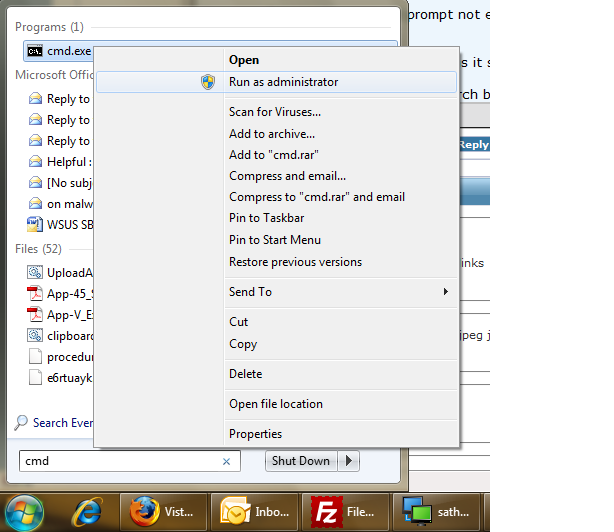
    Click on Start button, Type cmd in search bar, follow the screen shot.

    untitled.png

    right click on cmd.exe and run as administrator.

    And paste the commands there

      My System SpecsSystem Spec

Page 1 of 2 12 LastLast
Windows update messed up programs

Similar Threads
Thread Thread Starter Forum Replies Last Post
Windows Update Messed Up DVD!!!! DJB MASTER Media Center 3 11 May 2008
Windows Update is Messed Up moto Vista General 7 26 Nov 2007
Language settings messed up, can't install programs Jeff Schafer Vista installation & setup 2 23 Nov 2007
Windows Update - now "History" is messed up Fred B. Vista General 4 15 Jul 2007
A Windows Vista Security Tip: Use Windows Update to Update all Microsoft Programs on your Computer tokjad@gmail.com Vista security 5 12 May 2007