![]() |
![]() | ![]() | ![]() | ![]() | ![]() | ![]() | ![]() |
| Welcome to Windows Vista Forums. Our forum is dedicated to helping you find solutions with any problems, errors or issues you are experiencing with Windows Vista. The Vista forum also covers news and updates and has an extensive Windows Vista tutorial section that covers a wide range of tips and tricks. |
| |||||||
![]() |
| |
| | #11 (permalink) |
| vista business x32, vista home premium x32 | Re: Cannot update anything, 80080005 Thats why i always hate reg cleaners.... Try this registry entry Attachment 14358 Let me know the result ![]() Tried this now have error 80070424 |
My System Specs![]() |
| | #12 (permalink) |
| Vista Bussiness x64 PL | Re: Cannot update anything, 80080005 This error has many faces - http://www.vistax64.com/1088791-post8.html |
My System Specs![]() |
| | #13 (permalink) |
| Windows 7 | Re: Cannot update anything, 80080005 Thats why i always hate reg cleaners.... Try this registry entry Attachment 14358 Let me know the result ![]() Tried this now have error 80070424 Let us recconfigure bits service, To do that follow my steps, 1. Click Start, click Run, type services.msc, and then click OK. 2. Double-click Background Intelligent Transfer Service. 3. In the Startup type box, click Automatic(delayed start), and then click Apply. 4. Click the Log On tab, and then verify that the service is enabled in every hardware profile that is listed. If the service is disabled in one or more hardware profiles, click the hardware profile, click Enable, and then click Apply. 5. Click the General tab, and then click Start. If that's all okay, then perhaps 1. Click Start. 2. Choose Run. 3. In the Run box, type (pressing okay after the command) Regsvr32 QMGR.DLL Otherwise reinstall Bits. Its available here Let me know the result |
My System Specs![]() |
| | #14 (permalink) |
| Vista Bussiness x64 PL | Re: Cannot update anything, 80080005 Not only -it can be also trouble with Windows Update or Windows Module Installer examples from our forum Vista 64 Update Error 80070424 Advanced |
My System Specs![]() |
| | #15 (permalink) |
| vista business x32, vista home premium x32 | Re: Cannot update anything, 80080005 hi, Thats why i always hate reg cleaners.... Try this registry entry Attachment 14358 Let me know the result ![]() Tried this now have error 80070424 Let us recconfigure bits service, To do that follow my steps, 1. Click Start, click Run, type services.msc, and then click OK. 2. Double-click Background Intelligent Transfer Service. 3. In the Startup type box, click Automatic(delayed start), and then click Apply. 4. Click the Log On tab, and then verify that the service is enabled in every hardware profile that is listed. If the service is disabled in one or more hardware profiles, click the hardware profile, click Enable, and then click Apply. 5. Click the General tab, and then click Start. If that's all okay, then perhaps 1. Click Start. 2. Choose Run. 3. In the Run box, type (pressing okay after the command) Regsvr32 QMGR.DLL Otherwise reinstall Bits. Its available here Let me know the result ![]() |
My System Specs![]() |
| | #16 (permalink) |
| Windows 7 | Re: Cannot update anything, 80080005 This error is related to bits service.. Let us recconfigure bits service, To do that follow my steps, 1. Click Start, click Run, type services.msc, and then click OK. 2. Double-click Background Intelligent Transfer Service. 3. In the Startup type box, click Automatic(delayed start), and then click Apply. 4. Click the Log On tab, and then verify that the service is enabled in every hardware profile that is listed. If the service is disabled in one or more hardware profiles, click the hardware profile, click Enable, and then click Apply. 5. Click the General tab, and then click Start. If that's all okay, then perhaps 1. Click Start. 2. Choose Run. 3. In the Run box, type (pressing okay after the command) Regsvr32 QMGR.DLL Otherwise reinstall Bits. Its available here Let me know the result ![]() Found on other forum.. Will u pls post the name of the dll files inside your servicing folder... We can check with other computer |
My System Specs![]() |
| | #17 (permalink) |
| Vista Bussiness x64 PL | Re: Cannot update anything, 80080005 and check you have service Windows Modules Installer and is set to MANUAL Windows Vista Service Pack 2 Services Information - Windows Modules Installer Have you tried also my post 9? http://www.vistax64.com/1093990-post9.html |
My System Specs![]() |
| | #18 (permalink) |
| vista business x32, vista home premium x32 | Re: Cannot update anything, 80080005 This error is related to bits service.. Let us recconfigure bits service, To do that follow my steps, 1. Click Start, click Run, type services.msc, and then click OK. 2. Double-click Background Intelligent Transfer Service. 3. In the Startup type box, click Automatic(delayed start), and then click Apply. 4. Click the Log On tab, and then verify that the service is enabled in every hardware profile that is listed. If the service is disabled in one or more hardware profiles, click the hardware profile, click Enable, and then click Apply. 5. Click the General tab, and then click Start. If that's all okay, then perhaps 1. Click Start. 2. Choose Run. 3. In the Run box, type (pressing okay after the command) Regsvr32 QMGR.DLL Otherwise reinstall Bits. Its available here Let me know the result ![]() Found on other forum.. Will u pls post the name of the dll files inside your servicing folder... We can check with other computer ![]() CbsApi.dll CbsMsg.dll TrustedInstaller.exe vsp1ceip.exe wrpintapi.dll folders en-US GC32 Packages Packages |
My System Specs![]() |
| | #19 (permalink) |
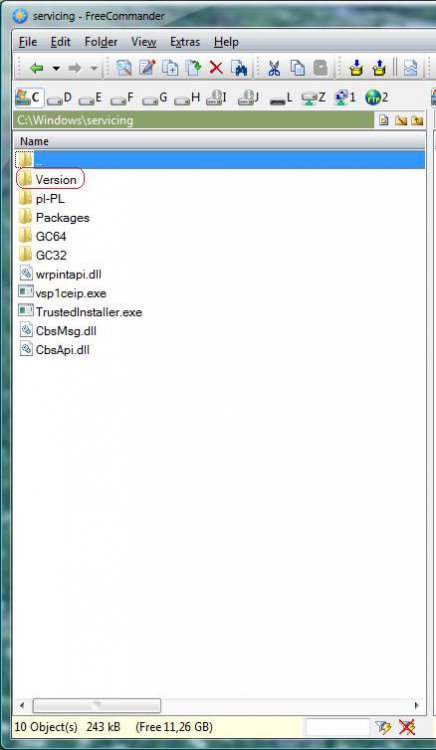
| Vista Bussiness x64 PL | Re: Cannot update anything, 80080005 You should also have folder Version.Do you have this folder? EDIT I have Vista x64 PL and there are bit different than in EN version,and you have x32 but folder Version you should have |
My System Specs![]() |
| | #20 (permalink) |
| vista business x32, vista home premium x32 | Re: Cannot update anything, 80080005 |
My System Specs![]() |
![]() |
| Thread Tools | |
| |
Similar Threads | ||||
| Thread | Forum | |||
| error code: 80080005 | Live Messenger | |||
| error code 80080005 | Windows Updates | |||
| Error 80080005 | Windows Updates | |||
| getting error 80080005 when updating....windows update service cant be started | Vista General | |||
| Re: windos update error 80080005 | Vista General | |||