Windows Vista Forums
Vista Forums Home Join Vista Forums Windows 7 Forum Vista Tutorials Tags
Welcome to Windows Vista Forums. Our forum is dedicated to helping you find solutions with any problems, errors or issues you are experiencing with Windows Vista. The Vista forum also covers news and updates and has an extensive Windows Vista tutorial section that covers a wide range of tips and tricks.

Go Back   Vista Forums > Vista Forums > Windows Updates

Vista - Cannot update anything, 80080005

Reply
 
Old 07-22-2009   #21 (permalink)


vista business x32, vista home premium x32


Re: Cannot update anything, 80080005

Quote  Quote: Originally Posted by MrWonderful1 View Post
Quote  Quote: Originally Posted by Flavius View Post
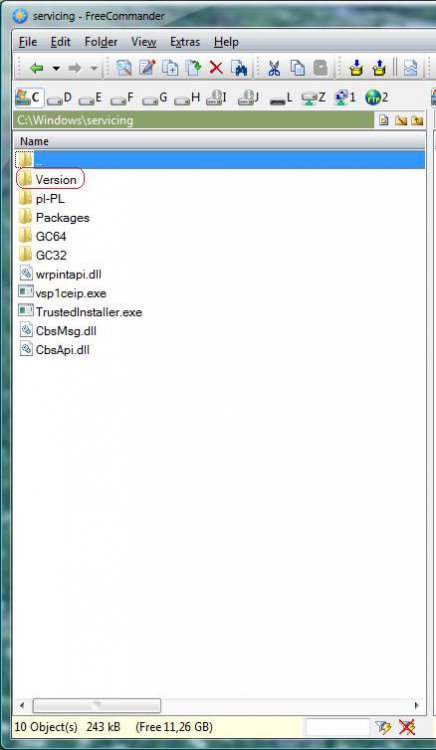
You should also have folder Version.Do you have this folder?

EDIT

I have Vista x64 PL and there are bit different than in EN version,and you have x32
but folder Version you should have

Yes I have a versions folder typed package twice.

When I open windows update the first time I get the red error box but if I try to run it againg it runs till I close it and give me the following error in Windows logs System every 30 seconds. When I try to start the windows modules service I also get the folloing error.

-System
-Provider[ Name] Service Control Manager[ Guid] {555908D1-A6D7-4695-8E1E-26931D2012F4}[ EventSourceName] Service Control Manager
-EventID7023[ Qualifiers] 49152
Version0Level2Task0Opcode0Keywords0x80000000000000-TimeCreated[ SystemTime] 2009-07-22T18:04:37.000Z
EventRecordID188819Correlation-Execution[ ProcessID] 0[ ThreadID] 0
ChannelSystemComputerMarkLaptopSecurity
-EventData
param1Windows Modules Installerparam2%%126

My System SpecsSystem Spec
Old 07-22-2009   #22 (permalink)


Vista Bussiness x64 PL


Re: Cannot update anything, 80080005

Check permissions for C:\Windows\Servicing folder: (right click on folder>>properties>>security)

TrustedInstaller -full control (all checked)
Administrators (Read & Execute,list folder contest,read)
Users (Read & Execute,list folder contest,read)
System (Read & Execute,list folder contest,read)

Helpful guide:Folder Permissions
My System SpecsSystem Spec
Old 07-22-2009   #23 (permalink)


vista business x32, vista home premium x32


Re: Cannot update anything, 80080005

Quote  Quote: Originally Posted by Flavius View Post
Check permissions for C:\Windows\Servicing folder: (right click on folder>>properties>>security)

TrustedInstaller -full control (all checked)
Administrators (Read & Execute,list folder contest,read)
Users (Read & Execute,list folder contest,read)
System (Read & Execute,list folder contest,read)

Helpful guide:Folder Permissions

Folder permissions match exactly
My System SpecsSystem Spec
Old 07-22-2009   #24 (permalink)


Vista Bussiness x64 PL


Re: Cannot update anything, 80080005

Download Process Monitor Process Monitor

Run this tool and create log in *.PML format:File>>Save as *.PML ,pack this file and upload it on Speedy Share - upload your files here

because it will be too big to attache directly to post
My System SpecsSystem Spec
Old 07-22-2009   #25 (permalink)


vista business x32, vista home premium x32


Re: Cannot update anything, 80080005

Quote  Quote: Originally Posted by Flavius View Post
Download Process Monitor Process Monitor

Run this tool and create log in *.PML format:File>>Save as *.PML ,pack this file and upload it on Speedy Share - upload your files here

because it will be too big to attache directly to post


Here is the download link

Marks.PML
My System SpecsSystem Spec
Old 07-22-2009   #26 (permalink)


Vista Bussiness x64 PL


Re: Cannot update anything, 80080005

I'll view this log tommorow ,now you make another thing

Run cmd.exe with administrative previlliges (right click on this file as admin) and type

sfc /scannow

when it finish make next command

findstr /c:"[SR]" %windir%\logs\cbs\cbs.log >%userprofile%\Desktop\sfcdetails.txt

On your desktop appear file sfdetails.txt->attache this file to post also
My System SpecsSystem Spec
Old 07-22-2009   #27 (permalink)


vista business x32, vista home premium x32


Re: Cannot update anything, 80080005

Quote  Quote: Originally Posted by Flavius View Post
I'll view this log tommorow ,now you make another thing

Run cmd.exe with administrative previlliges (right click on this file as admin) and type

sfc /scannow

when it finish make next command

findstr /c:"[SR]" %windir%\logs\cbs\cbs.log >%userprofile%\Desktop\sfcdetails.txt

On your desktop appear file sfdetails.txt->attache this file to post also

sfc /scannon causes error as follows

Windows resources could not start the repair service.

Ran comand command propt as admin.
My System SpecsSystem Spec
Old 07-22-2009   #28 (permalink)


Vista Bussiness x64 PL


Re: Cannot update anything, 80080005

Quote  Quote: Originally Posted by MrWonderful1 View Post
Quote  Quote: Originally Posted by Flavius View Post
I'll view this log tommorow ,now you make another thing

Run cmd.exe with administrative previlliges (right click on this file as admin) and type

sfc /scannow

when it finish make next command

findstr /c:"[SR]" %windir%\logs\cbs\cbs.log >%userprofile%\Desktop\sfcdetails.txt

On your desktop appear file sfdetails.txt->attache this file to post also

sfc /scannon causes error as follows

Windows resources could not start the repair service.

Ran comand command propt as admin.
Sorry my thought.Yes of course.I forgot SFC command require Windows Modules Installer working
My System SpecsSystem Spec
Old 07-22-2009   #29 (permalink)


Windows 7


Re: Cannot update anything, 80080005

Quote  Quote: Originally Posted by MrWonderful1 View Post
Quote  Quote: Originally Posted by Flavius View Post
You should also have folder Version.Do you have this folder?

EDIT

I have Vista x64 PL and there are bit different than in EN version,and you have x32
but folder Version you should have

Yes I have a versions folder typed package twice.
Okay.. mmmm..

Try these commands,
  1. Open elevated command prompt window
  2. net stop msiserver Press enter.
  3. MSIEXEC /UNREGISTER Press enter.
  4. MSIEXEC /REGSERVER Press enter.
  5. net start msiserver Press enter.
This will reset your windows module installer service...

Let me know the result
My System SpecsSystem Spec
Old 07-23-2009   #30 (permalink)


Vista Bussiness x64 PL


Re: Cannot update anything, 80080005

@MrWonderful1

Question:

Do you have this key?

HKLM\Software\Microsoft\Windows\CurrentVersion\Component Based Servicing\Version

It depence from kind of system this key looks a bit different-by me is:
Attached Thumbnails
version.jpg  
My System SpecsSystem Spec
Reply

Thread Tools


Similar Threads
Thread Forum
error code: 80080005 Live Messenger
error code 80080005 Windows Updates
Error 80080005 Windows Updates
getting error 80080005 when updating....windows update service cant be started Vista General
Re: windos update error 80080005 Vista General


Vista Forums is an independent web site and has not been authorized,
sponsored, or otherwise approved by Microsoft Corporation.
"Windows Vista", the Start Orb, and related materials are trademarks of Microsoft Corp.
© Designer Media Ltd

1 2 3 4 5 6 7 8 9 10 11 12 13 14 15 16 17 18 19 20 21 22 23 24 25 26 27 28 29 30 31 32 33 34 35 36 37 38 39 40 41 42 43 44 45 46