Windows Vista Forums
Vista Forums Home Join Vista Forums Windows 7 Forum Vista Tutorials Tags
Welcome to Windows Vista Forums. Our forum is dedicated to helping you find solutions with any problems, errors or issues you are experiencing with Windows Vista. The Vista forum also covers news and updates and has an extensive Windows Vista tutorial section that covers a wide range of tips and tricks.

Go Back   Vista Forums > Vista Forums > Windows Updates

Vista - Cannot update anything, 80080005

Reply
 
Old 07-23-2009   #41 (permalink)


Vista Bussiness x64 PL


Re: Cannot update anything, 80080005

Quote:
Windows Registry Editor Version 5.00

[HKEY_LOCAL_MACHINE\Software\Microsoft\Windows\CurrentVersion\Component Based Servicing]
"EnableDpxLog"=dword:00000001
"EnableLog"=dword:00000001
"SessionIdHigh"=dword:01c9eb60
"SessionIdLow"=dword:6302cab8
"LastModified_UTC"="2009/06/12/13:20:13"
"RollbackFailed"=dword:00000000
"ExecuteState"=dword:00000000
"RetryAllowed"=dword:00000001
I can say only one word: PASS

The whole key is damaged!

Any effort as said Borg

"The resist are futile"

Try these but I'm not guarantee they will work also

System Restore - undo
(I suggest METHOD I)
Repair Install For Vista

My System SpecsSystem Spec
Old 07-23-2009   #42 (permalink)


vista business x32, vista home premium x32


Re: Cannot update anything, 80080005

Quote  Quote: Originally Posted by Flavius View Post
Quote:
Windows Registry Editor Version 5.00

[HKEY_LOCAL_MACHINE\Software\Microsoft\Windows\CurrentVersion\Component Based Servicing]
"EnableDpxLog"=dword:00000001
"EnableLog"=dword:00000001
"SessionIdHigh"=dword:01c9eb60
"SessionIdLow"=dword:6302cab8
"LastModified_UTC"="2009/06/12/13:20:13"
"RollbackFailed"=dword:00000000
"ExecuteState"=dword:00000000
"RetryAllowed"=dword:00000001
I can say only one word: PASS

The whole key is damaged!

Any effort as said Borg

"The resist are futile"

Try these but I'm not guarantee they will work also

System Restore - undo
(I suggest METHOD I)
Repair Install For Vista

One more question. What if I recovered just the software file of the registry?

Windows\System32\config\Software
My System SpecsSystem Spec
Old 07-23-2009   #43 (permalink)


Vista Bussiness x64 PL


Re: Cannot update anything, 80080005

Quote  Quote: Originally Posted by MrWonderful1 View Post
[
One more question. What if I recovered just the software file of the registry?

Windows\System32\config\Software
Well if you have any good SOFTWARE file...that yes ->it is any chance for you
My System SpecsSystem Spec
Old 09-02-2009   #44 (permalink)


Vista Business 32bit


Re: Cannot update anything, 80080005

On a client's computer running VB 32bit I had the same problem - no updates. Windows Modules Installer could not be started -- The specified module could not be found.
I replaced the whole Windows\Servicing folder from Vista SP1 DVD - no fix.
As a last resort I used ProcMon to log what's going on when TrustedInstaller attempted to start. When filtered on the TrustedInstaller.Exe process I found that right before exit the process tried to open the file
C:\WINDOWS\winsxs\x86_microsoft-windows-servicingstack_31bf3856ad364e35_6.0.6001.18000_none_095f6148c74a7a64\wrpint.dll unsuccessfully.
I checked and found the file wrpint.dll was indeed missing from that folder.
I found the file in the immediate above folder
C:\WINDOWS\winsxs\x86_microsoft-windows-servicingstack_31bf3856ad364e35_6.0.6000.16386_none_07289f4cca5f6990
Broke permissions and copied the file. It fixed the problem, the service started and updates have been installed.
My System SpecsSystem Spec
Old 09-02-2009   #45 (permalink)


Vista Bussiness x64 PL


Re: Cannot update anything, 80080005

If you compare your and @MrWonderful threads there are really similar -but there are also seriously difference
This folder:
Quote:
C:\WINDOWS\winsxs\x86_microsoft-windows-servicingstack_31bf3856ad364e35_6.0.6001.18000_none_095f6148c74a7a64
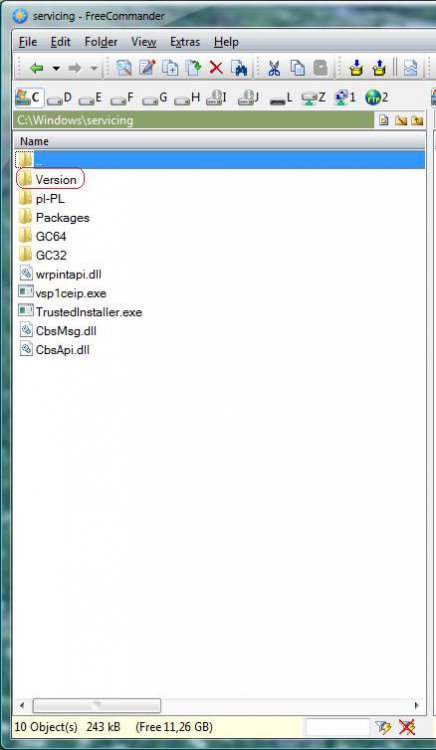
is noticed in registry in HKLM\Software\Microsoft\Windows\CurrentVersion\Component Based Servicing\Version (exactly value and coresponding folder depends of system version,update status) see image in post 30,@MrWonderful had damaged all CBS subkeys (including also Version subkey) his whole CBS key I showed in post 41,no chance to reconstruct,your problem was only missing those folder which Version subkey describe.
Neverless really error 80080005 relate to corrupted Version key or folder which this key point
My System SpecsSystem Spec
Reply

Thread Tools


Similar Threads
Thread Forum
error code: 80080005 Live Messenger
error code 80080005 Windows Updates
Error 80080005 Windows Updates
getting error 80080005 when updating....windows update service cant be started Vista General
Re: windos update error 80080005 Vista General


Vista Forums is an independent web site and has not been authorized,
sponsored, or otherwise approved by Microsoft Corporation.
"Windows Vista", the Start Orb, and related materials are trademarks of Microsoft Corp.
© Designer Media Ltd

1 2 3 4 5 6 7 8 9 10 11 12 13 14 15 16 17 18 19 20 21 22 23 24 25 26 27 28 29 30 31 32 33 34 35 36 37 38 39 40 41 42 43 44 45 46