![]() |
![]() | ![]() | ![]() | ![]() | ![]() | ![]() | ![]() |
| Welcome to Windows Vista Forums. Our forum is dedicated to helping you find solutions with any problems, errors or issues you are experiencing with Windows Vista. The Vista forum also covers news and updates and has an extensive Windows Vista tutorial section that covers a wide range of tips and tricks. |
| |||||||
![]() |
| |
| | #1 (permalink) |
| Newbie | .NET Framework Problems Everytime I try to open a game or something requiring .NET Framework I get this error message: To run this application you need to install one of the following applications: .NET Framework v2.0.50727 I already installed this, and it errored, and it did not appear on my add/remove so I couldn't uninstall it. So I tried deleting it manually through the Framework folder, which Vista won't allow me permission to do. So i did the next best thing and ripped it out onto my desktop. I tried to reinstall and the installer claims that 2.0.5 is already installed, and I can't even reinstall 1.0 or 1.1 because it errors, and I can't install 3.5 because it thinks there's a prior version. So now i'm stuck with three folders on my desktop I can't delete, no .NET Framework and seemingly no way of getting it. What do I do? |
My System Specs![]() |
| | #2 (permalink) |
| Master | Re: .NET Framework Problems Check these service: Microsoft NET Framework NGEN v.2 is set to MANUAL if you have unlikely you have to correct it + restart If no help try this: Run cmd.exe with administrative previlliges (right click on this file as admin) and type %windir%\Microsoft.NET\Framework\v2.0.50727\ngen.exe update and wait for momemt |
My System Specs![]() |
| | #3 (permalink) |
| Newbie | Re: .NET Framework Problems Check these service: Microsoft NET Framework NGEN v.2 is set to MANUAL if you have unlikely you have to correct it + restart If no help try this: Run cmd.exe with administrative previlliges (right click on this file as admin) and type %windir%\Microsoft.NET\Framework\v2.0.50727\ngen.exe update and wait for momemt C:\WINDOWS\Microsoft.NET\Framwork\v2.0.50727\mscorwks.dll could not be loaded And an error on the cmd saying Unspecified Error <Exception from HRESULT: 0x8004005 <E_FAIL>> |
My System Specs![]() |
| | #4 (permalink) |
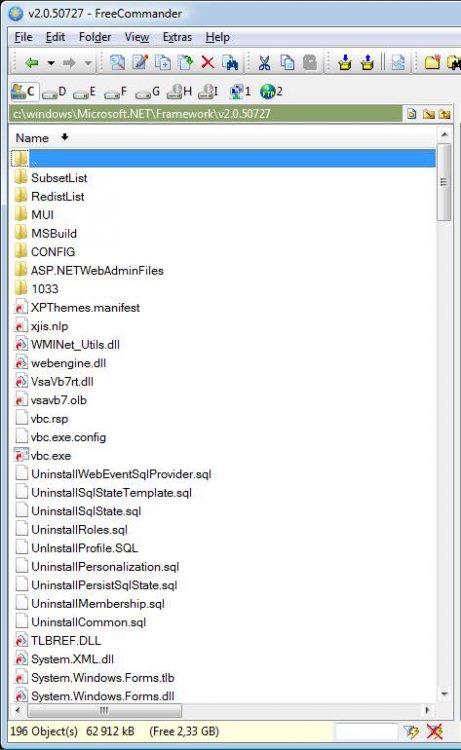
| Master | Re: .NET Framework Problems Do you have this folder which I showing in attached image?If not or you have not much files there for you only leave System Restore - undo or Repair Install For Vista |
My System Specs![]() |
| | #5 (permalink) |
| Newbie | Re: .NET Framework Problems Thanks for all your support. In a blind moment of luck I discovered that the auto update had tried to install .NET Framework before Service Pack 2, so I system restored and downloaded a standalone which installed and then Auto update cought itself up. Regards, Cypher |
My System Specs![]() |
![]() |
| Thread Tools | |
| |
Similar Threads | ||||
| Thread | Forum | |||
| .NET Framework Problems | .NET General | |||
| can't update .NET Framework 3.5 Service Pack 1 and .NET Framework 3.5(KB951847 | Windows Updates | |||
| Printing problems after Windows .NET Framework 3.5 installation | .NET General | |||
| .NET Framework problems | Vista installation & setup | |||
| Problems at startup (.NET framework & programs blocked) | Vista General | |||