![]() |
![]() | ![]() | ![]() | ![]() | ![]() | ![]() | ![]() |
| Welcome to Windows Vista Forums. Our forum is dedicated to helping you find solutions with any problems, errors or issues you are experiencing with Windows Vista. The Vista forum also covers news and updates and has an extensive Windows Vista tutorial section that covers a wide range of tips and tricks. |
| |||||||
![]() |
| |
| | #1 (permalink) |
| Gateway, Vista Home, 64-Bit, 640GB Drive, 6GB Ram | SP2 Vista 64-Bit Won’t Install Anymore SYSTEM: Vista Home Premium SP1 64-Bit (OEM – Gateway) 540GB – Free storage space 6GB RAM memory Downloaded SP2 form Microsoft: WindowsServer2003.WindowsXP-KB914961-SP2-x64-ENU.exe ISSUE (ERROR): 1. Last month, I was able to install Vista SP2, but now after redoing my system, I cannot update to SP2 anymore. I get the error: “Not enough storage to process this command.” 2. Gateway will not give me support since I am updating to SP2 (SP1 is the OEM when I bought the computer). 3. Microsoft will not support me either since I bought an OEM-OS system, unless I pay the $59 for the service. PROCESSES PERFORMED: 1. Ran as administrator 2. Ran in safe-mode 3. “IRPStackSize ” missing in my registry. Added “IRPStackSize” to my registry and set the value from 1 through 50. For my system, I had to use the “QWORD (64-bit) value”. 4. I tried CURE.ZIP 5. Uninstalled Norton Ghost 14 Any help will be greatly appreciated. Thanks Last edited by Caxtin; 08-09-2009 at 01:23 PM.. |
My System Specs![]() |
| | #2 (permalink) |
| Vista Bussiness x64 PL | Re: SP2 Vista 64-Bit Won’t Install Anymore Read this post:http://www.vistax64.com/1068328-post2.html and make sure you have everything like I showed there.If you have any unlike -correct it + restart |
My System Specs![]() |
| | #3 (permalink) |
| Gateway, Vista Home, 64-Bit, 640GB Drive, 6GB Ram | Re: SP2 Vista 64-Bit Won’t Install Anymore Read this post:http://www.vistax64.com/1068328-post2.html and make sure you have everything like I showed there.If you have any unlike -correct it + restart Thanks again. |
My System Specs![]() |
| | #4 (permalink) |
| Vista Bussiness x64 PL | Re: SP2 Vista 64-Bit Won’t Install Anymore Make sure you don't have second WOW6432Node (this means HKLM\SOFTWARE\Wow6432Node\Wow6432Node) key or more embadded - if yes you have to reduced it -this error can also relate to much registry size or issue with reading registry by system before this you have to create new checkpoint System Restore Point - create If you have only second WOW6432Node key this means HKLM\SOFTWARE\Wow6432Node\Wow6432Node at once you can remove this key +restart If you have more embadded WOW6432Node key (more levels) you have to do like below: 1.Navigate to key HKLM\SOFTWARE\Wow6432Node\....\Wow6432Node\Microsoft\Windows\CurrentVersion\App Paths\IEXPLORE.EXE and remove it -this means remove subkey IEXPLORE.EXE from last level WOW6432Node +restart.This procedure should remove WOW6432NODE from 3 to last level 2.After restarting you can savely now remove second WOW6432Node this means remove key HKLM\SOFTWARE\Wow6432Node\WOW6432Node +restart After it defrag registry by using this tool Defrag Registry | Quicksys RegDefrag And try install again SP2.If still no help run cmd.exe with administrative pevilliges (right click on cmd.exe as admin) and type: REG EXPORT "HKLM\System\CurrentControlSet\Services\LanmanServer" %userprofile%\Desktop\Lanman.txt On your desktop appear Lanman.txt file ->attache this file to post |
My System Specs![]() |
| | #5 (permalink) |
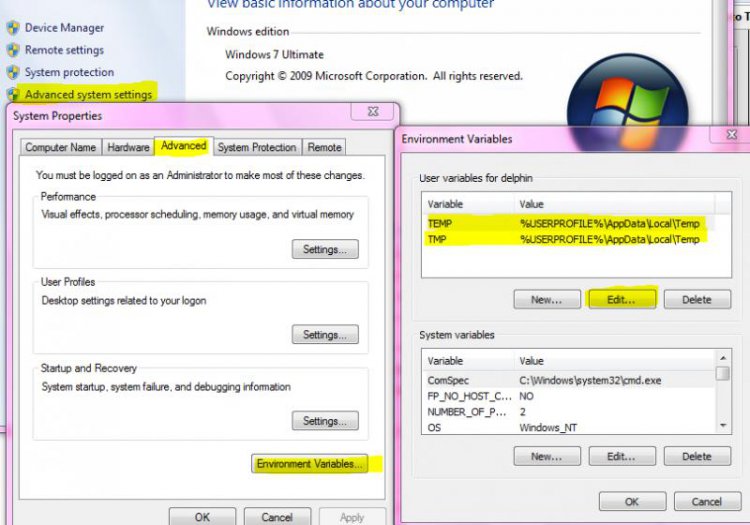
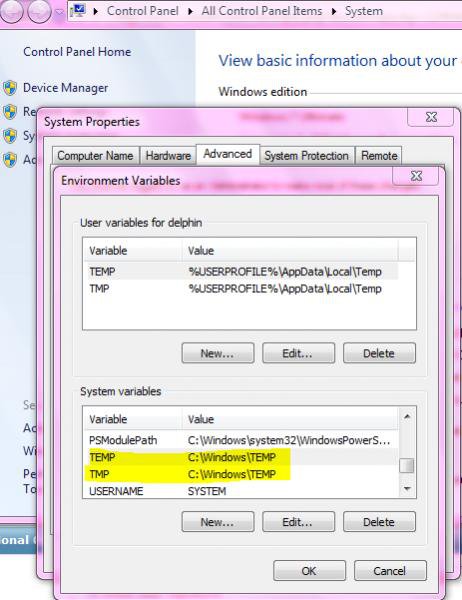
| Windows 7 | Re: SP2 Vista 64-Bit Won’t Install Anymore Here is some steps to eleminate this 1. Login to your system with administrator privilege, 2. Create folders as temp1 inside C:\Users\your account name\AppData\Local and c:\windows directory. 3. Right click on my compter and go to properties >advanced system settings>environment variables. Under user variables, highlight temp and click on edit. And make that value to %userprofile%\AppData\Local\temp1. Highlight tmp and click on edit make that value to %userprofile%\AppData\Local\temp1. ![]() 4. Under system variables, highlight temp and click on edit. And make that value to c:\windows\temp1. Highlight tmp and click on edit make that value to c:\windows\temp1. ![]() Restart your computer and try to update. |
My System Specs![]() |
| | #6 (permalink) |
| Gateway, Vista Home, 64-Bit, 640GB Drive, 6GB Ram | Re: SP2 Vista 64-Bit Won’t Install Anymore From the bottom of my heart, I really appreciate all the help I got from this forum. Unfortunately, all the information that were given to me did not work, I don't know why. I had to go through all the things to try one more time, step by step, still the SP2 won't install. Then I decided to take the machine to the office and use our higher speed and much higher download qota. It worked (installed), smoothly! One thing I noticed was that the new SP2 I redownload is 1.6+GB compared to the original one of 400MB. Maybe the file was the issue. All is well now. Thanks again to y'all for your help. |
My System Specs![]() |
![]() |
| Thread Tools | |
| |
Similar Threads | ||||
| Thread | Forum | |||
| They Don't Give Install Disks Anymore???? | General Discussion | |||
| Can't install McAfee 8.7 or 8.5 anymore | Vista General | |||
| don't want Vista anymore | Vista General | |||
| Vista was running sweet, not so anymore (two weeks after install) | Vista General | |||
| Vista was running sweet, not so anymore (two weeks after install) | Vista installation & setup | |||