![]() |
![]() | ![]() | ![]() | ![]() | ![]() | ![]() | ![]() |
| Welcome to Windows Vista Forums. Our forum is dedicated to helping you find solutions with any problems, errors or issues you are experiencing with Windows Vista. The Vista forum also covers news and updates and has an extensive Windows Vista tutorial section that covers a wide range of tips and tricks. |
| |||||||
![]() |
| |
| | #1 (permalink) |
| Vista Home Premium 64 bit now running 32 bit SP2 | Just curious How many updates do you have in your installed list? I'm up to 132 this morning. It's been a week since I installed 32 bit after 64 bit SP2 install wouldn't boot. 32 bit SP2 went in last night and all is good. |
My System Specs![]() |
| | #2 (permalink) |
| Vista Home Premium SP2 32bit, Windows7x32bit | 101 updates for me . |
My System Specs![]() |
| | #3 (permalink) |
| Windows 7 Ultimate x64 | Counting all updates including optional 2 weeks on this new laptop, for x64 there are 46 updates, not including the ones that failed and then installed successfully (4). |
My System Specs![]() |
| | #4 (permalink) |
| Vista Ultimate 64-bit, SP2 | On the "Uninstall an Update Page" it says "Currently installed updates 113." When I go to "Review Your Update History" I gave up counting at 200. Why the difference? |
My System Specs![]() |
| | #5 (permalink) |
| Vista Home Premium 32bit [x86] - SP2 | Could it be that some are overwritten [for bugs etc.] by later Updates? |
My System Specs![]() |
| | #6 (permalink) |
| Vista Ultimate 64-bit, SP2 | Could it be that some are overwritten [for bugs etc.] by later Updates? ![]() |
My System Specs![]() |
| | #7 (permalink) |
| Vista Home Premium 32bit [x86] - SP2 | Could it be that some are overwritten [for bugs etc.] by later Updates? ![]() ![]() Nope! |
My System Specs![]() |
| | #8 (permalink) |
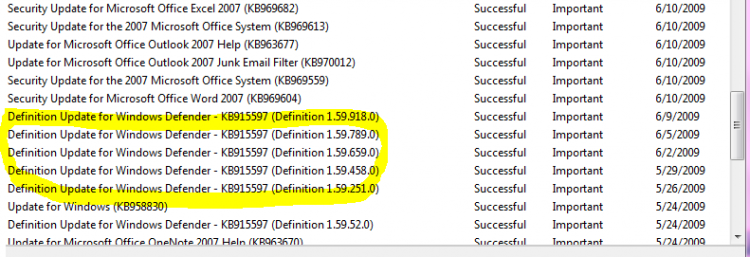
| Windows 7 | See the image below ![]() Those i highlighted are definitions for windows defender and you cannot uninstall the definition updates. As a result those updates will not be shown in uninstall an update windows. But you can see those things in your update history. ![]() Likewise, you cannot uninstall the critical and some security patches. So it will not be counted on uninstall an update page. This is the reason behind the mismatch ![]() Hope it will clarify you ![]() And after all this is the best forum to ask all the questions |
My System Specs![]() |
| | #9 (permalink) |
| Vista Ultimate 64-bit, SP2 | See the image below Attachment 15052 Those i highlighted are definitions for windows defender and you cannot uninstall the definition updates. As a result those updates will not be shown in uninstall an update windows. But you can see those things in your update history. ![]() Likewise, you cannot uninstall the critical and some security patches. So it will not be counted on uninstall an update page. This is the reason behind the mismatch ![]() Hope it will clarify you ![]() And after all this is the best forum to ask all the questions ![]() You are right on both points. Yep I should have realised why the mismatch. ![]() Thanks. |
My System Specs![]() |
![]() |
| Thread Tools | |
| |
Similar Threads | ||||
| Thread | Forum | |||
| Just curious | Vista General | |||
| Just curious... | Vista General | |||
| Just Curious | Vista General | |||
| I'm Curious too | Vista installation & setup | |||