![]() |
![]() | ![]() | ![]() | ![]() | ![]() | ![]() | ![]() |
| Welcome to Windows Vista Forums. Our forum is dedicated to helping you find solutions with any problems, errors or issues you are experiencing with Windows Vista. The Vista forum also covers news and updates and has an extensive Windows Vista tutorial section that covers a wide range of tips and tricks. |
| |||||||
![]() |
| |
| | #1 (permalink) |
| Vista Ultimate x64 | error 80070424 windows could not search for new updates Hey all, I've been stuck with this problem for a while now, tried support pages on microsoft.com and googled a lot, but all the solutions that worked for other people never seem to work for me. Any ideas here? Someone with the same problem maybe? Cheers, Amplid |
My System Specs![]() |
| | #2 (permalink) |
| Vista 32 win 7 7600 32 bit | Could you go into event viewer (type event viewer in search) and see what errors exist relating to this problem? Ken |
My System Specs![]() |
| | #3 (permalink) |
| Windows 7 | This is the error related with bits service. Try registering the following files, Open elevated command prompt and type regsvr32.exe wuapi.dll regsvr32.exe wups.dll regsvr32.exe wuaueng.dll regsvr32.exe wucltui.dll regsvr32.exe MSXML3.dll regsvr32.exe qmgr.dll regsvr32.exe qmgrprxy.dll Hit enter after every line, you will get a message that the operation succeeded for every line. net.exe start wuauserv and restart your computer. If your problem not rectified after this post your windows update.log file. You can find the file in c:\windows directory |
My System Specs![]() |
| | #4 (permalink) |
| Vista Bussiness x64 PL | So many people had the same error.Same errors numbers - but reasons of this error many different: If have luck maybe help you these MS articles ->How do I reset Windows Update components? if it fail you can also try this:An update is available to fix a Background Intelligent Transfer Service (BITS) crash on a Windows Vista-based computer but this error have many meanings -it would going on BITS service but is also possible it is problem with other services;Check you have these services and correct set: Windows Update -start AUTO Background Inteligent Transfer Service -start DELAYED-AUTO Cryptographic Service -start AUTO Windows Modules Installer - start MANUAL Windows Installer -start MANUAL if this is problem with Windows Installer follow to this:Windows Installer 4.5 is available if this is problem with Windows Update follow to this:How to obtain the latest version of the Windows Update Agent to help manage updates on a computer if this is problem with Windows Modules Installer follow to this:http://www.vistax64.com/1082478-post2.html More deatails about last option we discussed here:Vista Forums |
My System Specs![]() |
| | #5 (permalink) |
| Vista Ultimate x64 | This is the error related with bits service. Try registering the following files, Open elevated command prompt and type regsvr32.exe wuapi.dll regsvr32.exe wups.dll regsvr32.exe wuaueng.dll regsvr32.exe wucltui.dll regsvr32.exe MSXML3.dll regsvr32.exe qmgr.dll regsvr32.exe qmgrprxy.dll Hit enter after every line, you will get a message that the operation succeeded for every line. net.exe start wuauserv and restart your computer. If your problem not rectified after this post your windows update.log file. You can find the file in c:\windows directory ![]() "The module wuaueng.dll was loaded, but the call to DIIRegisterServer failed with error code 0x80070005." When inserting wucltui command: "The module wucltui.dll failed to load. Make sure the binary is stored at specified path or debug it to check for problems with the binary or dependent .DLL files. The specified module could not be found. ." MSXML3 gives same error code as wuaueng qmgr next: "The module qmgr.dll was loaded but the entry-point DLLRegisterServer was not found. Make sure that qmgr.dll is a valid DLL or OCX file and then try again." The others succeeded. @zigzag, see the thread name for the error code. @flavius, when I installed the BITS installer it said the repair was not required currently. Could you repeat what you said with the start AUTO and start MANUAL, I didn't really get it.. Thanks for quick replies so far ![]() Amplid |
My System Specs![]() |
| | #6 (permalink) |
| Vista Bussiness x64 PL | This is the error related with bits service. Try registering the following files, Open elevated command prompt and type regsvr32.exe wuapi.dll regsvr32.exe wups.dll regsvr32.exe wuaueng.dll regsvr32.exe wucltui.dll regsvr32.exe MSXML3.dll regsvr32.exe qmgr.dll regsvr32.exe qmgrprxy.dll Hit enter after every line, you will get a message that the operation succeeded for every line. net.exe start wuauserv and restart your computer. If your problem not rectified after this post your windows update.log file. You can find the file in c:\windows directory ![]() "The module wuaueng.dll was loaded, but the call to DIIRegisterServer failed with error code 0x80070005." When inserting wucltui command: "The module wucltui.dll failed to load. Make sure the binary is stored at specified path or debug it to check for problems with the binary or dependent .DLL files. The specified module could not be found. ." (...) do this the same Quote: Could you repeat what you said with the start AUTO and start MANUAL, I didn't really get it.. select all,make log and attache it to post |
My System Specs![]() |
| | #7 (permalink) |
| Windows 7 | Quote: "The module wuaueng.dll was loaded, but the call to DIIRegisterServer failed with error code 0x80070005." Quote: When inserting wucltui command: "The module wucltui.dll failed to load. Make sure the binary is stored at specified path or debug it to check for problems with the binary or dependent .DLL files. The specified module could not be found. For all the other file you are getting permission error. Run the command prompt with administrator privilege |
My System Specs![]() |
| | #8 (permalink) |
| Vista Ultimate x64 | I repeated the progress in the command prompt as administrator and did not get that error 80070005 anymore. However WU will still not work. I ran the SysInfo tool and the log is in attachment. Amplid |
My System Specs![]() |
| | #9 (permalink) |
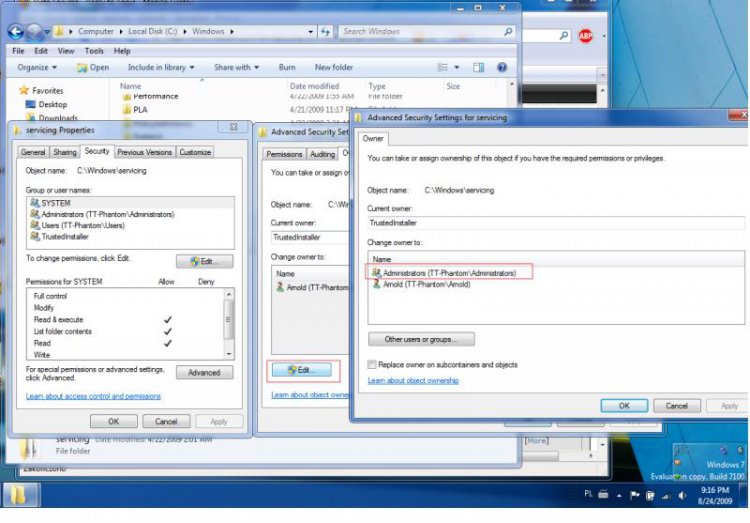
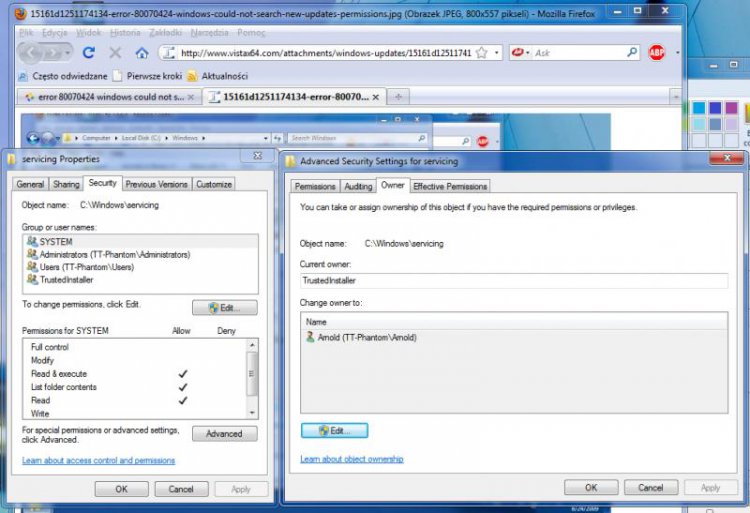
| Vista Bussiness x64 PL | You also don't have Windows Modules installer service,read this:http://www.vistax64.com/1093756-post16.html |
My System Specs![]() |
| | #10 (permalink) |
| Vista Ultimate x64 | Okay, so I am at the moment unpacking the install.wim with 7-zip. Amplid EDIT/ Flavius, where exactly in the install.wim file is the TrustedInstaller.exe located? Because there are 6 folders which each split into folders like Programdata, users, windows,... |
My System Specs![]() |
![]() |
| Thread Tools | |
| |
Similar Threads | ||||
| Thread | Forum | |||
| Windows could not search for new updates - Code 80070424 | Windows Updates | |||
| Windows Could Not Search for New Updates? Error 8007007E | Windows Updates | |||
| Windows Can’t Search for Updates – Error 80070490 | Windows Updates | |||
| Re: Windows cannot search for updates - error 8008005 | Vista performance & maintenance | |||
| Windows could not search for Updates: error 0x80070002 | Vista General | |||