Windows Vista Forums
Vista Forums Home Join Vista Forums Windows 7 Forum Vista Tutorials Tags
Welcome to Windows Vista Forums. Our forum is dedicated to helping you find solutions with any problems, errors or issues you are experiencing with Windows Vista. The Vista forum also covers news and updates and has an extensive Windows Vista tutorial section that covers a wide range of tips and tricks.

Go Back   Vista Forums > Vista Forums > Windows Updates

Vista - Microsoft SQL Server updates

Reply
 
Old 09-03-2009   #1 (permalink)


Vista 32


Microsoft SQL Server updates

Hi Guys!

So this is my first post on here, and its a good one!! I've have this prompt to install Microsoft SQL Server 2005 Express Edition Service Pack 3 (KB955706) for quite some time now but it never installs, It keeps saying Some updates failed to install, I have no idea if i need to install this but its really annoying if i go into sleep mode it tries installing and the same when i shut down, is there any way of installing this at all??

Thankyou!!

My System SpecsSystem Spec
Old 09-03-2009   #2 (permalink)


Vista Bussiness x64 PL


Re: Microsoft SQL Server updates

Have you tried install it from Microsoft Download Center http://www.microsoft.com/downloads/d...displaylang=en

If it is also impossible read from Windows Update history error code,try re-register WU How do I reset Windows Update components?
My System SpecsSystem Spec
Old 09-03-2009   #3 (permalink)


Vista 32


Re: Microsoft SQL Server updates

Yeah ive tried all the links but when i click on them i dont get directed to the actual download nothing happens, I click on the link and the page stays the same?? Am i doing something obviously wrong?

I clicked on the Microsoft FIX IT and it does nothing at all

PLEASE HELP!!!
My System SpecsSystem Spec
Old 09-03-2009   #4 (permalink)


Vista Bussiness x64 PL


Re: Microsoft SQL Server updates

Quote  Quote: Originally Posted by magica10 View Post
Yeah ive tried all the links but when i click on them i dont get directed to the actual download nothing happens, I click on the link and the page stays the same?? Am i doing something obviously wrong?
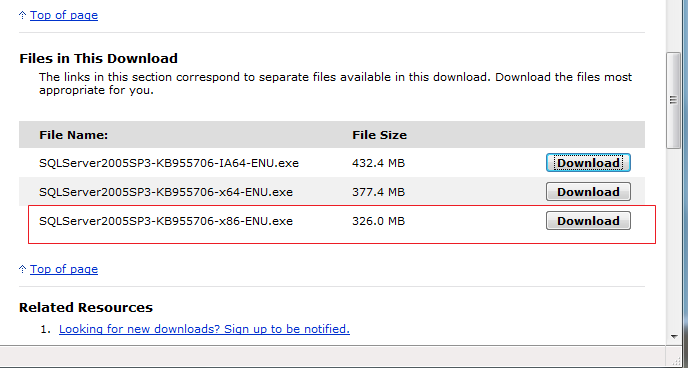
Navigate down and you'll see links,circled link is for your system
Attached Images
File Type: png SQL.png (20.5 KB, 43 views)
My System SpecsSystem Spec
Old 09-03-2009   #5 (permalink)


Vista 32


Re: Microsoft SQL Server updates

Hi Flavius,

I tried that just now and its the same thing i click on it and nothing happens, is it a more serious problem in my system do you think, im baffled!
My System SpecsSystem Spec
Old 09-03-2009   #6 (permalink)


Vista Bussiness x64 PL


Re: Microsoft SQL Server updates

With any browser do you have the same issue?

1.Try also reset IE and disable bad add-ones Internet Explorer - Reset
2.Run cmd.exe with administrative previlliges (right click on this file as admin) and type

netsh winhttp reset proxy

+restart

3.If still no results uninstall all protected software non-system firewall,antivirus,antispyware if still won't be result try reset winsock

Run cmd.exe with admin previlliges and type

netsh winsock reset

+restart

4.If point 3 also don't help I will suspect any viruses;because scanning on allive system is not credible (many viruses can hide before protected software) I recomend use any livecd with antivir for example this one Dr.Web LiveCD is a software product that features a standard, Dr.Web scanner
burn it,boot & scan computer
My System SpecsSystem Spec
Old 09-03-2009   #7 (permalink)


Vista 32


Re: Microsoft SQL Server updates

YEY!! it installed via the link you sent me above, the only problem i have no is that windows updates is still prompting me to install it, is there any way it can be removed from the updates?

Thankyou again!!
My System SpecsSystem Spec
Old 09-03-2009   #8 (permalink)


Vista Bussiness x64 PL


Re: Microsoft SQL Server updates

Quote  Quote: Originally Posted by magica10 View Post
YEY!! it installed via the link you sent me above, the only problem i have no is that windows updates is still prompting me to install it, is there any way it can be removed from the updates?
On our forum there were these accidents with this hotfix -unfortunately probably you can only workaround this problem hide this hotfix in WU
My System SpecsSystem Spec
Reply

Thread Tools


Similar Threads
Thread Forum
Microsoft updates Vista General
New microsoft updates Vista General
New Updates Available for Vista, Server 2008 Vista News
Microsoft Releases Public Betas of Exchange Server 2007 and Forefront Security for Exchange Server Vista News


Vista Forums is an independent web site and has not been authorized,
sponsored, or otherwise approved by Microsoft Corporation.
"Windows Vista", the Start Orb, and related materials are trademarks of Microsoft Corp.
© Designer Media Ltd

1 2 3 4 5 6 7 8 9 10 11 12 13 14 15 16 17 18 19 20 21 22 23 24 25 26 27 28 29 30 31 32 33 34 35 36 37 38 39 40 41 42 43 44 45 46