Windows Vista Forums
Vista Forums Home Join Vista Forums Windows 7 Forum Vista Tutorials Tags
Welcome to Windows Vista Forums. Our forum is dedicated to helping you find solutions with any problems, errors or issues you are experiencing with Windows Vista. The Vista forum also covers news and updates and has an extensive Windows Vista tutorial section that covers a wide range of tips and tricks.

Go Back   Vista Forums > Vista Forums > Windows Updates

Vista - Do I have SP1 or not?

Reply
 
Old 3 Weeks Ago   #1 (permalink)


Vista Home Premium 32bit


Do I have SP1 or not?

I have Vista Home Premium 32-bit. I'm sure that I installed SP1 about a year ago. The "System" details in Control Panel says that SP1 is installed.

I wanted to now install Vista SP2.

I got the message "element not found. Details: ERROR_NOT_FOUND (0X8007 0490)"

The MS solution is to install SP2 manually. I tried this, and got the same error.

The MS site recommends a repair install, so I started to do a repair install using Brink's tutorial:
Repair Install For Vista

That tutorial says I must remove SP1 first, because my Dell OS CD does not contain SP1.

However, there is no mention of SP1 in the Uninstall Programs applet in Control Panel. Also, my Windows Updates History does not mention SP1. (During Windows Update, I am not being offered SP1, but I AM being offered SP2.)

Should I assume that SP1 is NOT installed? (So I can then install SP1 manually, then hopefully SP2.)

My System SpecsSystem Spec
Old 3 Weeks Ago   #2 (permalink)


Vista Home Premium 32 bit now with SP2!


Re: Do I have SP1 or not?

Hello,
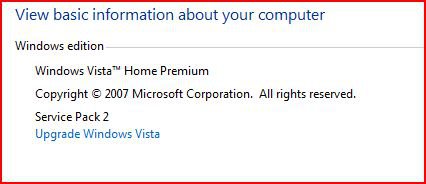
I'm not sure about your error message, but have you tried Control Panel>System?
The top left section of the page should tell you what SP Vista thinks is installed..

capture.jpg
My System SpecsSystem Spec
Old 3 Weeks Ago   #3 (permalink)


Vista Home Premium 32bit


Re: Do I have SP1 or not?

Quote  Quote: Originally Posted by Peppurr101 View Post
...have you tried Control Panel>System?
The top left section of the page should tell you what SP Vista thinks is installed..

Attachment 16827
Yes. That's where I can see that SP1 is installed. But it's not in the uninstall programs applet, and not in update history.
My System SpecsSystem Spec
Old 3 Weeks Ago   #4 (permalink)


Vista Home Premium 32 bit now with SP2!


Re: Do I have SP1 or not?

Hi Old Grantonian,
Mine is listed under updates, but not available in programs (neither is SP2).
I wish I could help further, but alas, I'm not that good! Perhaps someone else could?
My System SpecsSystem Spec
Old 3 Weeks Ago   #5 (permalink)


Vista Home Premium 32bit


Re: Do I have SP1 or not?

Quote  Quote: Originally Posted by Peppurr101 View Post
Mine is listed under updates, but not available in programs (neither is SP2).
Thanks for the response

Note that you need to click "View installed updates" to see a list of installed updates.
.
My System SpecsSystem Spec
Old 3 Weeks Ago   #6 (permalink)


Vista Bussiness x64 PL


Re: Do I have SP1 or not?

Please note if you have corrupted CBS or CSI components system lose information what is installed or not thus you have message about "need to install SP1" although SP1 is already installed.I even doubt is possible uninstall SP1 i your case.

Apart "Repair Install" method using Vista DVD Vista SP2 ,sometimes alternative method is manually fill missing files & key - of course it is only possible and worth to do that if damages are not too big.

We try diagnose it:

1.Run cmd.exe with administrative previlliges (right click on this file as admin) and type

sfc /scannow

when it finish type next

findstr /c:"[SR]" %windir%\logs\cbs\cbs.log >%userprofile%\sfcdetails.txt

on your desktop appear file sfcdetails.txt

2.Run Readiness Tool Description of the System Update Readiness Tool for Windows Vista, for Windows Server 2008, for Windows 7, and for Windows Server 2008 R2

This tool create CheckSur.log file in C:\Windows\Logs\CBS

Both files sfcdetails.txt and CheckSur.log pack it and attache to post
My System SpecsSystem Spec
Old 3 Weeks Ago   #7 (permalink)


Vista Home Premium 32bit


Re: Do I have SP1 or not?

Quote  Quote: Originally Posted by Flavius View Post

Both files sfcdetails.txt and CheckSur.log pack it and attache to post
Thanks for your help

I have attached a 7Z file as requested.

Edited: I can't see the attached file. Where should it be?

Edited2: I changed the 7Z extension to ZIP. But please note that it's actually a 7Z file.
Attached Files
File Type: zip ForFlavius.zip (6.1 KB, 1 views)

Last edited by OldGrantonian; 3 Weeks Ago at 03:25 PM.. Reason: Can't see attached file
My System SpecsSystem Spec
Old 3 Weeks Ago   #8 (permalink)


Vista Bussiness x64 PL


Re: Do I have SP1 or not?

CheckSur.log report you have corrupted components in C:\Windows\Servicing and in C:\Windows\WinSxS which addressed to KB905866 (hotfix for Windows mail).Possibly Windows Mail is not working.Unfortuanately MS constantly is changing this hotfix - there were many version of this hotfix in two years and available to download is only the newest one -but you need any unidentified the older version so in this situation the only outcome is repair install using Vista SP2 DVD or upgrade to Windows 7

THREE METHODS TO OUTCOME:

METHOD I

exchange Vista DVD How to replace Microsoft software or hardware, order service packs and product upgrades, and replace product manuals
it will cost about 20$

METHOD II

Prepare yourself sleapstreamed Vista SP2 Sliptream Vista SP2

METHOD III

upgrade to Windows 7 Upgrade Install with Windows 7 - Windows 7 Forums
My System SpecsSystem Spec
Reply

Thread Tools


Vista Forums is an independent web site and has not been authorized,
sponsored, or otherwise approved by Microsoft Corporation.
"Windows Vista", the Start Orb, and related materials are trademarks of Microsoft Corp.
© Designer Media Ltd

1 2 3 4 5 6 7 8 9 10 11 12 13 14 15 16 17 18 19 20 21 22 23 24 25 26 27 28 29 30 31 32 33 34 35 36 37 38 39 40 41 42 43 44 45 46