Two things: 1) In your CheckSur.log
Checking Component Watchlist (f) CBS Watchlist Component Missing 0x80070002 amd64_bthmtpenum.inf_31bf3856ad364e35_0.0.0.0_none_7ff053f99479855b Microsoft-Windows-WPD7IP-SKU-Package~31bf3856ad364e35~amd64~~7.0.6002.18112.bthmtpenum Package registry presence failed, possibly an orphaned package on package watchlist (f) CBS Watchlist Component Missing 0x80070002 amd64_wpdfs.inf_31bf3856ad364e35_0.0.0.0_none_a5e566b2d3236f6d Microsoft-Windows-WPD7IP-SKU-Package~31bf3856ad364e35~amd64~~7.0.6002.18112.wpdfs Package registry presence failed, possibly an orphaned package on package watchlist (f) CBS Watchlist Component Missing 0x80070002 amd64_wpdmtp.inf_31bf3856ad364e35_0.0.0.0_none_9f92d6d487384aad Microsoft-Windows-WPD7IP-SKU-Package~31bf3856ad364e35~amd64~~7.0.6002.18112.wpdmtp Package registry presence failed, possibly an orphaned package on package watchlist (f) CBS Watchlist Component Missing 0x80070002 amd64_wpdmtphw.inf_31bf3856ad364e35_0.0.0.0_none_78371ba92ff2a242 Microsoft-Windows-WPD7IP-SKU-Package~31bf3856ad364e35~amd64~~7.0.6002.18112.wpdmtphw Package registry presence failed, possibly an orphaned package on package watchlist
+ from your CBS.log
2010-02-25 08:32:10, Info CBS Failed removing poqexec from Cbs key. hr: 0x80070002 2010-02-25 08:32:10, Info CBS Failed removing impactful-commit disabling value from CCP. hr: 0x80070002 2010-02-25 08:32:10, Info CBS Setting RollbackFailed flag to 0
These reported strings are orphaned.You have to remove them Download PSTools
PsTools extract from this pack
psexec.exe file and place it into
C:\Windows\System32 Next run
cmd.exe with admin previlliges (right click on cmd.exe as admin) and type:
psexec -s -i -d regedit This command will run regedit from SYSTEM account level (not from your level), next find in registry following keys:
HKLM\Software\Microsoft\Windows\CurrentVersion\Component Based Servicing\ComponentDetect\amd64_bthmtpenum.inf_31bf3856ad364e35_0.0.0.0_none_7ff053f99479855b
HKLM\Software\Microsoft\Windows\CurrentVersion\Component Based Servicing\ComponentDetect\amd64_wpdfs.inf_31bf3856ad364e35_0.0.0.0_none_a5e566b2d3236f6d
HKLM\Software\Microsoft\Windows\CurrentVersion\Component Based Servicing\ComponentDetect\amd64_wpdmtp.inf_31bf3856ad364e35_0.0.0.0_none_9f92d6d487384aad
HKLM\Software\Microsoft\Windows\CurrentVersion\Component Based Servicing\ComponentDetect\amd64_wpdmtphw.inf_31bf3856ad364e35_0.0.0.0_none_78371ba92ff2a242 and give SYSTEM account full control for those keys.Next in above keys remove following strings:
in
HKLM\Software\Microsoft\Windows\CurrentVersion\Component Based Servicing\ComponentDetect\amd64_bthmtpenum.inf_31bf3856ad364e35_0.0.0.0_none_7ff053f99479855b remove string
Microsoft-Windows-WPD7IP-SKU-Package~31bf3856ad364e35~amd64~~7.0.6002.18112.bthmtpenum
in
HKLM\Software\Microsoft\Windows\CurrentVersion\Component Based Servicing\ComponentDetect\amd64_wpdfs.inf_31bf3856ad364e35_0.0.0.0_none_a5e566b2d3236f6d remove string
Microsoft-Windows-WPD7IP-SKU-Package~31bf3856ad364e35~amd64~~7.0.6002.18112.wpdfs
in
HKLM\Software\Microsoft\Windows\CurrentVersion\Component Based Servicing\ComponentDetect\amd64_wpdmtp.inf_31bf3856ad364e35_0.0.0.0_none_9f92d6d487384aad remove string
Microsoft-Windows-WPD7IP-SKU-Package~31bf3856ad364e35~amd64~~7.0.6002.18112.wpdmtp
in
HKLM\Software\Microsoft\Windows\CurrentVersion\Component Based Servicing\ComponentDetect\amd64_wpdmtphw.inf_31bf3856ad364e35_0.0.0.0_none_78371ba92ff2a242 remove string
Microsoft-Windows-WPD7IP-SKU-Package~31bf3856ad364e35~amd64~~7.0.6002.18112.wpdmtphw
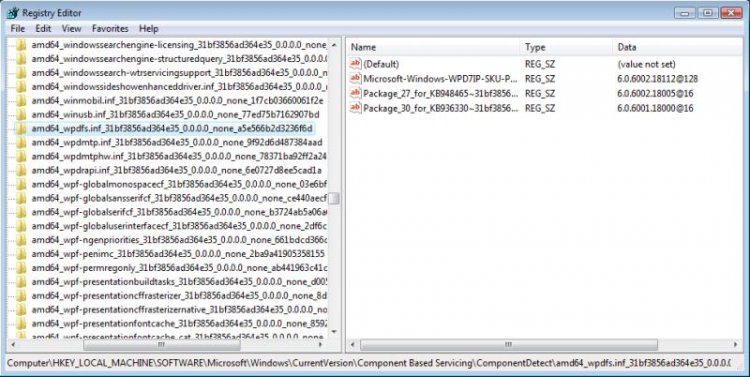
example how it look one of this key

(strings you have in right window)
2) CBS.log report also some issues with this hotfix
2010-03-11 08:41:46, Error Failed to find the CixTarget for Container package_for_kb973917_winpesrv~31bf3856ad364e35~amd64~~6.0.1.2.cat
2010-03-11 08:41:46, Error DpxException hr=0x80070002 code=0x020109
2010-03-11 08:41:49, Error Failed to find the CixTarget for Container package_for_kb973917_server~31bf3856ad364e35~amd64~~6.0.1.2.cat
2010-03-11 08:41:49, Error DpxException hr=0x80070002 code=0x020109
2010-03-11 08:41:49, Error Failed to find the CixTarget for Container package_for_kb973917_sc~31bf3856ad364e35~amd64~~6.0.1.2.cat
2010-03-11 08:41:49, Error DpxException hr=0x80070002 code=0x020109
Seems KB973917 is incorrectly installed.Uninstall this update,make sure you have correct data & time both in system and in BIOS and reinstall this hotfix again
3)It would be also well to reset WU components in aggressive mode
How do I reset Windows Update components?
and WU libreries
Repair & Fix Windows Updates with Fix WU Utility | The Windows Club
If nothing help empty
C:\Windows\Logs\CBS folder,again run Readiness Tool and attache to post new CBS.log and CheckSur.log