Windows Vista Forums

problem with updates i think
  1. #1
    jasond19's Avatar

    Senior Member
    Join Date : Jan 2011
    visalia, ca
    Posts : 348
    ms windows vista home premium 32-bit sp2
    Local Time: 03:24 AM
    usa us california

    problem with updates i think

    windows updates always says windows is up to date so i assumed they were in stalling but when i checked i havent had an installed update sense march 23, my specs r not the same: MS Windows Vista Home Premium 32-bit SP2
    CPU
    Intel Pentium T2080 @ 1.73GHz 64 °C
    Yonah 65nm Technology
    RAM
    1.0GB Dual-Channel DDR2 @ 266MHz (4-4-4-12)
    Motherboard
    TOSHIBA ISRAE (U2E1)
    Graphics
    Analyzing...
    Hard Drives
    117GB TOSHIBA TOSHIBA MK1237GSX ATA Device (SATA) 46 °C
    Optical Drives
    PIONEER DVD-RW DVR-K17LF ATA Device
    Audio
    Realtek High Definition Audio
    any help would be greatly appreciated


      My System SpecsSystem Spec

  2. #2
    richc46's Avatar

    BSOD Squad


    Join Date : Dec 2008
    Fairfield County, CT
    Posts : 19,241
    Windows 7 SP1 x64
    Local Time: 04:24 AM
    usa us connecticut


    Re: problem with updates i think

    The date of 3/23 is not significant. Updates do not come out on a particular schedule.
    May I suggest go to a website for a driver that you feel may be outdated and try to update (dont rely on windows update). Many of the big sites such as intel have a search service that looks for outdated drivers.
    You should always be update on the importatnt drivers, graphics, audio, mouse etc. For other software, games etc go to the appropriate site.

      My System SpecsSystem Spec

  3. #3
    jasond19's Avatar

    Senior Member
    Join Date : Jan 2011
    visalia, ca
    Posts : 348
    ms windows vista home premium 32-bit sp2
    Local Time: 03:24 AM
    usa us california

      Thread Starter

    error code 80240016 tryn to install updts

    got up today noticed i was downloading updates, 21 important updates needed, i went to install and got error code 80240016, i logged on to vista 15 min ago and soon as i did, i was prompt to reboot, i did that after rebooting, now i have 15 important updates, this is the first time i have gotn any updates in about 3 weeks, i was concerned about 2 weeks ago and asked some 1 here and was said to be ok, i dont think getting 21 updates in 1 day is correct but im not a comp wiz, so idk, any help? ty!
    toshiba laptop,
    vista home prem
    32 bit
    sry old spec r not correct

      My System SpecsSystem Spec

  4. #4
    kesume's Avatar

    Senior Member


    Join Date : Feb 2011
    Lake District, England
    Posts : 1,320
    vista Home Basic 32bit
    Local Time: 09:24 AM
    uk uk yorkshire


    Re: error code 80240016 tryn to install updts

    Hi Jason,
    Windows updates:- Microsoft release new updates 2nd Tuesday of each month.
    Sometimes not many, this month seventeen (17).
    I update them a few at a time rather than let them do it automatically.
    See this thread, may help.
    Very, very slow opening images/pictures

      My System SpecsSystem Spec

  5. #5
    kesume's Avatar

    Senior Member


    Join Date : Feb 2011
    Lake District, England
    Posts : 1,320
    vista Home Basic 32bit
    Local Time: 09:24 AM
    uk uk yorkshire


    Re: error code 80240016 tryn to install updts

    Jason this is what came out as information for us regarding these updates.
    They don't as I said usually have so many.
    A further point to keep in mind is that there are false updates going around out there, so watch for them.
    So if you keep in mind that the official updates are the 2nd Tuesday of each month, you can more alert for the false ones.
    Hope the info can help?

    Microsoft Security Bulletin Summary for April 12 2011

      My System SpecsSystem Spec

  6. #6
    Arvinwebb's Avatar

    Vista Lover

    Join Date : Jan 2011
    New Delhi
    Posts : 318
    Vista Home Premium 32bit SP2
    Local Time: 01:54 PM


    Re: error code 80240016 tryn to install updts

    Hello Jason,

    Kesume is absolutely right that you can watch microsoft official updates which always released on 2nd Tuesday of each month as Kesume mentioned. Or even View all updates one by one and google it. You can easily find which one is right and which one wrong. Thats what i always do.

    Thanks

      My System SpecsSystem Spec

  7. #7
    jasond19's Avatar

    Senior Member
    Join Date : Jan 2011
    visalia, ca
    Posts : 348
    ms windows vista home premium 32-bit sp2
    Local Time: 03:24 AM
    usa us california

      Thread Starter

    Re: error code 80240016 tryn to install updts

    hmm thank you i had no idea, learn every day! thank u guys

      My System SpecsSystem Spec

  8. #8
    Arvinwebb's Avatar

    Vista Lover

    Join Date : Jan 2011
    New Delhi
    Posts : 318
    Vista Home Premium 32bit SP2
    Local Time: 01:54 PM


    Re: error code 80240016 tryn to install updts

    you are always welcome.

      My System SpecsSystem Spec

  9. #9
    Arvinwebb's Avatar

    Vista Lover

    Join Date : Jan 2011
    New Delhi
    Posts : 318
    Vista Home Premium 32bit SP2
    Local Time: 01:54 PM


    Re: problem with updates i think

    Hello Jason,

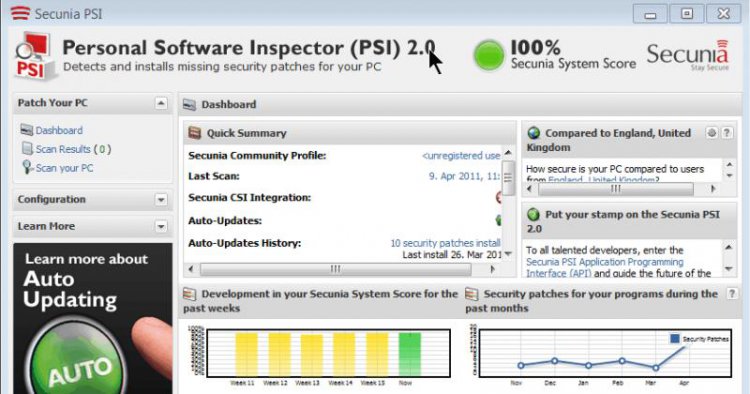
    Finding all these updates going to each sites one by one is very tedious work and time consuming task. To ease this operation I use a freeware application that searches even almost all (apart from Windows Update) is PSI secunia. Secunia PSI automates and alerts you when your programs and plug-ins require updates.

    Secunia Personal Software Inspector (PSI)


      My System SpecsSystem Spec

  10. #10
    kesume's Avatar

    Senior Member


    Join Date : Feb 2011
    Lake District, England
    Posts : 1,320
    vista Home Basic 32bit
    Local Time: 09:24 AM
    uk uk yorkshire


    Re: problem with updates i think

    Jason, Just to reiterate what Arvinwebb has stated, Secunia is a great application.
    It keeps track of your programs, gets , patches for them.
    It indicates the level ofd security of the programs in your taskbar even.
    So you are aware of what it is doing.
    I have it downloaded for my computers.
    I got it after a recommendation by Richc.
    screenhunter_01-apr.-13-22.06.jpg
    That is what info it can give you.

      My System SpecsSystem Spec

Page 1 of 2 12 LastLast
problem with updates i think problems?

Similar Threads
Thread Thread Starter Forum Replies Last Post
RE: problem after updates Phil Vista General 0 15 Oct 2009
updates and driver problem greg Vista General 0 28 Aug 2008
Problem signing in after updates ShellShell626 Vista General 1 19 Dec 2007
Problem with Security updates bobdallama Vista security 1 26 Oct 2007
XP updates- problem BH2 Vista General 2 29 Jun 2007