![]() |
![]() | ![]() | ![]() | ![]() | ![]() | ![]() | ![]() |
| Welcome to Windows Vista Forums. Our forum is dedicated to helping you find solutions with any problems, errors or issues you are experiencing with Windows Vista. The Vista forum also covers news and updates and has an extensive Windows Vista tutorial section that covers a wide range of tips and tricks. |
| |||||||
![]() |
| |
| | #1 (permalink) |
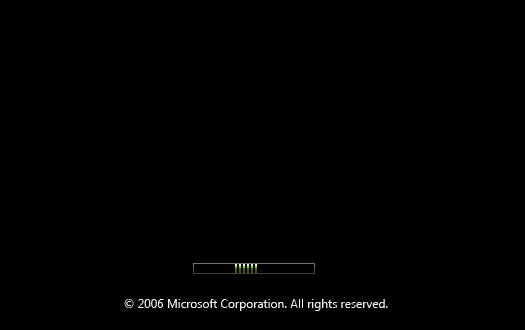
| Vista Ultimate x64 | Bad BCD, now it wont boot to install CD for repair? Hi guys, New to registering on the forum, been following it, but now I need some help. I accidentally put vista into sleep mode. The video was all garbled and it was clear there was an issue. So, I hit the reset button on my tower to stop the mess. My next boot I got the error. File: Boot/BCD Status: 0x0000001 Info: An error occurred while attempting to read the boot configuration data. It says to put in the windows installation disk and "click repair your computer." The issue is when booting to the DVD, on the page with the moving green bar and it says Windows Vista under, it hangs. I even left it there for 2 hrs. The HDD LED on my computer is solid the whole time too. All my hard drives are SATA and they are in AHCI which is turned on in the BIOS. Perhaps changing the drives to IDE would help? Anyways, Id like to get into that repair CD so I can fix my boot sector so I dont have to reformat. This has happened before and Ive had to reformat. Im sick of it, I dont want to reformat Vista again. Incase you didnt already know Im using Vista Ultimate x64. |
My System Specs![]() |
| | #2 (permalink) |
| Vista x64 Ultimate SP2, Windows 7 Ultimate x64 | Re: Bad BCD, now it wont boot to install CD for repair? Hi Fugazi48, Welcome to the forum. ![]() Make sure that you have the CD/DVD listed first in the boot order in the BIOS settings. When you restart, you will need to press a key to boot from the DVD when that screen pops up. You only have a few seconds to do it. Also, make sure that all USB devices are unplugged from the computer. This will show you how to do the Startup Repair from the Vista installation DVD. How to Do a Startup Repair in Vista If that does not fix the problem, then try a Repair Install. How To Perform a Repair Installation For Vista Shawn |
My System Specs![]() |
| | #3 (permalink) |
| Vista Ultimate x64 | Re: Bad BCD, now it wont boot to install CD for repair? Hi Fugazi48, Make sure that you have the CD/DVD listed first in the boot order in the BIOS settings. When you restart, you will need to press a key to boot from the DVD when that screen pops up. You only have a few seconds to do it. Also, make sure that all USB devices are unplugged from the computer. Shawn Im really quite aware of the steps to boot to a cd/dvd. Im a pc repair tech. ![]() My issue is, I cant even get to the third slide shown here: How to Do a Startup Repair in Vista If I could get to that install windows splash with the select language etc. then I'd be golden. My issue is that it hangs right before it gets to that splash screen. When booting into the installation DVD, it hangs on the screen that has the moving green bar. It looks like this: |
My System Specs![]() |
| | #4 (permalink) |
| Vista x64 Ultimate SP2, Windows 7 Ultimate x64 | Re: Bad BCD, now it wont boot to install CD for repair? Hi Shawn, Im really quite aware of the steps to boot to a cd/dvd. Im a pc repair tech. ![]() My issue is, I cant even get to the third slide shown here: How to Do a Startup Repair in Vista If I could get to that install windows splash with the select language etc. then I'd be golden. My issue is that it hangs right before it gets to that splash screen. When booting into the installation DVD, it hangs on the screen that has the moving green bar. It looks like this: I never know the experience level for whom I'm helping, so I always try to include full details. No offense intended. If the system has over 3 GB of RAM installed, then you should try temporarily removing a stick and try booting from the DVD. You may also check to see if there is a newer BIOS version available for the MOBO. This can also sometimes help workout issues like this. If you have any USB drives plugged in, then make sure that they are also unplugged. Shawn |
My System Specs![]() |
| | #5 (permalink) |
| Vista Ultimate x64 | Re: Bad BCD, now it wont boot to install CD for repair? Sorry Fugazi48, If the system has over 3 GB of RAM installed, then you should try temporarily removing a stick and try booting from the DVD. You may also check to see if there is a newer BIOS version available for the MOBO. This can also sometimes help workout issues like this. If you have any USB drives plugged in, then make sure that they are also unplugged. Shawn Heres the important piece of information. It will only hang when AHCI is on in BIOS, it wont hang when my SATA drives are in the Native IDE configuration. However, when I boot into the DVD with Native IDE no Windows partitions can be seen! I have the achi64.sys drivers for the ATI south bridge that I got off ASUS' (my mobo is a m2r32-mvp) website and they dont do anything when I add them to see drives when in Native IDE. Any help on why I cannot boot into the Vista installation DVD when AHCI is enabled??? I really want to repair the boot sector so I dont have to reformat AGAIN! I appreciate your help!! |
My System Specs![]() |
| | #6 (permalink) |
| Vista Ultimate x64 | Re: Bad BCD, now it wont boot to install CD for repair? Sorry for dp, but heres what happening now. The idea of lowering the RAM worked! Now I can get into the DVD under AHCI. However, vista doesnt see any OS, which I expected. Now when I try and load my ahchi64.sys drivers that I loaded on the initial install of the OS, Vista says "The Installation has Failed." If these drivers load then In theory I can see my Vista installation. I am making progress through. |
My System Specs![]() |
| | #7 (permalink) |
| Vista x64 Ultimate SP2, Windows 7 Ultimate x64 | Re: Bad BCD, now it wont boot to install CD for repair? Fugazi48, Well, at least it's some progress. ![]() Since you able to get to the Vista DVD now, will it let you do a Startup Repair or a Repair Install from the DVD. I found this that might apply here to under the title: "Common problems switching to AHCI under Windows" Advanced Host Controller Interface - Wikipedia, the free encyclopedia Shawn |
My System Specs![]() |
| | #8 (permalink) |
| Vista Ultimate x64 | Re: Bad BCD, now it wont boot to install CD for repair? . I cant repair at all because it cannot see a Windows OS. Here in this slide: ![]() I explained that in my last post (the dp). Sorry I wasnt clear enough, no worries. |
My System Specs![]() |
| | #9 (permalink) |
| Vista x64 Ultimate SP2, Windows 7 Ultimate x64 | Re: Bad BCD, now it wont boot to install CD for repair? You might try having only the boot drive connected. It may be to far gone to repair, and only a reformat will help. Hope this is not the case. Shawn |
My System Specs![]() |
| | #10 (permalink) |
| Vista Ultimate x64 | Re: Bad BCD, now it wont boot to install CD for repair? This same thing occurs. GRUB messes up, and then all I can do to fix is reformat. Im really getting tired of it... It may be back to XP for me, till atleast SP1 in vista. |
My System Specs![]() |
![]() |
| Thread Tools | |
| |
Similar Threads | ||||
| Thread | Forum | |||
| Startup Repair fails.... wont boot... | General Discussion | |||
| Computer wont boot after re-install | General Discussion | |||
| OS clean install, boot repair gone! | Vista performance & maintenance | |||
| Failed Vista install. help me repair my boot! | Vista installation & setup | |||
| Install Startup Repair as a boot option? | Vista installation & setup | |||