Windows Vista Forums

Accidentally Uninstalled The 'Windows Installer Service' - How To Reinstall It?
  1. #1


    Member
    Join Date : Oct 2010
    Posts : 35
    Windows Vista Home Premium 32 bit with service pack 2 installed
    Local Time: 03:04 AM

    Accidentally Uninstalled The 'Windows Installer Service' - How To Reinstall It?

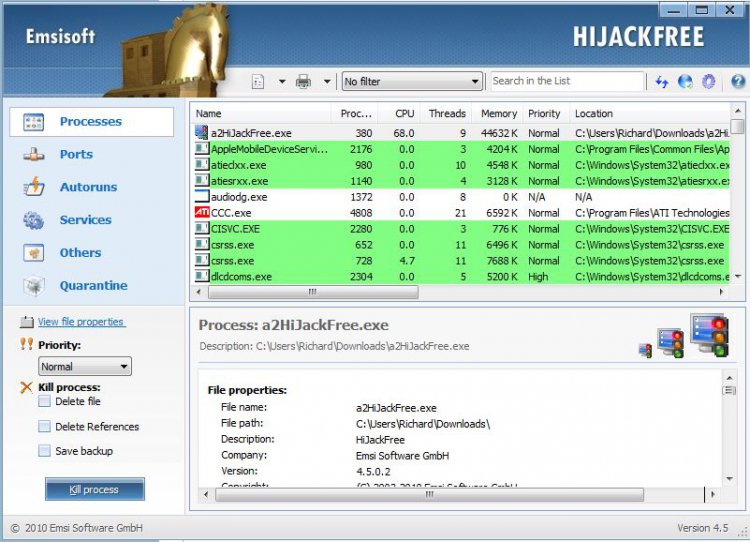
    My HP Pavilion DV6516TX Notebook has 32 bit Windows Vista Home Premium with Service Pack 2 installed. I accidentally and somewhat stupidly uninstalled the 'windows installer service' known as 'msiserver' yesterday using emsisoft hijackfree (i have post that event rechecked in services.msc and that specific service is just not available and is absent from the list) and since then i cannot install anything including installing windows updates. Even system restore cannot restore the 'windows installer service' and fails to restore the system completely. Is there any simpler solution to reinstall the 'windows installer service' short of completely reinstalling windows vista home premium back from scratch. I have to inform that all the other default standard services applicable for 32 bit Windows Vista Home Premium with sp2 installed are all available in services.msc

    I have the 'windows vista recovery disc' specific for my system from HP when i purchased the notebook in October 2007 but that will restore the system only to factory settings without service pack 1 and 2. There is also an equivalent recovery partition on my system's hard disk. My system already has the windows installer msiexec.exe (version 4.5) in the system32 folder of windows. The winsxs store is also there. The registry however is bereft of msiserver.


    I do agree it was completely stupid of me to uninstall the windows installer service but if there is a simpler solution from you as experts please do provide the stepwise details to reinstall this specific service. Can it be done solely through a registry modification or something more is required? I would be highly thankful to any or all of you if you can help me with the stepwise details of the re-installation of the windows installer service msiserver. If however, the only solution is to completely reinstall vista from scratch please state so.

      My System SpecsSystem Spec

  2. #2
    bruce2's Avatar

    Senior Member
    Join Date : Dec 2007
    Posts : 618
    Vista Ultimate 64 bit
    Local Time: 04:34 PM
    usa


    Re: Accidentally Uninstalled The 'Windows Installer Service' - How To Reinstall It?

    Hi pm2397, welcome to the board.

    I don't see any short cuts to it. To restore the system to original factory settings with the recovery disk HP provided seems to be the best option. Plus this will avoid any other issues might show up later. Service pack 1 and 2 with be automatically update when recovery is completed. Please remember to backup all your important data.

    Good luck and let us know how it goes.

    Bruce

      My System SpecsSystem Spec

  3. #3
    mitchell's Avatar

    Ngai Tahu/Tau Iwi

    Join Date : Nov 2008
    New Zealand
    Posts : 420
    Windows Seven Home Premium 32bit SP1
    Local Time: 09:34 AM
    newzealand


    Re: Accidentally Uninstalled The 'Windows Installer Service' - How To Reinstall It?

    Hallo pm2397, have a look at this tutorial you may be able to use parts of it to re establish the service or at least be able to use it in safe mode.
    It is written for Windows Seven & i don't have Vista at the moment to compare the Registry & Services to see if you can apply it to Vista, worth a look anyway

    Uninstall and Remove Software in Safe Mode - Windows 7 Forums

      My System SpecsSystem Spec

  4. #4


    Member
    Join Date : Oct 2010
    Posts : 35
    Windows Vista Home Premium 32 bit with service pack 2 installed
    Local Time: 03:04 AM


      Thread Starter

    Re: Accidentally Uninstalled The 'Windows Installer Service' - How To Reinstall It?

    Quote Originally Posted by bruce2 View Post
    Hi pm2397, welcome to the board.

    I don't see any short cuts to it. To restore the system to original factory settings with the recovery disk HP provided seems to be the best option. Plus this will avoid any other issues might show up later. Service pack 1 and 2 with be automatically update when recovery is completed. Please remember to backup all your important data.

    Good luck and let us know how it goes.

    Bruce
    Sir, i am sure there must be a simpler method such as a 'solely specific' (msiserver branch in the registry) exported compatible .reg registry file from a similar Vista system (with 'common msiserver settings' in the registry) in which the windows installer service is working properly. This can then be merged with my system registry to make the windows installer service to work once again. Please consider this method and provide your comments.

    Secondly, the method you suggested will only be a last option scenario but in that too the service pack 1 and 2 will not be automatically updated when recovery is complete, because the recovery disc is for the retail version of the OS and provided with my system by HP when purchased in October 2007 when neither service pack 1 nor service pack 2 was in existence. So, these 2 service packs will have to be downloaded online and then installed. Further, Microsoft support is no longer available for the retail version of the OS as on date but only for the service pack 2 installed version of the OS currently. So, altogether it may not be a very practical solution and much time-taking. Anyway thanks for your response at least.

      My System SpecsSystem Spec

  5. #5


    Member
    Join Date : Oct 2010
    Posts : 35
    Windows Vista Home Premium 32 bit with service pack 2 installed
    Local Time: 03:04 AM


      Thread Starter

    Re: Accidentally Uninstalled The 'Windows Installer Service' - How To Reinstall It?

    Quote Originally Posted by mitchell View Post
    Hallo pm2397, have a look at this tutorial you may be able to use parts of it to re establish the service or at least be able to use it in safe mode.
    It is written for Windows Seven & i don't have Vista at the moment to compare the Registry & Services to see if you can apply it to Vista, worth a look anyway

    Uninstall and Remove Software in Safe Mode - Windows 7 Forums
    Sir, maybe it may apply to Vista maybe not because i do not know the exact differences between Vista and Windows 7 as i have never worked with a Windows 7 system. But can i take that risk unless it is an established procedure for 32 bit Windows Vista Home Premium with service pack 2 installed is the moot question running in my mind. Please do reassess and respond if you find some solution that can surely work out as quite logical. Anyway thanks at least for responding quickly.

    Please see if you can assess and comment on the method i have discussed in my reply above to Bruce2.

      My System SpecsSystem Spec

  6. #6


    Banned

    Join Date : Dec 2009
    Posts : 3,375
    Vista Home Premium x86 SP2
    Local Time: 10:34 PM
    uk european union


    Re: Accidentally Uninstalled The 'Windows Installer Service' - How To Reinstall It?

    Give me a few minutes to compose my reply!

    Richard

      My System SpecsSystem Spec

  7. #7


    Banned

    Join Date : Dec 2009
    Posts : 3,375
    Vista Home Premium x86 SP2
    Local Time: 10:34 PM
    uk european union


    Re: Accidentally Uninstalled The 'Windows Installer Service' - How To Reinstall It?

    Hello pm2397!

    My name is Richard, and I will be helping you to try and fix this problem. Before you follow these instructions, please do the following:

    System Restore Point - create << I know it does not work, but we should create one anyway.

    ERUNT and NTREGOPT << Please create an ERUNT backup.

    Right, please run steps 1, 2A, 3 (about 15 minutes), 4, 5, and then Step 1 from the top yellow box, but only follow this last one if Integrity Violations were found. Please upload the new sfcdetails.txt from your Desktop. System Files - SFC Command

    If the issue has been fixed, do not continue!

    Please check to see if it is in the quarantine box of Emsisoft HiJackFree, and restore it if it is.

    If the issue has been fixed, do not continue!

    Import the registry script included at the bottom of this post.

    If the issue has been fixed, do not continue!

    Re-run SFC, and upload the latest sfcdetails.txt from your Desktop.

    If the issue has been fixed, do not continue!

    Tell me the symptoms you are still getting. Include:

    • Any changes that have taken place.
    • If it (Windows Installer) shows up in services.msc.
    • if it does, what error message do you get when you try to start it up.
    • Any additional information.

    Thanks!

    Richard

    Last edited by niemiro; 18 Oct 2010 at 03:19 AM. Reason: Shoot! Forgot the registry script! I always forget to attach the files by the end of the post!
      My System SpecsSystem Spec

  8. #8
    ilikefree's Avatar

    Senior Member


    Join Date : Jan 2010
    New Zealand
    Posts : 2,380
    Vista Home Premium 32bit.SP2
    Local Time: 09:34 AM
    newzealand


    Re: Accidentally Uninstalled The 'Windows Installer Service' - How To Reinstall It?

      My System SpecsSystem Spec

  9. #9


    Banned

    Join Date : Dec 2009
    Posts : 3,375
    Vista Home Premium x86 SP2
    Local Time: 10:34 PM
    uk european union


    Re: Accidentally Uninstalled The 'Windows Installer Service' - How To Reinstall It?

    msiexec.exe /unregister
    msiexec.exe /regserver
    msiexec.exe /unreg

    etc.
    These have been discontinued in Vista and 7. This article only applies to Windows XP and below, and serves no function on modern systems. The registry permissions changes may even cause more problems. Please see my post above

      My System SpecsSystem Spec

  10. #10


    Member
    Join Date : Oct 2010
    Posts : 35
    Windows Vista Home Premium 32 bit with service pack 2 installed
    Local Time: 03:04 AM


      Thread Starter

    Re: Accidentally Uninstalled The 'Windows Installer Service' - How To Reinstall It?

    Quote Originally Posted by niemiro View Post
    Hello pm2397!

    My name is Richard, and I will be helping you to try and fix this problem. Before you follow these instructions, please do the following:

    System Restore Point - create << I know it does not work, but we should create one anyway.

    ERUNT and NTREGOPT << Please create an ERUNT backup.

    Right, please run steps 1, 2A, 3 (about 15 minutes), 4, 5, and then Step 1 from the top yellow box, but only follow this last one if Integrity Violations were found. Please upload the new sfcdetails.txt from your Desktop. System Files - SFC Command

    If the issue has been fixed, do not continue!

    Please check to see if it is in the quarantine box of Emsisoft HiJackFree, and restore it if it is.

    If the issue has been fixed, do not continue!

    Import the registry script included at the bottom of this post.

    If the issue has been fixed, do not continue!

    Re-run SFC, and upload the latest sfcdetails.txt from your Desktop.

    If the issue has been fixed, do not continue!

    Tell me the symptoms you are still getting. Include:

    • Any changes that have taken place.
    • If it (Windows Installer) shows up in services.msc.
    • if it does, what error message do you get when you try to start it up.
    • Any additional information.

    Thanks!

    Richard
    FAO: niemiro - Reply To Your Post #7

    First of all i want to inform you that it was while surfing the Web using Google Search in relation to some issue i was facing some time back i first landed up on a Web page on this Forum and that thread involved specifically you helping out a person whose system registry was widely and badly messed up. It was then that i really admired your specific skills and painstaking and persistent approach in resolving that issue. I had then read that whole thread and kept in my mind that if i ever faced any issues may God hopefully help me through you. So i remembered this forum and posted this specific issue i had now faced on it. And see now you are specifically available there to help me with the msiserver.reg file.

    However, even before your post on this present specific issue offering me help with the msiserver.reg file was in my notice on my e-mail address, i had been helped with a similar msiserver.reg file by someone else not on this forum because it was in my mind (as already apparent from my earlier replies to other Posters on this thread that such a msiserver.reg file from a similar system in which the 'Windows Installer Service' works) could help me resolve this issue and i had spread my hands for help for it elsewhere too.

    I have to inform you that that msiserver.reg file from that someone else not on this forum has helped me to fully resolve the issue i posted in this thread. On merging that msiserver.reg file into my system registry and rebooting the system the 'Windows Installer Service' is now up and listed in Services.msc with Startup type as 'Manual'. And nothing else was required to be done to resolve the issue. Now Windows Updates are being downloaded and installed on my system and even i can install applications on my system or even uninstall them.

    I am sure that had your post offering help with the msiserver.reg file preceded the one already made earlier by someone else not on this forum in the meantime, it would surely have been you would be the one to have definitely resolved this issue faced by me through the msiserver.reg file attached with your post. So equal thanks to you as to that someone else too. Definitely if someone else faces a similar issue on a Vista system in future the msiserver.reg file you have attached may help to resolve it.

    I will come back to specifically you for help in future if i face any issues on my system because i know you are one of the best technically and your approach is with a never-say-die attitude.

    Coming to the other steps you have suggested in your post i have the following comments to make although at this stage they are only of academic interest as the issue is already resolved.

    Restore point Creation - Sir, you must be aware that in 32 bit Windows Vista Home Premium with SP2 installed the System Restore Configuration is disabled by Group Policy default setting. The other point is that in this Edition of Vista, the Group Policy Editor is not made available. in view of this manual creation of Restore Points is normally not possible as the Create Button is greyed out and even temporary disabling of System Restore is not normally allowed by the default Group Policy settings. I seem to remember having read somewhere that a registry hack can be used to get around this issue but do not remember exactly how it is done. Further, in that case the reverse hack must also be made available to restore the settings back to default later. I think it may be sometimes important to disable System restore temporarily to remove a virus from a System permanently that resides in the System Volume Information area where earlier versions of a System are stored by System Restore. But this technique has the downside that all earlier System Restore Points are then gone permanently.

    Backing up the Registry using ERUNT and NTREGOPT: I think there are some known issues with Vista in backing up the Registry using ERUNT as already mentioned on the ERUNT Website but yes that is still otherwise good enough. I am not very sure about NTREGOPT.

    SFC /Scannow (Issue is already resolved so not needed as per your suggestion): I am sure you must be suspecting the integrity of some system files on my system but is there any reason for that unless some virus has infected some files. Norton Internet Security is up and running on my system since i purchased the System in October 2007. In that case it can be done. But is there any downside to using SFC /Scannow considering if it does not complete because it may then entail a repair installation ultimately?

    Starting up the Windows Installer Service in Services.msc after the merger of the msiserver.reg file in the registry and a System Restart: Sir, no issues there it starts up. Its really fine.

    Quarantine box check of Emsisoft Hljackfree to see if the 'Windows Installer Service' is there in it and to restore it.: Sir, there is no quarantine box in Emsisoft Hijackfree. One is available in Emsisoft Anti-Malware but there it only stores files infected by Malware not uninstalled files.

    Additional Information: Sir, everything is fine except that in Services.msc i find that the Volume Shadow Copy Service is set to only 'Manual', whereas as per the required default settings it should be 'Manual Started'. However when i start it up there are no issues and it starts up but on a system Restart it again reverts back to only 'Manual'. I don't understand why this should be so?

    If you so insist after specific confirmation by you i will run SFC /Scannow on my system and upload the sfcdetails.txt .

    Looking Forward to your reply to the above and your esteemed help in future too. Thanks a lot

    pm2397

    Last edited by pm2397; 18 Oct 2010 at 07:16 PM. Reason: spelling mistake in 'Emsisoft Anti-Malware' earler written incorrectly as 'Emsisoft Anti-Mallarme'.
      My System SpecsSystem Spec

Page 1 of 2 12 LastLast
Accidentally Uninstalled The 'Windows Installer Service' - How To Reinstall It? problems?

Similar Threads
Thread Thread Starter Forum Replies Last Post
Accidentally uninstalled windows media center waneslash Vista performance & maintenance 5 23 Feb 2009
Accidentally uninstalled wrong disk drive-can I reverse it? ctbird Drivers 1 31 Dec 2008
Accidentally uninstalled sound, how to reinstall? ssecorp Vista General 1 28 Aug 2008
uninstalled Vista then accidentally installed Carriemau Vista installation & setup 1 03 Jan 2008
Accidentally uninstalled Java- HELP andy Vista General 3 11 Aug 2007