![]() |
![]() | ![]() | ![]() | ![]() | ![]() | ![]() | ![]() |
| Welcome to Windows Vista Forums. Our forum is dedicated to helping you find solutions with any problems, errors or issues you are experiencing with Windows Vista. The Vista forum also covers news and updates and has an extensive Windows Vista tutorial section that covers a wide range of tips and tricks. |
| |||||||
![]() |
| |
| | #1 (permalink) |
| windows vista ultimate 32bit | Outlook 2007 won't open in Vista Outlook 2007 worked great for about 8 months but now it won't open. I can sometime coax it to open in safe mode but that is only after attempting to open it then closing it when it doesn't respond and trying to open it again, up to 8 or 9 times. I have tried disabling the addins but that didn't help. I have reinstalled Office 2007 but that didn't help either. Does anyone have any suggestions? I will try anything. This is so frustrating. Thank you! Betty |
My System Specs![]() |
| | #2 (permalink) |
| Windows Vista Home Premium x64 SP1 | Re: Outlook 2007 won't open in Vista Where are you trying to open it from? I've had problems, but they were always solved with how to get there. |
My System Specs![]() |
| | #3 (permalink) |
| windows vista ultimate 32bit | Re: Outlook 2007 won't open in Vista Thank you for your prompt reply. I am not quite sure what you mean by "where do I open it from". I have an Outlook short cut on my desktop or I go to the start menu. Is that what you mean? Thank you Betty |
My System Specs![]() |
| | #4 (permalink) |
| Windows Vista Home Premium x64 SP1 | Re: Outlook 2007 won't open in Vista Yeah. Okay, let's start with the desktop icon. Right click on it and go to "Properties." What is the target? Is it grey so you can't modify it? |
My System Specs![]() |
| | #5 (permalink) |
| windows vista ultimate 32bit | Re: Outlook 2007 won't open in Vista The Target is Microsoft Office Ultimate 2007 and yes it is grey as you predicted. Betty |
My System Specs![]() |
| | #6 (permalink) |
| Windows Vista Home Premium x64 SP1 | Re: Outlook 2007 won't open in Vista Alright. Let's try something. I've had a problem with Quick Launch icons with the Enterprise edition of Office 2007. As always, let's start with the desktop icon. You can adjust it however you want for the rest of the places. 1) Right-click somewhere on the desktop. 2) Go to "New" => "Shortcut" 3) This will bring up a wizard of sorts. Click "Browse" 4) Navigate to Outlook. You'll probably go "Computer" => "Local Disk (C " => "Program Files" => "Microsoft Office" => "Office12" => "OUTLOOK" (we're looking for the .exe, so just pick the one with the icon). 5) Click "Ok". This should make the location read something like "C:\Program Files (x86)\Microsoft Office\Office12\OUTLOOK.EXE" 6) Click "Next" 7) Name the shortcut whatever you want (you can change this later, if you want). 8) Click "Finish" This will give you an icon on the desktop that you can use. Give it a try, and it should open Outlook up for you, no problem. Let me know how this works and if you need any guidance with other locations for shortcuts or for the other Office programs (it wouldn't surprise me if they give you the same problems). ***My path includes "(x86)" after Program Files because I am running 64-bit. Yours probably won't have that, but I don't have a 32-bit machine to compare to at the moment. |

My System Specs![]() |
| | #7 (permalink) |
| windows vista ultimate 32bit | Re: Outlook 2007 won't open in Vista Hello again. Thank you for taking the time to give such detailed instructions. I did as you suggested and ended up with a desktop shortcut whose target is now: "C:\Program Files\Microsoft Office\Office12\OUTLOOK.EXE" Unfortunately, when it tries to open it still just "hangs" and it says "not responding". Outlook is the only program of Office 2007 that does this. What a mystery! Any other suggestions you might have I will give a try! Thank you again. Betty |
My System Specs![]() |
| | #8 (permalink) |
| Windows Vista Home Premium x64 SP1 | Re: Outlook 2007 won't open in Vista Are you fully updated in Office 2007? SP1 can be downloaded here: Download details: The 2007 Microsoft Office Suite Service Pack 1 (SP1) Don't know if it'll help, but one never can tell. |
My System Specs![]() |
| | #9 (permalink) |
| windows vista ultimate 32bit | Re: Outlook 2007 won't open in Vista Yup...service pack already downloaded. It did help in some areas but not Outlook. Do you know if there are any programs incompatible with Outlook? |
My System Specs![]() |
| | #10 (permalink) |
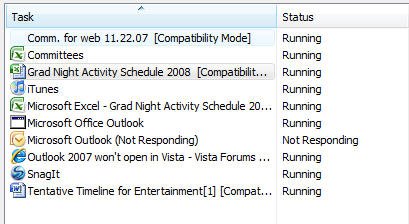
| Windows Vista Home Premium x64 SP1 | Re: Outlook 2007 won't open in Vista Can't think of any. Have you looked at Task Manager while you tried to open Outlook or before hand? Is there a hanging version of it somewhere in there that is causing confusion? |
My System Specs![]() |
![]() |
| Thread Tools | |
| |
Similar Threads | ||||
| Thread | Forum | |||
| Outlook 2007 will not open | Microsoft Office | |||
| Office 2007 Outlook Contracts will not open in Vista Windows Mail | Vista mail | |||
| Can't Open Outlook 2007 | Microsoft Office | |||
| Can't open Outlook 2007 at all | Vista General | |||
| Unable to open links in Outlook 2007 on Vista 5384 | Vista General | |||