![]() |
![]() | ![]() | ![]() | ![]() | ![]() | ![]() | ![]() |
| Welcome to Windows Vista Forums. Our forum is dedicated to helping you find solutions with any problems, errors or issues you are experiencing with Windows Vista. The Vista forum also covers news and updates and has an extensive Windows Vista tutorial section that covers a wide range of tips and tricks. |
| |||||||
![]() |
| |
| | #1 (permalink) |
| Vista x64 + Windows 7 x64 (Ultimate) | Recovery software for reformatted drive... and fresh installed OS One of my neighbors installed Norton 360, she says it told her it needed to update some plugins, once it was done, it said it needed to restart windows to finish installing the plugins... she was never able to boot to desktop after that. without asking for help, she went ahead and did a complete System Restore and she is now without pictures, documents and other very important data. I installing "On Track Easy Recovery Pro 6.12" on the fresh drive and use the featured they have to recover data from Freshly installed and Reformatted drives but I was unable to get anything out of it... all I got was what it was already there from the fresh install. She is using Windows XP pro w/Media Center and this is a Vista forum but I got nowhere else to go and I don't trust anybody else. I was thinking that if I install the software on my PC and use her drive as a slave or with a USB/SATA adapter I could get more data but I am thinking that it will yield the same results. I have recovered data before but it has been on a dying but Unformatted drive... is there anything else I can try? any other software that you have first hand experience with cases similar to this? would anyone know if Norton 360 has some sort of reverse feature that I could use in order to get this back or am I just that naive ![]() I need to help them as they have always helped us out and this could be a good way to repay them back... they are like family. Whatever you can suggest, it will be greatly appreciated I also have a software call "Recover my files" that I have also had some good results with but again... never with a reformatted/fresh install OS drive. Thanks and sorry for the rant... I do that when I am anxious. |
My System Specs![]() |
| | #2 (permalink) |
| Vista home premium 64 bit | Unformat a Drive; Step by Step Unformat Data Recovery instructions MS-DOS unformat command help Look at the above two links first, if any help let me know. You will have to be very careful as to what you put on the drive as this will over write what is already on the drive. I would suggest looking for a cd/dvd that is bootable and can work without installing anything to the harddrive. Or install the program onto an sd card. |
My System Specs![]() |
| | #3 (permalink) |
| Vista home premium 32bit | I do not want to discourage you, but on a reformatted drive the case is pretty hopeless. All the reference points to the old files such as the Master File Table are gone. But this is what these recovery programs like RECUVA etc. need to find the files. |
My System Specs![]() |
| | #4 (permalink) |
| Vista home premium 64 bit | If a fast format was done then the fact that the MBR was destroyed just means it will take time. |
My System Specs![]() |
| | #5 (permalink) |
| Vista x64 + Windows 7 x64 (Ultimate) | Recover my files tells you that you don't install a new windows onto that formatted drive. Well, that is not an option for me since they already went and did that. The DOS command will probably help if the drive was only formatted and left alone but, again... that is not the case here. Well, I guess this is all I got to go on, in the end, I will feel good about having tried everything I could. I just hope they appreciate the fact that I DID TRY. Now, if I fail, do you guys believe that taking it to a professional will yield any good results? Do they use more technologically advance software or all they are going to do is take the money from this folks and use the same software I have already use? Also, again, is it better to install the software on the newly formatted drive with new windows on or would it be better to run that drive as a slave with a USB/Sata adapter? Sorry if I seem thick headed and ungrateful, on the contrary, I thank you guys for all the help in this matter but I need to make sure I give these folks a fair chance of recovering something. |
My System Specs![]() |
| | #6 (permalink) |
| Vista home premium 64 bit | Taking it to a professional will yield very good results. They can read the magnetic resonance of a hard drive. This is how people can get files from an old machine sold at a second hand store. Run the reformatted drive as a slave and write protect it while you are setting up the new drive. Once the new drive is working you will have to take of the write protection to retrieve the old files. The first two links I gave you was the first two that I found from google that looked any good. I have had to retieve files from a harddrive in the past but that was 10 years ago. I used dos and all of the files were numbered starting at 1, a right pain but I got a big pay rise for sorting it. |
My System Specs![]() |
| | #7 (permalink) |
| Vista x64 + Windows 7 x64 (Ultimate) | roy, can you offer some assistance as to where can this be taken? It looks more and more than they need to seek professional help... I am throwing the towel here! |
My System Specs![]() |
| | #8 (permalink) |
| Vista home premium 32bit | Have a look a this: Data Recovery Services and Companies - Just be aware that those services are very expensive. Several hundred Dollars are not unusual. And here are the Florida outfits: http://www.datarecoverycompanies.com/florida.html Last edited by whs; 08-19-2009 at 02:55 PM.. Reason: typo |
My System Specs![]() |
| | #9 (permalink) |
| Vista x64 + Windows 7 x64 (Ultimate) | Thanks, I still have more more buckshot to throw at this puppy, if that fails... I'll give my friends that information. Much appreciated guys. |
My System Specs![]() |
| | #10 (permalink) |
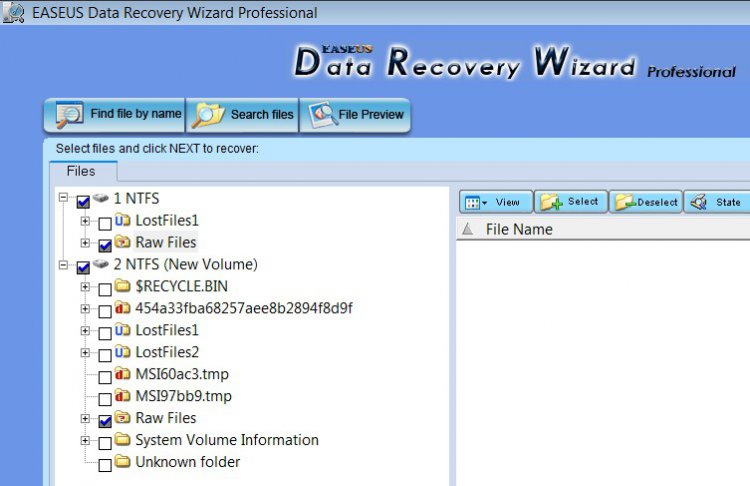
| VISTA HOME PREMIUM X64/ 7 x64 / 7x86 | Hi Asta, The problem is that the reinstallation of the o/s will have overwritten a lot of the files. In addition , pretty much anything done on that new install will overwrite even more. You should be able to recover files that have not been overwritten - check this out: Recover Files After Format - Windows 7 Forums I have since performed a similar experiment - this time much more challenging. It was an attempt to recover files from an area of the HD that had been partitioned several in the past, and several attempts to undelete the partition itself with different apps. That meant the boot sectors would be confusing for undelete apps. While Recuva did rescue some files - a good proportion were corrupt. The good news is that Easeus Data Recovery Wizard managed to undelete a huge number of files - virtually all of which it restored in working condition. Vastly better than the free apps. It is not intended for undeleting .exe, .msi,.iso and so on - it is for User files. EASEUS Data Recovery Wizard: Advanced and Best Data Recovery Software to Undelete Files; Format Recovery; Recover Deleted Files. You might give it a try - it is $70 though, and there's no knowing how much has been overwritten already. Whichever undelete app. you use - do not install it on the partition you are trying to recover files from. Another possibility - is Disk Digger - only looks for ceratin file types, and it's not quick, but it's free Quote: DiskDigger can even scan reformatted or badly formatted disks (disks to which Windows can’t assign a drive letter), and even disks with bad sectors. It bypasses the Windows file system drivers and scans your disk directly. How do I ... recover lost data with DiskDigger? | Microsoft Windows | TechRepublic.com |
My System Specs![]() |
![]() |
| Thread Tools | |
| |
Similar Threads | ||||
| Thread | Forum | |||
| Lost personal folder, data drive reformatted | Vista file management | |||
| Recovery Software | Vista music pictures video | |||
| XP Software Reformatted for Vista | General Discussion | |||
| Software to extract recovery?? | Software | |||
| Install Vista over XP or reformatted hard drive | Vista General | |||