![]() |
![]() | ![]() | ![]() | ![]() | ![]() | ![]() | ![]() |
| Welcome to Windows Vista Forums. Our forum is dedicated to helping you find solutions with any problems, errors or issues you are experiencing with Windows Vista. The Vista forum also covers news and updates and has an extensive Windows Vista tutorial section that covers a wide range of tips and tricks. |
| |||||||
![]() |
| |
| | #1 (permalink) |
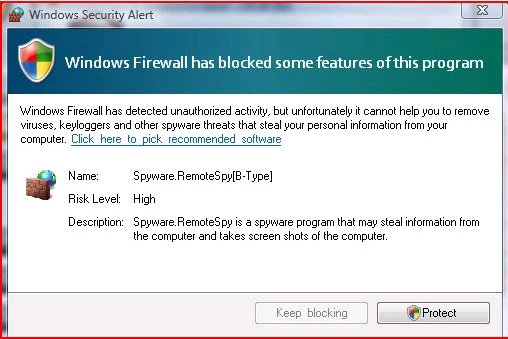
| Windows Vista™ Home Premium | Malware Hiding on me? Hey everyone, I have this annoying windows firewall box that pops up about every 15 minutes or so and i am starting to get really annoyed. The attached picture shows everything. I had Avast! when it stared and that didnt catch anything in real-time if my full system scan. I also downloaded spybot and that didnot come up with anything in my full system scan. Now i have downloaded comodo and there is nothing that has come up so far. How should i go about this? Any help is welcome Thanks Ben Also how do i stop comodo from haveing a popup box everytime i run something(it feels like every time i click the mouse for a program i have to approve about 5 other things with comodo before i can actually get to the program or task i am doing.) |
My System Specs![]() |
| | #2 (permalink) |
| Windows 7 RC x64 Vista HP x86 | Re: Malware Hiding on me? Evening Ben, try downloading this and running a full scan, may take a while but have found that it's very good, found 11 nasties on a machine for me earlier after a full scan with spybot and avast showed it clear ![]() Malwarebytes.org As for comodo, bear with it, as long as you have the "remember" box ticked it will soon settle down and it is the best free firewall around. |
My System Specs![]() |
| | #3 (permalink) |
| VISTA HOME PREMIUM X64/ 7 x64 / 7x86 | Re: Malware Hiding on me? Hi Ben, Looks like a fake pop - up to convince you to click the link and pay for a program to remove it. ( I know you realise that - it's in case anyone else is reading this link ) ![]() Yes I agree with agree with Nigel - try Malwarebytes - you can also download a nice little free app. from them called Rogue Remover. Comodo probably wouldn't find anything - you may have selected clean pc mode , when it assumes everything onboard is clean ( if I recall correctly, this may be the default ). If you want to return to using the windows firewall when the malware is cleared - you could take a look at at the free Vista Firewall control. It provides some outbound protection and actually sped up my startup times. Vista Firewall Control : Sphinx Software Avast is good, but no single app. can be expected to catch everything. You might want to keep using Avast, and just scan every so often with malwarebytes manually - you can do this with the free version. Hope it helps SIW2 Last edited by SIW2; 11-11-2008 at 07:44 PM.. |
My System Specs![]() |
| | #4 (permalink) |
| Windows Vista™ Home Premium | Re: Malware Hiding on me? Guys im screwed. I ran malware bites, spybot, and comodo virus scan, Comodo-nothing Spybot- a few cookies malware bites- found the rouge trojan I deleted it and it said i did it sucessfully. I thought i was all set I went to this websites homepage then the windows firewall (image from my first post) poped up again. I think im screwed i dont know what to do please help! |
My System Specs![]() |
| | #5 (permalink) |
| Windows 7 RC x64 Vista HP x86 | Re: Malware Hiding on me? Hi ben, what was the actual trojan that was found by Malwarebytes? if you can post back with the name of the thing will try and find specific removal instructions ok I must learn to read the name is in your post.will check and post back |
My System Specs![]() |
| | #6 (permalink) |
| Windows Vista™ Home Premium | Re: Malware Hiding on me? Here is the log from malwarebites the picture is small but if u hold down cntl and use ur scroller on ur mouse and roll it up you can zoom in(u porb already know this hahaha) |
My System Specs![]() |
| | #7 (permalink) |
| Windows 7 RC x64 Vista HP x86 | Re: Malware Hiding on me? Hi ben, Have found this explanation and removal instruction for the malware you appear to have. Remove Personal Defender 2009, removal instructions have a look at the description and see if that looks like the things your seeing. Have not had experience of removing this so would like any other members with actual experience with this to comment before you actually Try to remove it. as far as I can see this does not actually damage things directly so is better we are sure before starting. Last edited by barman58; 11-11-2008 at 11:57 AM.. Reason: Edit to link - not working |
My System Specs![]() |
| | #8 (permalink) |
| Windows Vista™ Home Premium | Re: Malware Hiding on me? barman, i think you need to repost and put the picture as an attachment. thanks, ben |
My System Specs![]() |
| | #9 (permalink) |
| Vista Ultimate x32 | Re: Malware Hiding on me? Try running scan using SuperAnti Spyware !!! |
My System Specs![]() |
| | #10 (permalink) |
| Vista Ultimate x64 | Re: Malware Hiding on me? Also run all your scans in safe mode (with networking, just in case you need toi go online for anything). |
My System Specs![]() |
![]() |
| Thread Tools | |
| |
Similar Threads | ||||
| Thread | Forum | |||
| Hiding my ip | Network & Sharing | |||
| hiding name | Vista mail | |||
| Win Med is hiding from me!?! | Sound & Audio | |||
| Malware Detections of Free Anti-Malware/Anti-Spyware | System Security | |||
| Where is my mail hiding? | Vista mail | |||