
How to Turn Windows Update Automatic Updating On or Off in Vista
 Information
This will show you how to turn Windows Update automatic updating on or off and how to adjust it's settings in Vista.
 Note
NoteTo have Vista install important updates as they become available, turn on automatic updating. Important updates provide significant benefits, such as improved security and reliability. You can also set Vista to automatically install recommended updates, which can address non-critical problems and help enhance your computing experience. Optional updates are not downloaded or installed automatically.
 Tip
Tip- For a complete list of Windows Updates with descriptions, see: ITsVISTA: Windows Updates
- For more about the types of updates that Microsoft publishes, see: Microsoft KB824684
- For more about automatic updating, see: Microsoft Help and Support: Understanding Windows automatic updating
Here's How:
1. Open the Start menu.
A) Click on All Programs, then Windows Update.
B) Go to step 3.
OR
2. Open the Control Panel (Classic View).
A) Click on the Windows Update icon.
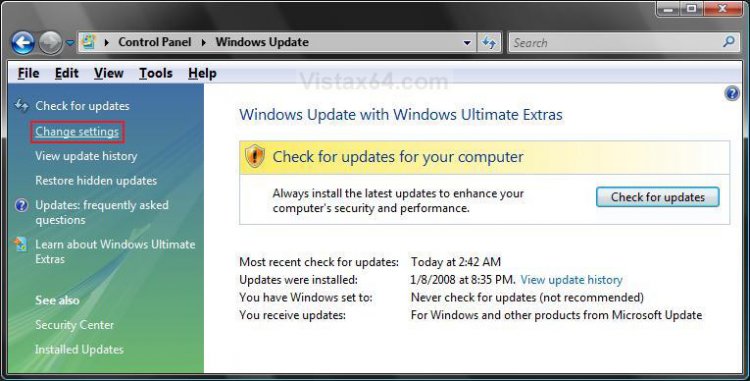
3. Click on Change settings. (See screenshot below)
4. To Turn On Automatic Updating with Automatic Install
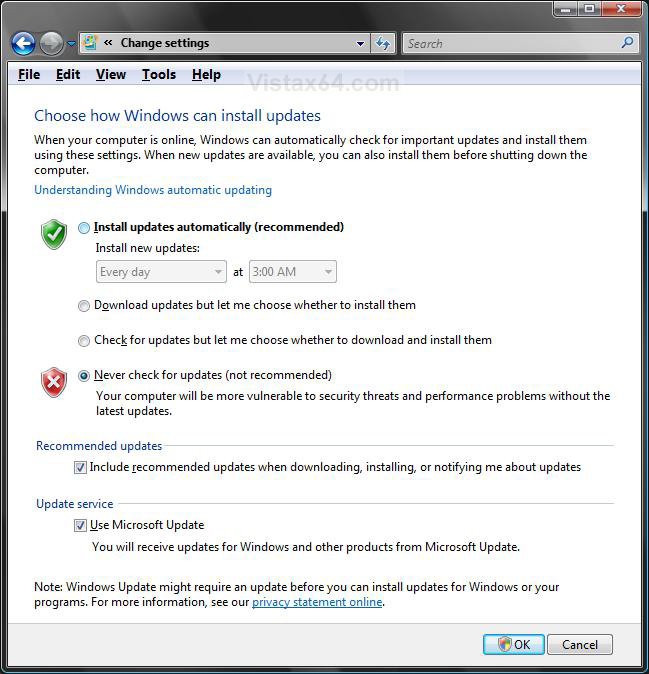
A) Select (dot) Install updates automatically (recommended). (See screenshot below step 7)
B) Under Recommended updates, check the Include recommended updates when downloading, installing, or notifying me about updates check box.
C) Under Update service, check the Use Microsoft Update check box.
5. To Turn On Automatic Updating without Automatic Install
A) Dot either Download updates but let me choose whether to install them, or Check for updates but let me choose whether to download and install them. (See screenshot below step 7)
B) Under Recommended updates, check the Include recommended updates when downloading, installing, or notifying me about updates check box.
C) Under Update service, check the Use Microsoft Update check box.
6. To Turn Off Automatic Updating
NOTE: Be sure to manually check for updates at least once a month to keep Vista up to date. You will get a Security Center alert warning that Windows Update is turned off.
A) Select (dot) Never check for updates (not recommened). (See screenshot below step 7)
7. Click OK.
8. Click on Continue for UAC prompt.
9. Close Windows Update window when done.
That's it,Shawn
Related Tutorials
- How to Hide or Unhide a Windows Update in Vista
- How to Turn Windows Features On or Off in Vista
- How to Uninstall a Windows Update in Vista
- How to Enable or Disable Windows Update Start Menu Power Button Alert in Vista
- How to Add or Remove Install Updates and Shut Down to the Vista Start Menu
- How to Fix the Windows Update 80246005 Error in Vista
- How to Enable or Disable Windows Updates from Automatically Restarting the Computer
- How to Reset Windows Update in Windows 7 and Vista
Attachments

Last edited:

