
How to Hide or Show the Navigation Pane Folders Tree Lines in Vista
 Information
This will show you how to hide or show the folder tree lines in the lower Folders section of the Navigation pane.
 Note
NoteIf you have the Windows Explorer window open, you will need to close it and reopen it to see the changes made below.
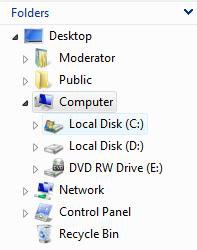
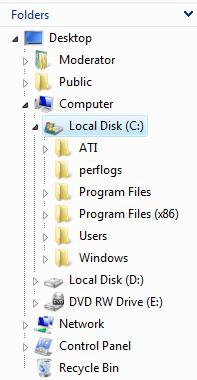
EXAMPLE: Folders Tree with Lines set to Hide and Show
NOTE: The left screenshot is with simple folder view displayed.
 METHOD ONE
1. Open Folder Options.
2. To Hide the Folders Tree Lines
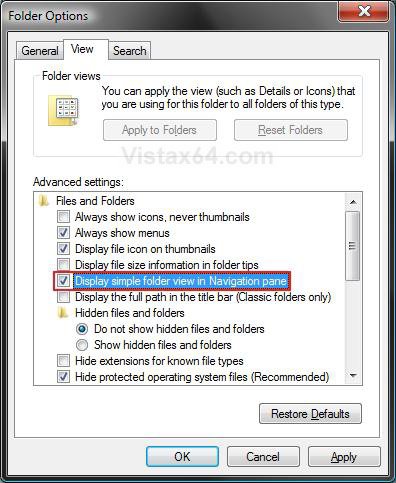
A) Check Display simple folder view in Navigation pane. (See screenshot below step 4)
B) Go to step 4.
3. To Show the Folders Tree Lines
NOTE: This is the default setting.
A) Uncheck Display simple folder view in Navigation pane. (See screenshot below)
4. Click on OK to apply.
NOTE: If you have the Windows Explorer window open, you will need to close it and reopen it to see the changes.
METHOD TWO 1. To Hide the Folders Tree Lines
A) Click on the download button below to download the file below.
Hide_Folder_Tree_Lines.reg

B) Go to step 3.
2. To Show the Folders Tree Lines
NOTE: This is the default setting.
A) Click on the download button below to download the file below.
Show_Folder_Tree_Lines.reg
3. Click on Save, and save the .reg file to the Desktop.
4. Right click on the downloaded .reg file and click on Merge.
5. Click on Run, Continue (UAC), Yes, and then OK when prompted.
6. If open, close and reopen the Windows Explorer window to see the change.
7. When done, you can delete the downloaded .reg file if you like.
That's it,Shawn
Attachments

Last edited: