
How to Use the Vista SP1 Disk Cleanup Tool
 Information
This will show you how to run the Vista SP1 Cleanup tool to permanently remove the Vista RTM backed up files created during the installion of the Vista SP1 to gain more hard drive space.
 Warning
Running the Windows Vista Service Pack 1 Disk Clean-up tool permanently removes the ability to uninstall the Vista SP1. Do not run this tool unless you have no plans of uninstalling the Vista SP1 and just want to save or regain hard drive space. The only option to remove the SP1 after using this tool is to do a clean install of Vista.
 Note
NoteThe Vista SP1 disk cleanup tool gave me back 1.6 GB on my hard drive. This amount will vary on each computer. To see how much space you recover, make a note of how much free space you have on the C:/ drive in Computer before and after you run the SP1 Cleanup Tool.
Here's How:
NOTE: If you installed Vista SP2, then you will need to use the Vista SP2 Disk Cleanup tool instead. The SP1 Disk Cleanup tool will no longer work after installing SP2.
1. Open a elevated command prompt.
2. In the elevated command prompt, type vsp1cln.exe and then press Enter. (See screenshot below)
3. Type Y when you see Would you like to continue? and press Enter.
NOTE: Tying N will cancel running the Vista SP1 disk cleanup tool. You can also just close the command prompt window to cancel to.
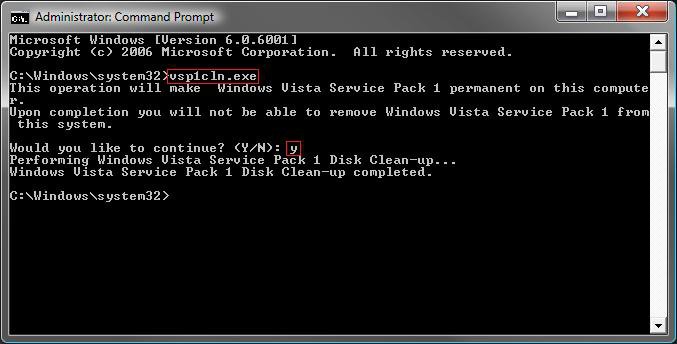
4. It will take a little bit to finish. When it is finished, you will see the Windows Vista Service Pack 1 Disk Clean-up completed message. (See screenshot above)
5. When it's done, you can close the elevated command prompt.
That's it,Shawn
Related Tutorials
- How to Use the Vista SP2 Disk Cleanup Tool
- How to Use Disk Cleanup in Vista
- How to Clear Vista Temporary Files in the Temp Folder
- How to Clear the Thumbnail Cache in Vista
- How to Delete the Internet Explorer Browsing History in Vista
- How to See and Flush the Contents of the DNS Resolver Cache in Vista
- How to Remove a Uninstall Entry in Programs and Features for Vista
- How to Uninstall or Change a Program in Vista
- How to Turn Windows Features On or Off in Vista
- How to Reset and Clean the Notification Icons List in Vista
- How to Create a Clear Clipboard Shortcut in Vista
- How to Uninstall a Windows Update in Vista
- How to Enable or Disable Clear Virtual Memory Paging File at Shutdown in Vista
- How to Uninstall the Vista SP1
- How to Uninstall the Vista SP2 Prerelease Version
Attachments
Last edited by a moderator:


 Maybe I just keep a cleaner house. LOL
  Yeah, that's it.


