
Windows Vista Forums
Vista Forums Home Join Vista Forums Windows 7 Forum Vista Tutorials Tags

Welcome to Windows Vista Forums. Our forum is dedicated to helping you find solutions with any problems, errors or issues you are experiencing with Windows Vista. The Vista forum also covers news and updates and has an extensive Vista tutorial section that covers a wide range of tips and tricks.

Go Back   Vista Forums > Vista Forums > Tutorials

Vista Tutorial - SP1 Disk Cleanup Tool

Comment
 
LinkBack Tutorial Tools Display Modes
<!-- google_ad_section_start -->SP1 Disk Cleanup Tool<!-- google_ad_section_end -->
SP1 Disk Cleanup Tool
How to Use the Vista SP1 Disk Cleanup Tool
Published by Brink
03-27-2008

How to Use the Vista SP1 Disk Cleanup Tool

Information
  This will show you how to run the Vista SP1 Cleanup tool to permanently remove the Vista RTM backed up files created during the installion of the Vista SP1 to gain more hard drive space.
WARNING
  Running the Windows Vista Service Pack 1 Disk Clean-up tool permanently removes the ability to uninstall the Vista SP1. Do not run this tool unless you have no plans of uninstalling the Vista SP1 and just want to save or regain hard drive space. The only option to remove the SP1 after using this tool is to do a clean install of Vista.
NOTE
  The Vista SP1 disk cleanup tool gave me back 1.6 GB on my hard drive. This amount will vary on each computer. To see how much space you recover, make a note of how much free space you have on the C:/ drive in Computer before and after you run the SP1 Cleanup Tool.
RELATED LINKS:


Here's How:
NOTE
  If you installed Vista SP2, then you will need to use the Vista SP2 Disk Cleanup tool instead. The SP1 Disk Cleanup tool will no longer work after installing SP2.
1. Open a elevated command prompt.

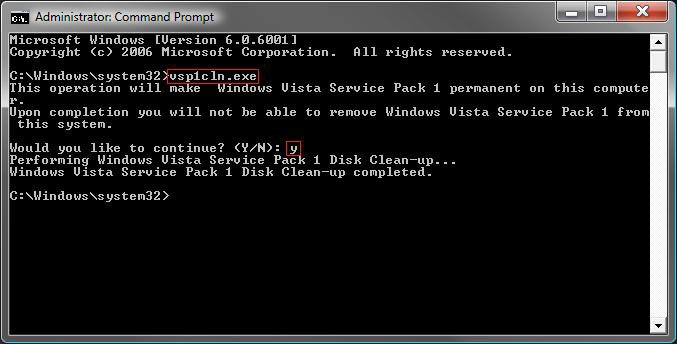
2. In the elevated command prompt, type vsp1cln.exe and then press Enter. (See screenshot below)

3. Type Y when you see Would you like to continue? and press Enter.
NOTE: Tying N will cancel running the Vista SP1 disk cleanup tool. You can also just close the command prompt window to cancel to.
command_prompt.jpg
4. It will take a little bit to finish. When it is finished, you will see the Windows Vista Service Pack 1 Disk Clean-up completed message. (See screenshot above)

5. When it's done, you can close the elevated command prompt.
That's it,
Shawn
Published by
Brink's Avatar
Administrator

Join Date: Apr 2007
Location: Texas, USA
Posts: 23,763
Rep Power: 150
Brink has a reputation beyond reputeBrink has a reputation beyond reputeBrink has a reputation beyond reputeBrink has a reputation beyond reputeBrink has a reputation beyond reputeBrink has a reputation beyond reputeBrink has a reputation beyond reputeBrink has a reputation beyond reputeBrink has a reputation beyond reputeBrink has a reputation beyond reputeBrink has a reputation beyond repute

Tutorial Tools
Show Printable Version Show Printable Version
Email this Page Email this Page

Applies to
All Vista Versions
64 Bit & 32 Bit

Page copy protected against web site content infringement by Copyscape

Old 03-27-2008  
ggbib's Avatar
ggbib
Member


Join Date: Mar 2008
Vista Ultimate x64 SP1
California
 
Rep Power: 10
ggbib is on a distinguished road
  ggbib is offline

Re: SP1 Disk Cleanup Tool

I tried to uninstall sp1, which it would not. Read on a page somewhere that it contains a kernel update is why it wouldn't? Then again, I have no need to uninstall it, but I dislike junk/clutter on any of my HD's, so thank you.

Jerry
My System SpecsSystem Spec
Old 03-27-2008  
Brink's Avatar
Brink
Administrator


Join Date: Apr 2007
Vista x64 Ultimate SP2
Texas, USA
 
Rep Power: 150
Brink has a reputation beyond reputeBrink has a reputation beyond reputeBrink has a reputation beyond reputeBrink has a reputation beyond reputeBrink has a reputation beyond reputeBrink has a reputation beyond reputeBrink has a reputation beyond reputeBrink has a reputation beyond reputeBrink has a reputation beyond reputeBrink has a reputation beyond reputeBrink has a reputation beyond repute
  Brink is offline

Re: SP1 Disk Cleanup Tool

You're welcome Jerry. I hate wasting space to. Especially when it is over 1 GB.
My System SpecsSystem Spec
Old 03-31-2008  
Mr Smiley's Avatar
Mr Smiley
Senior Member


Join Date: Jan 2008
Windows Vista Ultimate x64 SP1
Sydney, AUSTRALIA
 
Rep Power: 33
Mr Smiley is a splendid one to beholdMr Smiley is a splendid one to beholdMr Smiley is a splendid one to beholdMr Smiley is a splendid one to beholdMr Smiley is a splendid one to beholdMr Smiley is a splendid one to beholdMr Smiley is a splendid one to beholdMr Smiley is a splendid one to behold
  Mr Smiley is offline

Re: SP1 Disk Cleanup Tool

Hi Shawn

Thanks for that mate.

Tell me, is there a similar procedure for deleting all the backup files that accumulate from installing Hotfixes, Security Updates etc. through Windows Update? Please advise.

Regards

Neil
My System SpecsSystem Spec
Old 04-02-2008  
Brink's Avatar
Brink
Administrator


Join Date: Apr 2007
Vista x64 Ultimate SP2
Texas, USA
 
Rep Power: 150
Brink has a reputation beyond reputeBrink has a reputation beyond reputeBrink has a reputation beyond reputeBrink has a reputation beyond reputeBrink has a reputation beyond reputeBrink has a reputation beyond reputeBrink has a reputation beyond reputeBrink has a reputation beyond reputeBrink has a reputation beyond reputeBrink has a reputation beyond reputeBrink has a reputation beyond repute
  Brink is offline

Re: SP1 Disk Cleanup Tool

Sorry Neil, but all I can find is how to remove the Windows Update backup files in XP and not in Vista. It will not work for Vista.


Shawn
My System SpecsSystem Spec
Old 04-02-2008  
Mr Smiley's Avatar
Mr Smiley
Senior Member


Join Date: Jan 2008
Windows Vista Ultimate x64 SP1
Sydney, AUSTRALIA
 
Rep Power: 33
Mr Smiley is a splendid one to beholdMr Smiley is a splendid one to beholdMr Smiley is a splendid one to beholdMr Smiley is a splendid one to beholdMr Smiley is a splendid one to beholdMr Smiley is a splendid one to beholdMr Smiley is a splendid one to beholdMr Smiley is a splendid one to behold
  Mr Smiley is offline

Re: SP1 Disk Cleanup Tool

Thanks for checking it out Shawn. I'll try to find out from TuneUp Software and if I get anywhere I'll let everyone know. I know when I ran their cleanup utility previously it deleted something like 3,500 backup files.

Neil
My System SpecsSystem Spec
Old 04-03-2008  
SteveM
Guest


Re: SP1 Disk Cleanup Tool

Brill, worked for me clear 2 gig !
Thanks.
My System SpecsSystem Spec
Old 04-03-2008  
Brink's Avatar
Brink
Administrator


Join Date: Apr 2007
Vista x64 Ultimate SP2
Texas, USA
 
Rep Power: 150
Brink has a reputation beyond reputeBrink has a reputation beyond reputeBrink has a reputation beyond reputeBrink has a reputation beyond reputeBrink has a reputation beyond reputeBrink has a reputation beyond reputeBrink has a reputation beyond reputeBrink has a reputation beyond reputeBrink has a reputation beyond reputeBrink has a reputation beyond reputeBrink has a reputation beyond repute
  Brink is offline

Re: SP1 Disk Cleanup Tool

You're welcome Steve, that's great to hear.

I'm getting jealous. Everyone is reporting that they are gettin more space recovered than I did. I even had someone report that they got nearly 9 GB recovered. Maybe I just keep a cleaner house. LOL Yeah, that's it.
My System SpecsSystem Spec
Old 04-04-2008  
SteveM
Guest


Re: SP1 Disk Cleanup Tool

Maybe we like putting more rubish on than you !
My System SpecsSystem Spec
Old 04-04-2008  
Brink's Avatar
Brink
Administrator


Join Date: Apr 2007
Vista x64 Ultimate SP2
Texas, USA
 
Rep Power: 150
Brink has a reputation beyond reputeBrink has a reputation beyond reputeBrink has a reputation beyond reputeBrink has a reputation beyond reputeBrink has a reputation beyond reputeBrink has a reputation beyond reputeBrink has a reputation beyond reputeBrink has a reputation beyond reputeBrink has a reputation beyond reputeBrink has a reputation beyond reputeBrink has a reputation beyond repute
  Brink is offline

Re: SP1 Disk Cleanup Tool

LOL Steve. Could be. I'm always deleting things.
My System SpecsSystem Spec
Comment

Tags
cleanup, disk, performance & maintenance, sp1

Tutorial Tools
Display Modes


Similar Threads
Tutorial Tutorial Starter Category Comments Last Post
Disk Cleanup C.B. Vista General 10 05-29-2008 04:37 PM
disk cleanup funtomas Vista performance & maintenance 8 04-12-2008 12:54 AM
Disk Cleanup App Phil Vista General 2 01-04-2008 04:18 AM
Disk Cleanup opurplelady Vista General 4 05-09-2007 01:49 PM
Disk Defragmenting and Disk Cleanup tonya20 Vista hardware & devices 1 10-17-2006 10:06 PM


Vista Forums is an independent web site and has not been authorized,
sponsored, or otherwise approved by Microsoft Corporation.
"Windows Vista", the Start Orb, and related materials are trademarks of Microsoft Corp.
© Designer Media Ltd
Tutorial powered by GARS 2.1.8m ©2005-2006