
How to Restore or Remove "Restore Previous Versions" from the Vista Context Menu
 Information
This will allow you to restore or remove the Restore Previous Versions menu item from the context menu for all users.
Previous Versions is only available for the Ultimate, Business, and Enterprise editions of Windows Vista. For the other Vista editions, you might try this free alternative: http://www.shadowexplorer.com/
Previous Versions is only available for the Ultimate, Business, and Enterprise editions of Windows Vista. For the other Vista editions, you might try this free alternative: http://www.shadowexplorer.com/
EXAMPLE: "Restore Previous Versions" before and after Removed from the Context Menu
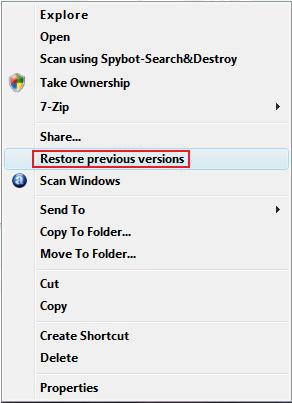
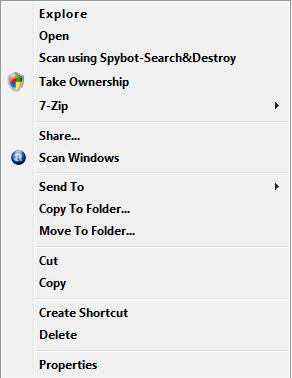
Here's How:1. To Remove "Restore Previous Versions" from the Context Menu
A) Click on the download button below to download the
Remove_Previous_Versions_Context_Menu.reg file.

B) Go to step 3.
2. To Restore "Restore Previous Versions" to the Context Menu
A) Click on the download button below to download the
Restore_Previous_Versions_Context_Menu.reg file.
3. Click on Save, and save the .reg file to the Desktop.
4. Right click on the .reg file (on Desktop) and click on Merge.
5. Click on the Run button in the Security Warning pop-up.
6. Click on Continue (UAC), Yes, and then OK when prompted.
7. When done, you can delete the .reg file (on Desktop).
That's it,Shawn
Related Tutorials
- How to Customize the Context Menu for the Start Menu in Vista
- How to Customize the Send To Context Menu in Vista
- How to Add Encrypt and Decrypt to the Context Menu in Vista
- How to Add and Remove a New Menu Item in Vista
- How to Add Take Ownership to the Context Menu in Vista
- How to Copy the Full Path of a File or Folder in Vista
- How to Add Flip 3D to the Context Menu in Vista
- How to Restore or Remove New from the Context Menu in Vista
- How to Enable or Disable the Context Menu in Vista
- How to Remove or Show Drives in the Vista and Windows 7 "Send To" Context Menu
- How to Add View and Print File Directory to the Context Menu in Vista
- How to Add or Remove Copy as Path from the Vista Context Menu
- How to Add or Remove Send To from the Vista Context Menu
- How to Add or Remove Turn Aero On or Off from the Vista Context Menu
- How to Add System Properties to Computer Context Menu in Vista
- How to Add COPY TO FOLDER and MOVE TO FOLDER to the Context Menu in Vista
- How to Restore Previous Versions of a File and Folder in Vista
- How to Restore or Remove Previous Versions Tab from Properties in Vista
- How to Add Empty Folder and Subfolders to the Vista Context Menu
- How to Hide or Show Previous Versions of Files from a Backup Location
Attachments

Last edited:


