
Windows Vista Forums
Vista Forums Home Join Vista Forums Windows 7 Forum Vista Tutorials Tags

Welcome to Windows Vista Forums. Our forum is dedicated to helping you find solutions with any problems, errors or issues you are experiencing with Windows Vista. The Vista forum also covers news and updates and has an extensive Vista tutorial section that covers a wide range of tips and tricks.

Go Back   Vista Forums > Vista Forums > Tutorials

Vista Tutorial - Sleep Return Timeout for Unattended Wake Up

Comment
 
LinkBack Tutorial Tools Display Modes
<!-- google_ad_section_start -->Sleep Return Timeout for Unattended Wake Up<!-- google_ad_section_end -->
Sleep Return Timeout for Unattended Wake Up
How to Change the Return to Sleep Timeout for a Unattended Wake Up in Vista
Published by Brink
07-29-2008

How to Change the Return to Sleep Timeout for a Unattended Wake Up in Vista
Information
  This will show you how to change how long Vista will wait to go back to sleep mode automatically after waking up unattended and idle. The default time is 120 seconds (2 minutes).
NOTE
 
RELATED LINKS:


Here's How:
1. Open the Start Menu.

2. In the white line (Start Search) area, type regedit and press Enter.

3. If prompted, click on Continue in the UAC prompt.

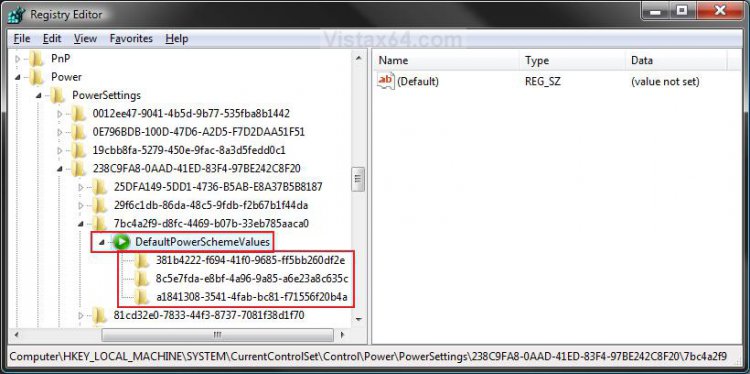
4. In regedit, go to: (See screenshot below)
HKEY_LOCAL_MACHINE\SYSTEM\CurrentControlSet\Control\Power\PowerSettings\238C9FA8-0AAD-41ED-83F4-97BE242C8F20\7bc4a2f9-d8fc-4469-b07b-33eb785aaca0\DefaultPowerSchemeValues
reg1.jpg
5. In the left pane, click on the triangle to expand DefaultPowerSchemeValues. (See screenshot above)

6. Click on the key (see table tip below) that is for the Power Plan that you want to change the wait time for. (See screenshot above)
NOTE: Normally, you would just do this for the Power Plan that you have selected (see tip below). If you have more than one user, then you may also want to include their Power Plan, or all of them.
Tip
 
Registry Key Power Plan
381b4222-f694-41f0-9685-ff5bb260df2e Balanced
8c5e7fda-e8bf-4a96-9a85-a6e23a8c635c High performance
a1841308-3541-4fab-bc81-f71556f20b4a Power saver
Any extra key listed Created Custom Power Plan
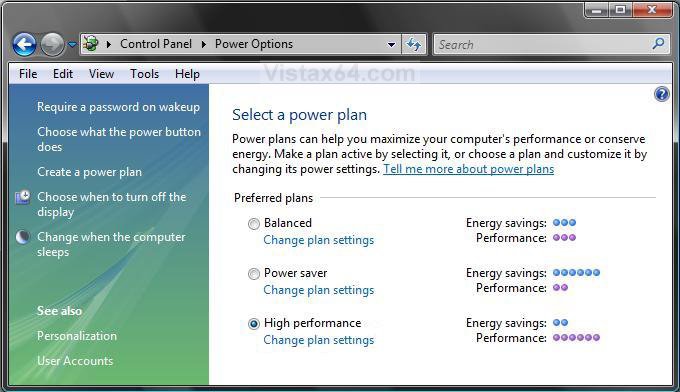
NOTE: For more about how to see and change a Power Plan, see STEP TWO here: How to Troubleshoot a Vista Sleep Mode Problem and Find a Solution
power_plans.jpg


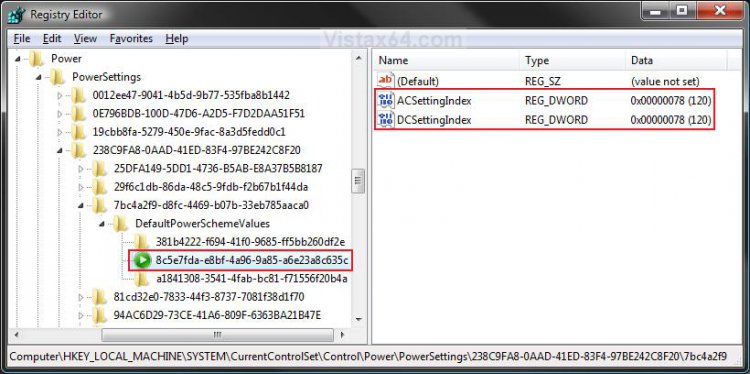
7. In the right pane, right click on ACSettingIndex (while on AC power) or DCSettingIndex (while on battery power) and click on Modify. (See screenshot below)
NOTE: You can choose to do this with one or both of these for what you want the timeout period to be for them.
reg2.jpg
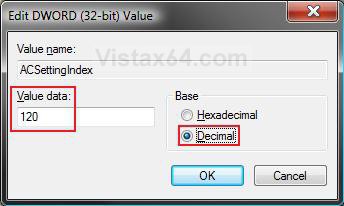
8. Dot Decimal, and type in how many seconds you want Vista to wait to go back to sleep automatically after an unattended wakeup. (See screenshot below step 9)
NOTE: The default time is 120 seconds.

9. Click OK or press Enter.
Name:  Modify.jpg
Views: 6416
Size:  32.5 KB
10. Close regedit.

11. Logoff and logon, or restart the computer to apply.
That's it,
Shawn
Published by
Brink's Avatar
Administrator

Join Date: Apr 2007
Location: Texas, USA
Posts: 23,762
Rep Power: 150
Brink has a reputation beyond reputeBrink has a reputation beyond reputeBrink has a reputation beyond reputeBrink has a reputation beyond reputeBrink has a reputation beyond reputeBrink has a reputation beyond reputeBrink has a reputation beyond reputeBrink has a reputation beyond reputeBrink has a reputation beyond reputeBrink has a reputation beyond reputeBrink has a reputation beyond repute

Tutorial Tools
Show Printable Version Show Printable Version
Email this Page Email this Page

Applies to
All Vista Versions
64 Bit & 32 Bit

Page copy protected against web site content infringement by Copyscape

Old 10-11-2008  
Oldroser
Member


Join Date: Jul 2008
Vista Home Premium 32bit
Cleveland, OH, USA
 
Rep Power: 8
Oldroser is on a distinguished road
  Oldroser is offline

Re: Sleep Return Timeout for Unattended Wake Up

Nice to see such a time switch exists. I shut the lid on my laptop, it wakes up and new shuts down again. Or is this when you have set it to sleep after a certain idle time and that sleep is different. I have done all suggested in your excellent tutorials and still it wakes up. Microsoft help said he couldn't help me any more, except to refer me higher which would cost me money. Network adapter waking laptop from sleep?

The Optomize__Power document from Microsoft I found, he said only referred to sleep after idle, not when I shut the lid, which sounds silly to me. It says,

Quote:
Wake on Timer

Windows Vista systems are capable of waking from Sleep due to a timer event, such as a scheduled task or Windows Media Center television recording. The wake on timer feature enables the power manager to program the platform timer alarm to wake the system at a predetermined future time, based on requests from applications and services.
The global ability for the system to wake from timer is controlled in Windows Vista power policy. By default, the ability to wake from Sleep on timer is enabled for all power plans and both AC and DC power states.
Friendly name
Allow wake on timer
Description
Allow Windows to automatically wake your computer from sleep on a timer for scheduled tasks and other programs.
GUID
bd3b718a-0680-4d9d-8ab2-e1d2b4ac806d
Symbol
GUID_WAKE_ON_TIMER
Defined in
Ntpoapi.h
Balanced defaults
Enabled (AC)
Enabled (DC)

The Windows power manager programs the platform timer alarm when the system enters the Sleep state. Disabling wake on timer for DC power prevents the power manager from programming the platform timer alarm if the system is on DC power when the computer enters Sleep. Similarly, disabling wake on timer for AC power prevents the power manager from programming the platform timer alarm when the system is on AC power and enters a Sleep state.
Disabling wake on timer can help extend usable mobile PC battery life by preventing the system from automatically waking from Sleep and allowing the system to wake from Sleep only when the user is ready to interact with the system again. System manufacturers designing ultraportable laptops for business and productivity use may want to disable the wake on timer policy.
However, it is important to note that if wake on timer is disabled, the following Windows functionality are not available on the system:
·Hibernate idle time-out.
·Windows Media Center television recording.
·Scheduled tasks that are programmed to wake the computer from the Sleep state.
·Automatic checks for new Windows Update if the preconfigured time occurs when the system is in the Sleep state.
·Any other program or service that attempts to schedule a wakeable timer via the SetWaitableTimer API.
How do you disable this sucker, if it does apply to the sleep when you shut the lid?
My System SpecsSystem Spec
Old 10-11-2008  
Brink's Avatar
Brink
Administrator


Join Date: Apr 2007
Vista x64 Ultimate SP2
Texas, USA
 
Rep Power: 150
Brink has a reputation beyond reputeBrink has a reputation beyond reputeBrink has a reputation beyond reputeBrink has a reputation beyond reputeBrink has a reputation beyond reputeBrink has a reputation beyond reputeBrink has a reputation beyond reputeBrink has a reputation beyond reputeBrink has a reputation beyond reputeBrink has a reputation beyond reputeBrink has a reputation beyond repute
  Brink is online now

Re: Sleep Return Timeout for Unattended Wake Up

Hello Oldroser,

From this and your other post, you might check your BIOS power management settings to see if it may also contain a "Wake on LAN" type option that needs to be disabled.

Hope this helps,
Shawn
My System SpecsSystem Spec
Old 10-11-2008  
Oldroser
Member


Join Date: Jul 2008
Vista Home Premium 32bit
Cleveland, OH, USA
 
Rep Power: 8
Oldroser is on a distinguished road
  Oldroser is offline

Re: Sleep Return Timeout for Unattended Wake Up

No, that's already been ruled out.
My System SpecsSystem Spec
Old 10-11-2008  
Brink's Avatar
Brink
Administrator


Join Date: Apr 2007
Vista x64 Ultimate SP2
Texas, USA
 
Rep Power: 150
Brink has a reputation beyond reputeBrink has a reputation beyond reputeBrink has a reputation beyond reputeBrink has a reputation beyond reputeBrink has a reputation beyond reputeBrink has a reputation beyond reputeBrink has a reputation beyond reputeBrink has a reputation beyond reputeBrink has a reputation beyond reputeBrink has a reputation beyond reputeBrink has a reputation beyond repute
  Brink is online now

Re: Sleep Return Timeout for Unattended Wake Up

I'm afraid that I do not know what else to try with your particular problem. Since it is related to the network waking up your laptop, you might post this question with all the details from both posts in the Network & Internet forum to see if someone may know of a solution for this for you.

I hope you get a solution soon,
Shawn
My System SpecsSystem Spec
Old 10-16-2008  
Oldroser
Member


Join Date: Jul 2008
Vista Home Premium 32bit
Cleveland, OH, USA
 
Rep Power: 8
Oldroser is on a distinguished road
  Oldroser is offline

Re: Sleep Return Timeout for Unattended Wake Up

Well, after I re-enabled the "allow the computer to put this device to sleep to save power" on the USB hubs, which a Microsoft specialist working on this problem had disabled, it slept until I woke it up twice. Unfortunately, the third time it went to sleep but couldn't be awakened. Had to hit the power button to turn it off. Curse it!
My System SpecsSystem Spec
Comment

Tags
plan, power management, sleep

Tutorial Tools
Display Modes


Similar Threads
Tutorial Tutorial Starter Category Comments Last Post
Return from Sleep/Lock problem +Bob+ Vista General 1 08-03-2008 01:46 PM
Shutdown on return from sleep Parlove Vista General 3 04-15-2008 10:15 PM
Return from sleep mode is strange David L Vista performance & maintenance 1 01-24-2008 04:13 PM
usb hub does not wake after sleep Michael Tissington Vista hardware & devices 1 09-08-2007 03:11 AM


Vista Forums is an independent web site and has not been authorized,
sponsored, or otherwise approved by Microsoft Corporation.
"Windows Vista", the Start Orb, and related materials are trademarks of Microsoft Corp.
© Designer Media Ltd
Tutorial powered by GARS 2.1.8m ©2005-2006