Windows Vista Forums
Vista Forums Home Join Vista Forums Windows 7 Forum Vista Tutorials Tags
Welcome to Windows Vista Forums. Our forum is dedicated to helping you find solutions with any problems, errors or issues you are experiencing with Windows Vista. The Vista forum also covers news and updates and has an extensive Windows Vista tutorial section that covers a wide range of tips and tricks.

Go Back   Vista Forums > Vista Forums > Tutorials

Vista - Send To Context Menu - Restore Default Menu Items

Comment
 

Send To Context Menu - Restore Default Menu Items

How to Restore Missing Default Send To Context Menu Items in Vista
Published by Brink
08-04-2008

How to Restore Missing Default Send To Context Menu Items in Vista
Information
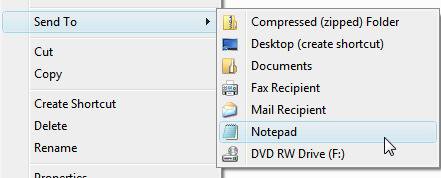
  This will show you how to restore any missing default menu items listed in the Send To context (right click) menu. This includes the Compressed (zipped) Folder, Desktop (create shortcut), Documents, Fax Recipient, and Mail Recipient menu items.
NOTE
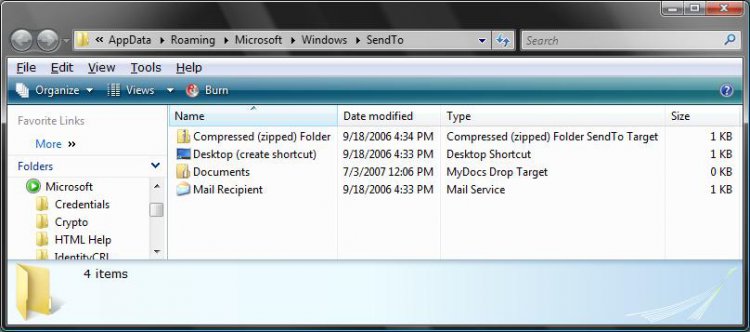
  The Send To menu folder is located at:
NOTE: You must have Show hidden files and folders checked in Folder Options to see the AppData folder. For how, see: How to Open and Change Folder Options in Vista

C:\Users\(your username)\AppData\Roaming\Microsoft\Windows\SendTo


RELATED LINKS:EXAMPLE: Send To Context Menu
sendto.jpg


Here's How:
1. For Compressed (zipped) Folder -
A) Click on the download button below to download the Compressed (zipped) folder.zip file.

B) Go to step 6.


2. For Desktop (create shortcut) -
A) Click on the download button below to download the Desktop (create shortcut).zip file.

B) Go to step 6.


3. For Documents -
A) Click on the download button below to download the Documents.zip file.

B) Go to step 6.


4. For Fax Recipient -
A) Click on the download button below to download the Fax Recipient .zip file.

B) Go to step 6.


5. For Mail Recipient -
A) Click on the download button below to download the Mail Recipient .zip file.


6. Click on Save, and save the ZIP file to the Desktop.

7. Right click on the ZIP file (on Desktop), and click on Open.

8. Extract the file to the Desktop.
NOTE: This file is the Send To context menu item you selected above.

9. Open the Start Menu.

10. In the white line (Start Search) area, type shell:sendto and press Enter. (See screenshot below)
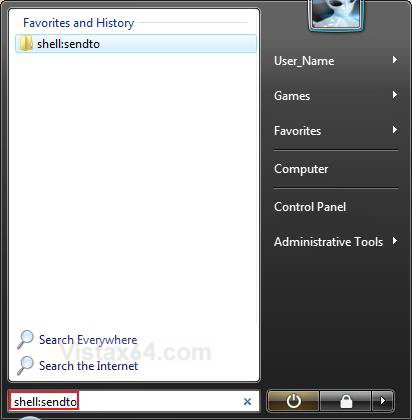
start_menu.jpg
11. Move the extracted file (step 8) to the Send To folder location in Windows Explorer. (See screenshot below)
12. Close the Send To Windows Explorer window.

13. When done, you can delete the ZIP file on your Desktop.
That's it,
Shawn

Published by
Brink's Avatar
Administrator

Join Date: Apr 2007
Location: Texas, USA
Posts: 25,919
Rep Power: 150
Brink has a reputation beyond reputeBrink has a reputation beyond reputeBrink has a reputation beyond reputeBrink has a reputation beyond reputeBrink has a reputation beyond reputeBrink has a reputation beyond reputeBrink has a reputation beyond reputeBrink has a reputation beyond reputeBrink has a reputation beyond reputeBrink has a reputation beyond reputeBrink has a reputation beyond repute

Tutorial Tools

Applies to
All Vista Versions
64 Bit & 32 Bit

Old 08-23-2008  
kvedt


Vista Home Premium 64


Re: Send To Context Menu - Restore Default Menu Items

Thanks!!! Been looking for help for this bizarre problem for a few days now. Thanks, thanks, and thanks!

My System SpecsSystem Spec
Old 08-23-2008  
Brink


Vista x64 Ultimate SP2, Windows 7 Ultimate x64


Re: Send To Context Menu - Restore Default Menu Items

You're welcome Kvedt, and welcome to Vista Forums.

Shawn
My System SpecsSystem Spec
Old 08-23-2008  
kvedt


Vista Home Premium 64


Re: Send To Context Menu - Restore Default Menu Items

Shawn - seeing as you took the time to create this, I was wondering if you could answer two related questions for me; the problem is now solved, but it left me still in the dark. The Send To commands for Desktop (Create shortcut) and Mail Recipient abruptly vanished one day earlier this week. Any idea why? And it might be related to that question, but as I rummaged around looking for a fix, I'd found many threads talking about values in the registry (which I had in mine, so that wasn't it) and how to add and delete destinations in Send To. But I also noticed from my other machine that Desktop referred to .Desklink, while Mail Recipient referred to .IMAPMail. These do not look like simple destinations, so I didn't want to just create shortcuts for the desktop and for Outlook and drag to the Send To folder. Would that have worked as well? And is the fact that these two destinations are more like commands have anything to do with their vanishing act?

I used to be OK dealing with XP, but having to learn some new & puzzling stuff on Vista 64.

Thanks again for the easy fix.

Peter
My System SpecsSystem Spec
Old 08-23-2008  
Brink


Vista x64 Ultimate SP2, Windows 7 Ultimate x64


Re: Send To Context Menu - Restore Default Menu Items

You're welcome Peter,

There could be several reasons why they would have vanished on you. The usual suspects are some utility program setting or malware.

No, those shortcuts would not have worked with just those files for the destination. About the only simple shortcut you could use like that would be a drive shortcut.
My System SpecsSystem Spec
Old 12-03-2008  
patio


Vista Ultimate 64bit


Re: Send To Context Menu - Restore Default Menu Items

Excellent and Thanx ! !
Future additions...such as Send To any folder ? ?
My System SpecsSystem Spec
Old 12-03-2008  
Brink


Vista x64 Ultimate SP2, Windows 7 Ultimate x64


Re: Send To Context Menu - Restore Default Menu Items

You're welcome Patio.

You could place a shortcut of the folder in the Send To menu if you have one that you are always sending files to, or you could use the tutorial below for any location.

Context Menu - Add COPY TO FOLDER and MOVE TO FOLDER

Hope this helps,
Shawn
My System SpecsSystem Spec
Old 05-21-2009  
narch


VHP 32 CA


Re: Send To Context Menu - Restore Default Menu Items

Thanks! It worked perfectly! Now why in the world would Vista drop items from this menu? So far I've lost the DVD drive and the Mail to:
My System SpecsSystem Spec
Old 05-21-2009  
Brink


Vista x64 Ultimate SP2, Windows 7 Ultimate x64


Re: Send To Context Menu - Restore Default Menu Items

You're welcome Narch, and welcome to Vista Forums.

It can be anything from the drive's driver to a wrong association for Mail To that could cause them to drop off.

Shawn
My System SpecsSystem Spec
Comment

Tutorial Tools


Similar Threads
Tutorial Category
New Context Menu - Restore Default Menu Items Tutorials
adding context menu items thru regedit Vista file management
Removing items from context menu Vista General
Vista Right-Click Context Menu Items... Vista General
Removing items from context menu Vista General


Vista Forums is an independent web site and has not been authorized,
sponsored, or otherwise approved by Microsoft Corporation.
"Windows Vista", the Start Orb, and related materials are trademarks of Microsoft Corp.
© Designer Media Ltd
Tutorial powered by GARS 2.1.8m ©2005-2006

1 2 3 4 5 6 7 8 9 10 11 12 13 14 15 16 17 18 19 20 21 22 23 24 25 26 27 28 29 30 31 32 33 34 35 36 37 38 39 40 41 42 43 44 45 46