![]() |
![]() | ![]() | ![]() | ![]() | ![]() | ![]() | ![]() |
| Welcome to Windows Vista Forums. Our forum is dedicated to helping you find solutions with any problems, errors or issues you are experiencing with Windows Vista. The Vista forum also covers news and updates and has an extensive Windows Vista tutorial section that covers a wide range of tips and tricks. |
| |||||||
![]() |
| |
| | |
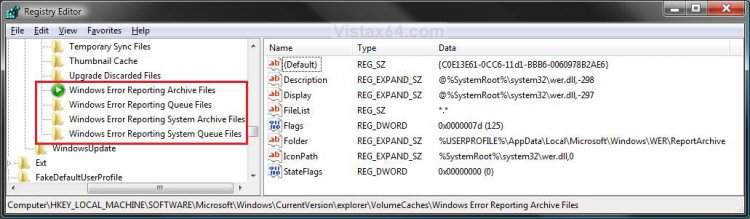
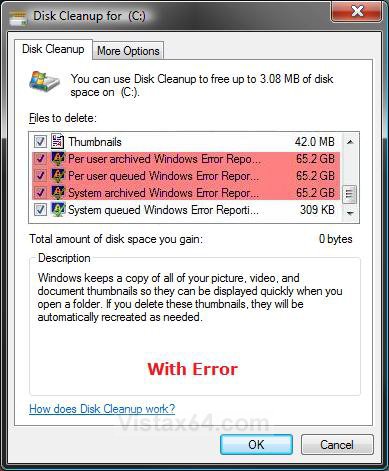
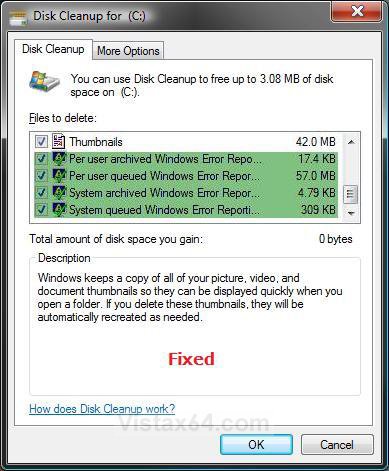
| Vista x64 Ultimate SP2, Windows 7 Ultimate x64 | Disk Cleanup Windows Error Reporting Bug Fix How to Fix the Vista Disk Cleanup Windows Error Reporting Bug |
My System Specs![]() |
| | |
| Vista x64 Ultimate SP2, Windows 7 Ultimate x64 | Re: Disk Cleanup Windows Error Reporting Bug Fix mmmf, That is the correct default program for reg files. Are you using some kind of download manager program by chance? |
My System Specs![]() |
| | |
| Vista Home Premium 32 bit | Re: Disk Cleanup Windows Error Reporting Bug Fix Hi! I click on disk cleanup and found all those big files.. I didn't want to delete them so, I checked out this tutorial. I had installed the .reg file and restarted the computer. Still I get : Debug Dump Files 147MB System queued Windows Error Reporting 2.16GB Per user archived Windows Error Reporting 53.8kb Per user queued Win. Err. Rep. 2.50MB I don't really remember if they were bigger files before instaling the .reg file.. but is it safe to delete them now if I installed the file?? I have windows home premium, 32bit.. Thanks! |
My System Specs![]() |
| | |
| Vista x64 Ultimate SP2, Windows 7 Ultimate x64 | Re: Disk Cleanup Windows Error Reporting Bug Fix Hello Satcfan, and welcome to Vista Forums. Those sizes are about normal and will be safe to delete. You really only need to worry if all of them had a large GB size. ![]() Shawn |
My System Specs![]() |
| | |
| Vista Home Premium 32bit | Re: Disk Cleanup Windows Error Reporting Bug Fix Hi, Sorry if this has been answered somewhere but I couldn't find it, including a Google search. Is it recommended everyone with Vista 64 bit install this fix even if they've never had GB-sized error reporting in Disk Cleanup? Or is this fix only for those who have seen these large sizes? I stumbled on this problem by accident browsing this (very wonderful) tutorial section! Scary! Never knew! Thanks for any clarification! |
My System Specs![]() |
| | |
| Vista x64 Ultimate SP2, Windows 7 Ultimate x64 | Re: Disk Cleanup Windows Error Reporting Bug Fix Hello Thumper, and welcome to Vista Forums. Usually you would only install this fix if have this problem, but it will not hurt anything to install it if you do not since it only removes the bad registry entries and restores the default entries. Hope this helps, Shawn |
My System Specs![]() |
| | |
| Vista Home Premium 32bit | Re: Disk Cleanup Windows Error Reporting Bug Fix Great! Thank you! I'll apply the fix just to be safe. |
My System Specs![]() |
| | |
| Vista x64 Ultimate SP2, Windows 7 Ultimate x64 | Re: Disk Cleanup Windows Error Reporting Bug Fix You're welcome Thumper. |
My System Specs![]() |
| | |
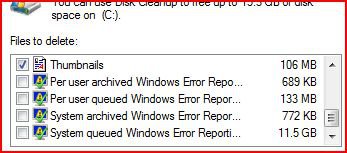
| Vista Home Premium 32bit | Hello, I read the tutorial after noticing that my System Queued Windows Error Reporting had a size of 11.5GB and installed and ran the .reg editor but the size of the files are still the same as it was. Can I do the cleanup and delete those files or will I get into trouble for this? I pasted a picture of the Clean Up window showing the size of the files. |
My System Specs![]() |
| | |
| Vista x64 Ultimate SP2, Windows 7 Ultimate x64 | Re: Disk Cleanup Windows Error Reporting Bug Fix Hello Ezsurfing, and welcome to Vista Forums. You should be fine with since it is the same after running the .reg file. To be extra safe you might create a restore point first as a backup. Shawn |
My System Specs![]() |
| | |
| Vista Home Premium 32bit | Re: Disk Cleanup Windows Error Reporting Bug Fix Hello Shawn, thanks for your answer. I created a restore point but I am still in doubt whether to do this as every time I have tried to do a restoration in the past hasn't worked at all. It always shows my restore points but after doing the restorations it always says that it couldn't be succesfully done. Maybe it has to do with my Internet Security or Antivirus. I would like to do the clean up of those 11 GB but worried about deleting more than that and ending up in reinstalling everything because I can't restore. Is that a normal size for those files? |
My System Specs![]() |
![]() |
| Tutorial Tools | |
| |
Similar Threads | ||||
| Tutorial | Category | |||
| Disk cleanup - System error memory dump files | Vista file management | |||
| Disk Cleanup files discarded by windows upgrade quesion. | General Discussion | |||
| Windows Disk Cleanup doesn't work | Vista hardware & devices | |||
| autoschedule Disk Cleanup and Error Checking | Vista account administration | |||
| disk cleanup in windows vists | Vista General | |||