Windows Vista Forums
Vista Forums Home Join Vista Forums Windows 7 Forum Vista Tutorials Tags
Welcome to Windows Vista Forums. Our forum is dedicated to helping you find solutions with any problems, errors or issues you are experiencing with Windows Vista. The Vista forum also covers news and updates and has an extensive Windows Vista tutorial section that covers a wide range of tips and tricks.

Go Back   Vista Forums > Vista Forums > Tutorials

Vista Tutorial - Disk Cleanup Windows Error Reporting Bug Fix

Comment
 

Disk Cleanup Windows Error Reporting Bug Fix

How to Fix the Vista Disk Cleanup Windows Error Reporting Bug
Published by Brink
08-17-2008

How to Fix the Vista Disk Cleanup Windows Error Reporting Bug
Information
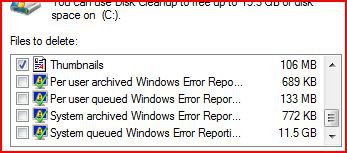
  This will show you how to fix the bug in Disk Cleanup when the listed items below have huge GB file sizes.
  • Per user archived Windows Error Reporting Files
  • Per user queued Windows Error Reporting Files
  • System archived Windows Error Reporting Files
  • System queued Windows Error Reporting Files
NOTE
  This is thought to be caused by some registry cleaning program that was allowed to delete or delete part of these registry entries located at:
HKEY_LOCAL_MACHINE\SOFTWARE\Microsoft\Windows\CurrentVersion\Explorer\VolumeCaches
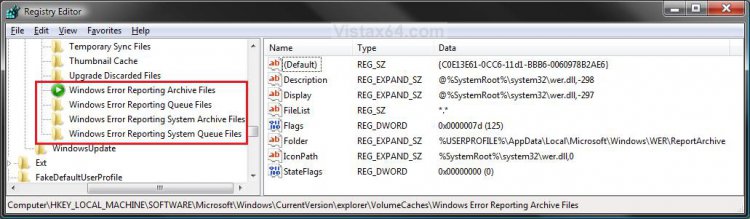
registry.jpg


WARNING
  Cleaning these listed items in Disk Cleanup without fixing this bug first will cause you to have to reinstall Vista.
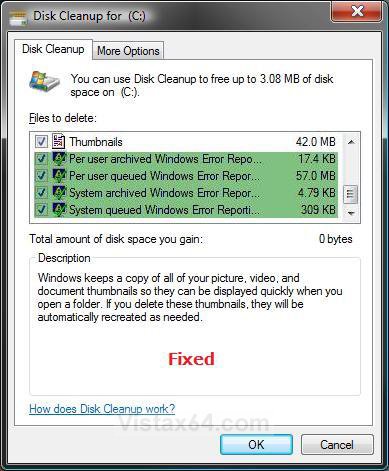
RELATED LINKS:EXAMPLE: Disk Cleanup with and with this Error Bug
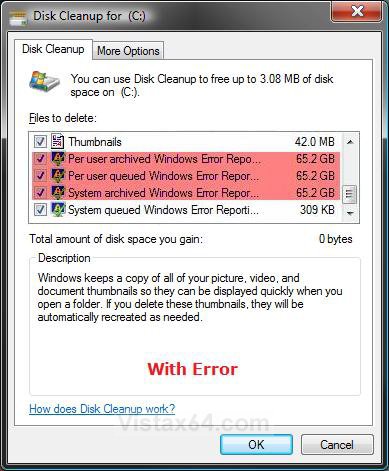
disk_cleanup_error.jpgfixed.jpg

Here's How:
NOTE
  This will restore the default registry entries in the location in the NOTE at the top of the tutorial.
1. Click on the download button below to download the Fix_DiskCleanup_Error_Reporting.reg file.

2. Click on Save, and save the .reg file to the Desktop.

3. Right click on the .reg file(on Desktop) and click Merge.

4. Click on the Run button for Security Warning pop-up.

5. Click on Continue (UAC), Yes, and then OK when prompted.

6. When done, you can delete the .reg file (on Desktop).

7. If you have the 64 bit Vista, then you will also need to do this tutorial to fix the Disk Cleanup shortcut. See: How to Correct Disk Cleanup Shortcut for Vista 64 bit
NOTE: The Disk Cleanup shortcut is correct in the 32 bit Vista.

8. Log off and log on, or restart the computer to apply the changes.

That's it,
Shawn

Published by
Brink's Avatar
Administrator

Join Date: Apr 2007
Location: Texas, USA
Posts: 25,806
Rep Power: 150
Brink has a reputation beyond reputeBrink has a reputation beyond reputeBrink has a reputation beyond reputeBrink has a reputation beyond reputeBrink has a reputation beyond reputeBrink has a reputation beyond reputeBrink has a reputation beyond reputeBrink has a reputation beyond reputeBrink has a reputation beyond reputeBrink has a reputation beyond reputeBrink has a reputation beyond repute

Tutorial Tools

Applies to
All Vista Versions
64 Bit & 32 Bit

Old 09-08-2008  
stevefoxon
Newbie


Join Date: Sep 2008
Vista Ultimate x64


Re: Disk Cleanup Windows Error Reporting Bug Fix

Hi. I seem to recall having this bug in 32 bit Vista about a year ago; now I have switched to x64, and after installing everything I ran disk cleanup on the C drive and the "system queued windows error report" has come up with just over 5GB. So I thought I'd check this was OK to delete and found this tutorial. So I downloaded and merged to the registry, and am still getting (after reboot) 5GB. Do I take it that this is safe to delete, along with the fact that the bug seems to give much bigger figures?

By the way, thanks for the great tutorials, I have come across this site 3 times in the last couple of weeks when searching for stuff, and it came up trumps every time

Cheers.

My System SpecsSystem Spec
Old 09-08-2008  
Brink
Administrator


Join Date: Apr 2007
Vista x64 Ultimate SP2, Windows 7 (7600) x64


Re: Disk Cleanup Windows Error Reporting Bug Fix

Hello Steve, and welcome to Vista Forums.

Did you also correct the Disk Cleanup shortcut since you have the 64 bit Vista? If you have, then you should be fine with only 5GB total. Of course, you should do a Complete PC Backup since you have Vista Ultimate to be extra safe though.

Hope this helps,
Shawn
My System SpecsSystem Spec
Old 09-09-2008  
stevefoxon
Newbie


Join Date: Sep 2008
Vista Ultimate x64


Re: Disk Cleanup Windows Error Reporting Bug Fix

Hi. Yes, I did that fix, and also have run from both that, and also the properties of the disk. As you say, I will backup first and then give it a go.

Cheers.
My System SpecsSystem Spec
Old 09-09-2008  
Brink
Administrator


Join Date: Apr 2007
Vista x64 Ultimate SP2, Windows 7 (7600) x64


Re: Disk Cleanup Windows Error Reporting Bug Fix

You're welcome Steve. That would be a nice amount of junk removed.

Shawn
My System SpecsSystem Spec
Old 09-09-2008  
mmmf
Newbie


Join Date: Sep 2008
vista business 32bit


Thanks for your work in fixing this bug...but why, oh why, haven't Microsoft put in their own permanent fix for this very old problem??

When I try the reg script that I downloaded to the desktop, I get a message saying that this cript can only be run from within the Registry.
Can you advise?
My System SpecsSystem Spec
Old 09-09-2008  
Brink
Administrator


Join Date: Apr 2007
Vista x64 Ultimate SP2, Windows 7 (7600) x64


You're welcome mmmf, and welcome to Vista Forums.

Well, this problem is usually associated with using a registry cleaning program that was improperly allowed to delete certain registry entries. This cannot be blamed on Microsoft since this problem is caused inadvertently by the computer user and a 3rd party program.

We all make mistakes though.


Quote  Quote: Originally Posted by mmmf View Post
When I try the reg script that I downloaded to the desktop, I get a message saying that this cript can only be run from within the Registry.
Can you advise?

When you download and save the reg file to the desktop, does it have a icon that looks like this?

Name:  Reg_Icon.jpg
Views: 5194
Size:  4.0 KB

If not, then the default association for the .reg file extension has been changed. In Method Two of this tutorial, you will need to .reg (Name) file extension back the Current Default of Registry Editor (C:\Windows\regedit.exe).

Default Programs

Hope this helps,
Shawn
My System SpecsSystem Spec
Old 09-10-2008  
mmmf
Newbie


Join Date: Sep 2008
vista business 32bit


Re: Disk Cleanup Windows Error Reporting Bug Fix

When I hit the DOWNLOAD button, the following is actually downloaded to my desktop

'"5910d121899818-disk-cleanup-windows-error-reporting-bug-fix-fix_diskcleanup_
_error_reporting"

...and there is no file extension

The file type is under "Registration entries"

Sorry if I am doing something dumb!
My System SpecsSystem Spec
Old 09-10-2008  
Brink
Administrator


Join Date: Apr 2007
Vista x64 Ultimate SP2, Windows 7 (7600) x64


Re: Disk Cleanup Windows Error Reporting Bug Fix

Using the Default Programs tutorial, what do you have listed as the Current Program for the .reg file extension?
My System SpecsSystem Spec
Old 09-10-2008  
mmmf
Newbie


Join Date: Sep 2008
vista business 32bit


Re: Disk Cleanup Windows Error Reporting Bug Fix

The current default I have for registration entries is "Registry editor".
My System SpecsSystem Spec
Comment

Tutorial Tools


Similar Threads
Tutorial Category
Disk cleanup - System error memory dump files Vista file management
Disk Cleanup files discarded by windows upgrade quesion. General Discussion
Windows Disk Cleanup doesn't work Vista hardware & devices
autoschedule Disk Cleanup and Error Checking Vista account administration
disk cleanup in windows vists Vista General


Vista Forums is an independent web site and has not been authorized,
sponsored, or otherwise approved by Microsoft Corporation.
"Windows Vista", the Start Orb, and related materials are trademarks of Microsoft Corp.
© Designer Media Ltd
Tutorial powered by GARS 2.1.8m ©2005-2006

1 2 3 4 5 6 7 8 9 10 11 12 13 14 15 16 17 18 19 20 21 22 23 24 25 26 27 28 29 30 31 32 33 34 35 36 37 38 39 40 41 42 43 44 45 46