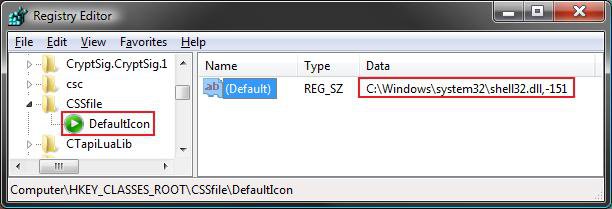
How to Change a File Extension Type Icon in Vista
 Information
This will show you how to change the default icon for a file extension type of your choice to whatever icon you want it to be displayed as in Windows Explorer instead.
 Note
NoteThis will change all of the icons for that file extension type in Vista, not just the shortcuts of them.
To see what the file extension is for a file, see: How to Show and Change a File Name Extension in Vista
Some Common Default Icon Registry Locations:
To see what the file extension is for a file, see: How to Show and Change a File Name Extension in Vista
Some Common Default Icon Registry Locations:
- Unknown file icon - HKEY_CLASSES_ROOT\Unknown\DefaultIcon
- Folder icon - HKEY_CLASSES_ROOT\Folder DefaultIcon
 Tip
TipYou can also use the free configuration utilty program named Types to easily change a file extension icon to what you like in a easy to use window instead of through the registry.
 Warning
- You will need to use a 256x256 pixel icon that was made for Vista for them to display properly at all of the available icon view sizes in Vista. For more about Vista icons, see: Icons in Windows Vista
- Some programs may automatically reset the default file extension icon back to the default one it uses even after you have changed it. This tutorial will not work for these programs.
- If you change the default program for what opens the file extension, it will also change the icon of the file extension to be whatever it is for the program you selected uses.
EXAMPLE: The Default .txt File Extension Type Icon

Here's How:
NOTE: For this tutorial, I am going to use just the file extensions .txt and .mp3 as an example. You can change any other files extension you like. Just substitute the file extension you want to change in the steps below instead.
1. Open the Start Menu.
2. In the white line (Start Search) area, type regedit and press Enter.
3. Click on Continue in the UAC prompt.
4. If Using the Default Program in Vista to Open With
NOTE: You would use this option if you are using the default program that Vista uses to open the file extension.
A) In regedit, go to: (See screenshot below)
NOTE: Substitute .txt with the file extension you want to change instead.
HKEY_CLASSES_ROOT\.txt
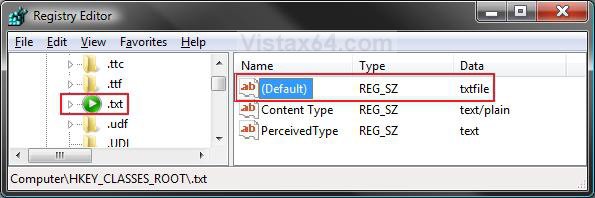
B) In the right pane of the file extension, look at the Data value to the right of (Default). (See screenshot above)
NOTE: For example it is txtfile for the .txt file extension type.
C) Go to step 6.
5. If Using a 3rd Party Program as the Default Program to Open With
NOTE: You would do this option if you have changed the program used to open the file extension to a 3rd party program instead of the one Vista used by default.
A) In regedit, go to: (See screenshot below)
NOTE: Substitute .mp3 with the file extension you want to change instead.
Code:
HKEY_CURRENT_USER\Software\Microsoft\Windows\CurrentVersion\Explorer\FileExts\.mp3\UserChoiceNOTE: If you do not have the UserChoice key, then in the left pane, right click on the file extension (ex: .mp3) and click on New and Key. Type UserChoice and press Enter.
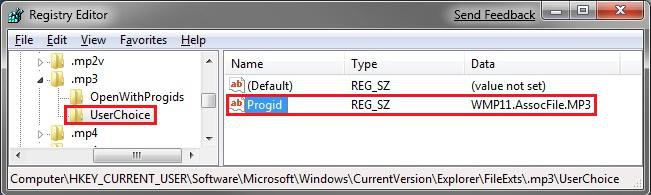
B) In the right pane of UserChoice, look at the Data value to the right of Progid. (See screenshot above)
NOTE: For example it is WMP11.AssocFile.MP3 for the .mp3 file extension type by default. Your value will vary depending on the default program you have to open this file extension.
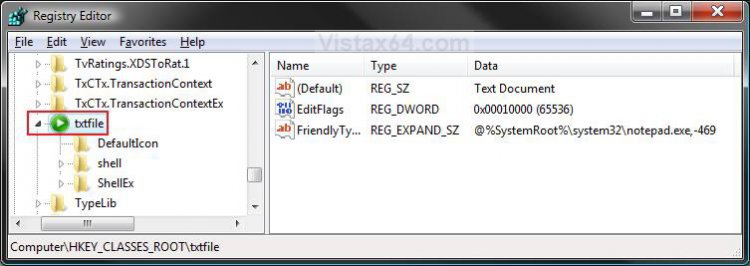
6. In regedit, scroll down past all the file extensions and keep going until you see: (See screenshots below 7)
NOTE: Substitute txtfile with the Data value from step 4B or 5B for the file extension you want to change instead.
HKEY_CLASSES_ROOT\txtfile
7. Click on the arrow next to txtfile to expand the key (folder).
NOTE: Substitute txtfile with the Data value from step 4B or 5B for the file extension you want to change instead.
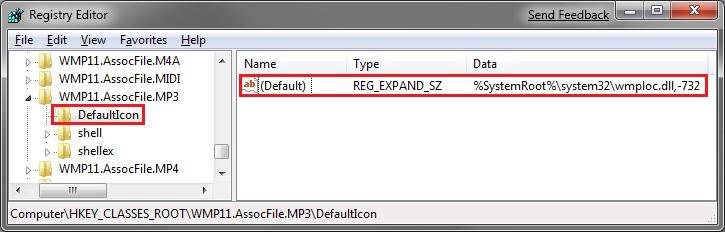
8. To Backup the Default File Extension Type Icon Settings
NOTE: To restore the default file extension type icon settings from this created backup below, right click on the .reg backup file and click on Merge. Next, approve the merge and log off and log on to apply the change.
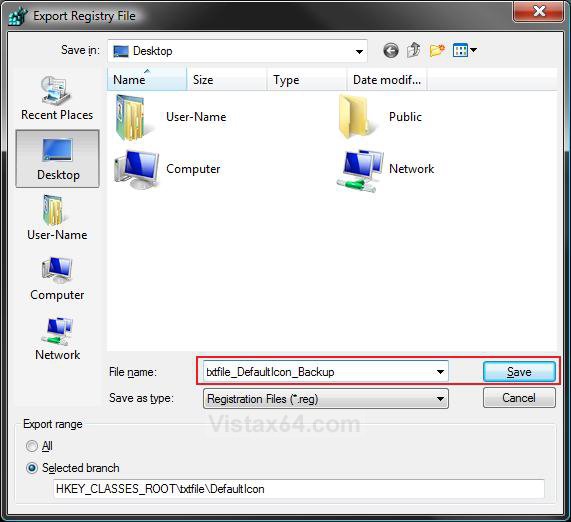
A) Right click on DefaultIcon and click on Export. (See screenshot below step 9)
B) Select a location to where you want to save the backup (reg file) at. (See screenshot below)
C) Type in a name and click on the Save button.
NOTE: Be sure to type in a name that is easily recognized by you for that file extension.
9. In the right pane of DefaultIcon, right click on (Default) and click on Modify. (See screenshot below)
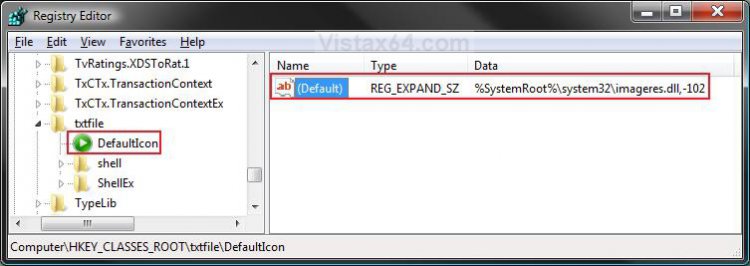
10. Select Option One or Option Two below for what icon you want to replace the file extension icon with.
 OPTION ONE
A. Download and save a icon of your choice to a location you wish to store this icon at.
NOTE: See the Warning box at the top of this tutorial for about what kind of icon to use. The icon must stay at this location for as long as it is being used for the file extension.
B. After step 9 above, type in the full path of the icon file location from step A and click on OK. (See screenshot below)
NOTE: For example, I used a icon file on my desktop. Sometimes you will need to add ,0 (number zero) at the end of the full path for it to work. For the example below, C:\Users\User-Name\Desktop\txt file.ico,0
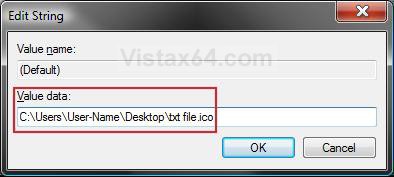
C. The registry will now look similar to this. (See screenshot below)
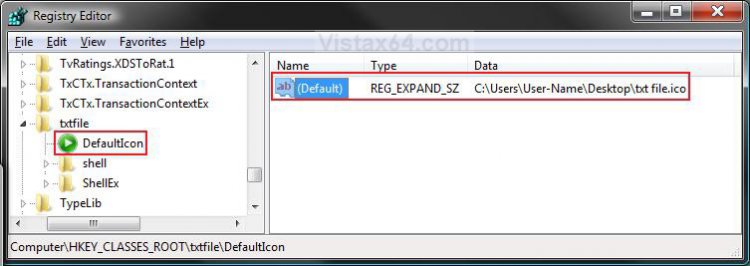
D. Go to step 11 below Option Two.
OPTION TWO A. Download and install the free program IconViewer.
NOTE: This program will add the Icons tab to files (ex: imageres.dll) that contain a icon library in them so you can see the icons available in it.
B. In Windows Explorer, navigate to C:\Windows\System32\imageres.dll and right click on imageres.dll and click on Properties.
C. Scroll through the icons and make note of the icon number of the one you want to use to replace the file extension icon with. (See screenshot below)
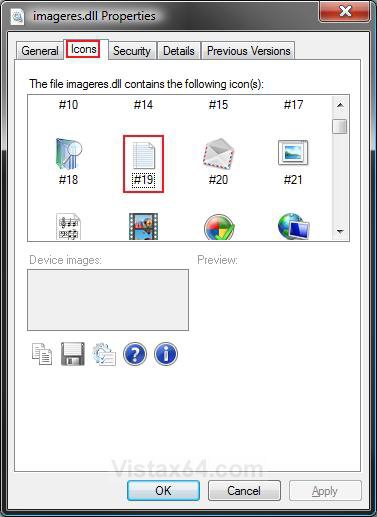
D. After you had made note of the icon number, close the Properties window and the Windows Explorer window.
E. After step 9 above, change the number after - at the end to the icon number in step C and click on OK. (See screenshot below)
NOTE: For example, I wanted to change the icon for the .txt file extension to be icon number 19 from step C instead. If you do not have %SystemRoot%\system 32\imageres.dll,-### in Modify, then change it to this with the number (ex: 19).
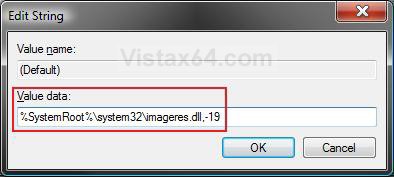
F. The registry will now look similar to this. (See screenshot below)
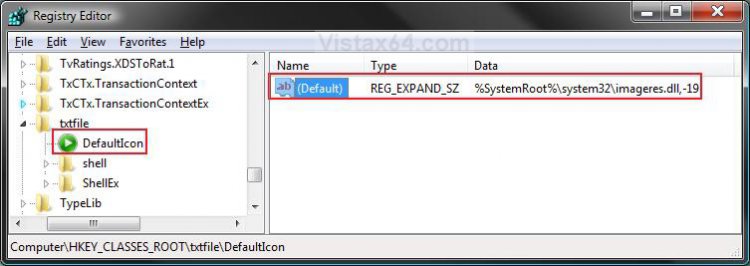
G. Continue to step 11 below.
11. Close Regedit.
12. Log off and log on, or restart the computer, to apply the changes.
NOTE: For the .txt file extension example, the left screenshot below is for after Option One, and the right screenshot is for after Option Two.


That's it,
Shawn
Related Tutorials
- How to Change a Folder Preview Picture in Vista
- How to Change a Shortcut Folder or File Icon in Vista
- How to Change the Open Folder Icon in Vista
- How to Change a Icon in the Control Panel in Vista
- How to Fix a Personal User Shell Folder Displayed as a Standard Yellow Folder Icon in Vista
- How to Change a Drive Icon in Vista
- How to Restore and Change a Desktop Icon in Vista
- How to Change the Desktop Control Panel Icon in Vista
- How to Rebuild the Icon Cache in Vista
- How to Hide a Folder or Shortcut Icon in Vista
- How to Change a Folder Icon in Vista
- How to Associate a Individual File Extension Type With a Program in Vista
- How to Unassociate a File Extension Type in Vista
- How to Show and Change a File Name Extension in Vista
- How to Add "Show/Hide Known File Extensions" to Context Menu in Vista and Windows 7
- Restore Default Vista File Extension Type Associations
- How to Change the Vista Default Folder Icon
Attachments

Last edited by a moderator: