
How to Allow or Block Unrated Websites with Internet Explorer Content Advisor
 Information
Internet Explorer Content Advisor uses ratings that websites provide to identify potentially offensive content to allow or block them with. This will show you how to allow or block all users to view websites that have no rating with Content Advisor. By default, unrated websites are blocked by Content Advisor.
 Warning
- Allowing unrated websites in Content Advisor might allow users to browse to and view objectionable content on the unrated website.
- You will need to do this while logged in to an administrator account.
Here's How:
1. If not already, then enable Internet Explorer Content Advisor.
2. Open the Control Panel (Classic view), and click on the Internet Options icon.
A) Go to step 4.
OR
3. In Internet Explorer, click on Tools and Internet Options.
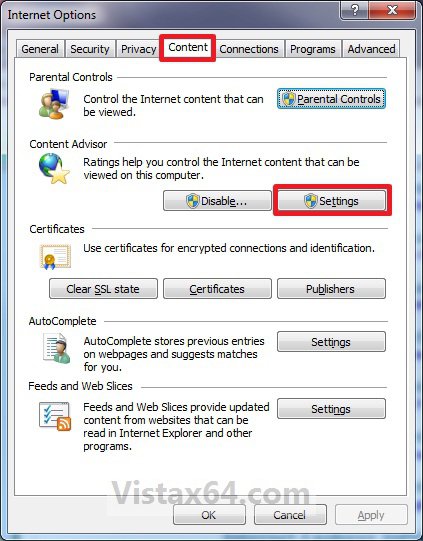
4. Click on the Content tab and on the Settings button. (See screenshot below)
5. If prompted by UAC, then click on Continue.
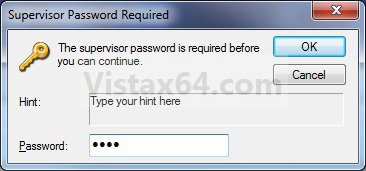
6. Type in your Content Advisor supervisor password and click on OK. (See screenshot below)
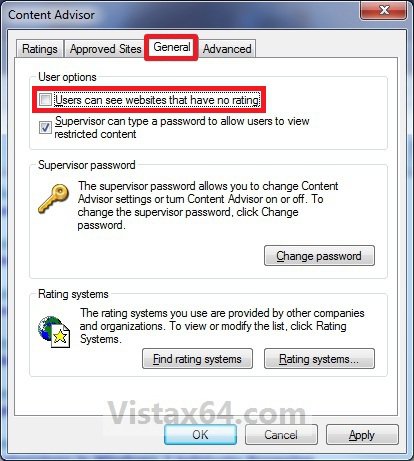
7. Click on the General tab. (See screenshot below)
8. To Allow Unrated Websites to be Viewed
A) Under User options, check the Users can see websites that have no rating box, and click on OK. (See screenshot above)
B) Go to step 10.
9. To Block Unrated Websites to be Viewed
A) Under User options, uncheck the Users can see websites that have no rating box, and click on OK. (See screenshot below step 7)
10. Click on OK. (See screenshot below step 4)
11. Close and reopen Internet Explorer to apply.
That's it,Shawn
Related Tutorials
- How to Enable or Disable Vista Internet Explorer Content Advisor
- How to Reset Vista Internet Explorer Content Advisor
- How to Reset or Change the Internet Explorer Content Advisor Password
- How to Change the Internet Explorer Content Advisor Ratings Level
- How to Allow or Block Specific Websites in Internet Explorer Content Advisor
- How to Setup a Windows Vista Web Filter in Parental Controls
Attachments

Last edited: