Windows Vista Forums
Vista Forums Home Join Vista Forums Windows 7 help and support Forum Windows 8 Forum Vista Tutorials

Welcome to Windows Vista Forums. Our forum is dedicated to helping you find solutions with any problems, errors or issues you are experiencing with Windows Vista. The Vista forum also covers news and updates and has an extensive Windows Vista tutorial section that covers a wide range of tips and tricks.

Go Back   Vista Forums > Vista Forums > Tutorials

Vista - Local Group Policy Editor - Open

Comment
 

Local Group Policy Editor - Open

How to Open the Local Group Policy Editor in Vista
Published by Brink
04-19-2009
Local Group Policy Editor - Open

How to Open the Local Group Policy Editor in Vista


information   Information
This will show you how to open the Local Group Policy Editor in Vista.
Note   Note
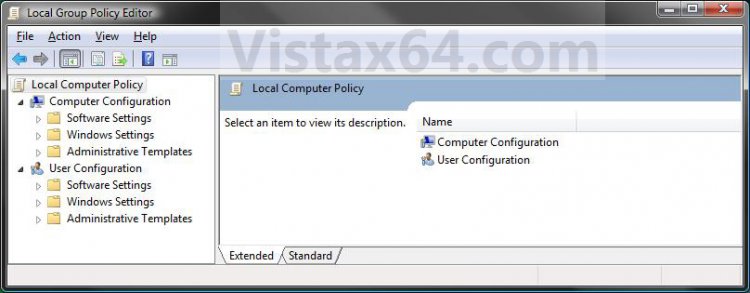
The Local Group Policy Editor is a Microsoft Management Console (MMC) snap-in that provides a single user interface through which all the Computer Configuration and User Configuration settings of Local Group Policy objects can be managed for your computer.
  • Computer Configuration
    Administrators can use Computer Configuration to set policies that are applied to computer, regardless of who logs on to the computers. Computer Configuration typically contains sub-items for software settings, Windows settings, and administrative templates.
  • User Configuration
    Administrators can use User Configuration to set policies that apply to users, regardless of which computer they log on to. User Configuration typically contains sub-items for software settings, Windows settings, and administrative templates.
By default the Local Group Policy Editor is applied to all users unless you use a specific users or groups, or all users except administrators Local Group Policy Editor to apply User Configuration policies.


warning   Warning
  • You will need to be an administrator to open the Local Group Policy Editor.
  • The Local Group Policy Editor will only be available in the Vista Business, Ultimate, and Enterpise editions. You will not have the Local Group Policy Editor available in the Vista Home Basic and Home Premium editions.

EXAMPLE: Local Group Policy Editor
group1.jpg

Here's How:
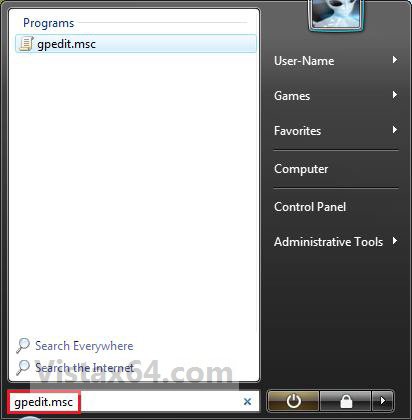
1. Open the Start menu, then type gpedit.msc in the search line and press Enter. (See screenshot below)
NOTE: This file is located at C:\Windows\System32\gpedit.msc.
group-2.jpg
2. If prompted by UAC, click on Continue.

3. You can now set and manage the Local Group Policies on your computer to how you want them.
NOTE: For more details and information about how to use the Local Group Policy Editor, click on the blue ? toolbar icon. (See screenshot below)
Click image for larger version

Name:	Group1.jpg
Views:	4386
Size:	105.3 KB
ID:	11965
That's it,
Shawn


Published by
Brink's Avatar
Administrator

Join Date: Apr 2007
Location: Texas, USA
Posts: 29,548
Brink has a reputation beyond reputeBrink has a reputation beyond reputeBrink has a reputation beyond reputeBrink has a reputation beyond reputeBrink has a reputation beyond repute
Brink has a reputation beyond reputeBrink has a reputation beyond reputeBrink has a reputation beyond reputeBrink has a reputation beyond reputeBrink has a reputation beyond reputeBrink has a reputation beyond reputeBrink has a reputation beyond reputeBrink has a reputation beyond reputeBrink has a reputation beyond reputeBrink has a reputation beyond reputeBrink has a reputation beyond reputeBrink has a reputation beyond repute

Tutorial Tools

Applies to
Business,Enterprise,Ultimate
64 Bit & 32 Bit

04-28-2009  
wembawemba


Vista Home Premium 32bit.


Re: Local Group Policy Editor - Open

Hello, thank you much, but are you absolutely sure, Group Policy is not available in Home Premium? please reply with a link of evidence please, thanks,robert.

My System SpecsSystem Spec
04-28-2009  
Brink


Vista x64 Ultimate SP2, Windows 7 Ultimate x64 SP1
Texas, USA


Re: Local Group Policy Editor - Open

Hello Wembawemba,

I'm sorry, but I'm 100% sure that Group Policy is not available in Vista Home Premium.

Shawn
My System SpecsSystem Spec
09-01-2010  
Aquapure


32-bit Operating System
singapore


Re: Local Group Policy Editor - Open

Hi I am new here

Ahum. I am using windows vista 32-bit home edition, and this file does not existe in my computer!!!! i tried to open it manually, and nothing is inside the file called GROUP POLICY, its emty! So what can I do??
My System SpecsSystem Spec
09-01-2010  
Brink


Vista x64 Ultimate SP2, Windows 7 Ultimate x64 SP1
Texas, USA


Re: Local Group Policy Editor - Open

Hello Aquapure, and welcome to Vista Forums.

Sorry, but the Local Group Policy Editor is not available in the Vista Home Basic and Home Premium editions.

If you would like, you could post what you wanted to do in the appropriate forum area here, and we'll see if we may be able to find a way for you to do it in the registry instead.
My System SpecsSystem Spec
06-02-2011  
arlanda


Vista 32


Re: Local Group Policy Editor - Open

Is there a way to search within the Group Policy Editor? I don't want to bother navigating through all tree
My System SpecsSystem Spec
06-02-2011  
Dwarf


Windows Vista Ultimate 32-bit & 64-bit both SP2
Doncaster, UK


Re: Local Group Policy Editor - Open

What is it you're looking for?

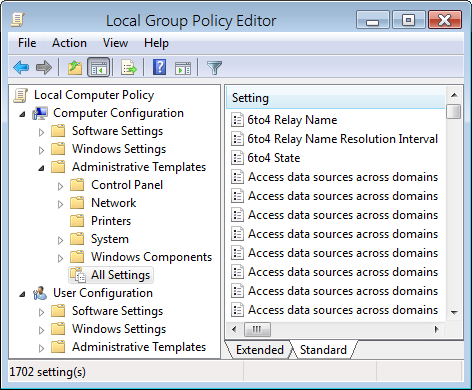
You can apply filters so that entries containing the required information only are displayed.

For example, this shows the editor when it is first opened (I have arranged and sized the columns for the purpose of this illustration):

Name:  Capture.PNG
Views: 52042
Size:  44.1 KB

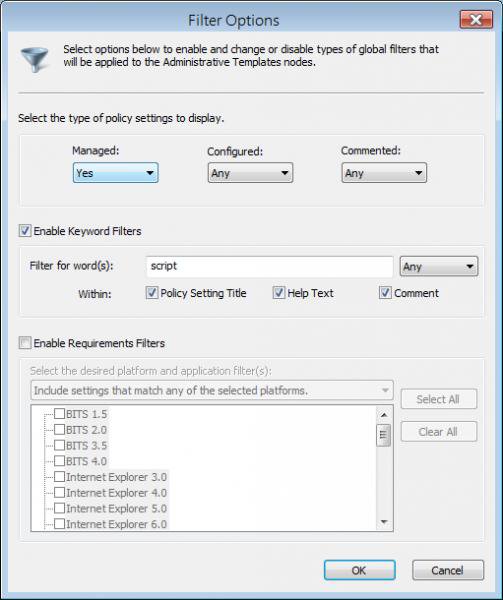
Suppose we want to quickly find and display all entries pertaining to scripts (and their derivatives). We click on Action and then Filter Options... As shown in the image below, we fill in script and check (tick) Enable Keyword Filters.

Name:  Capture1.jpg
Views: 52067
Size:  40.0 KB

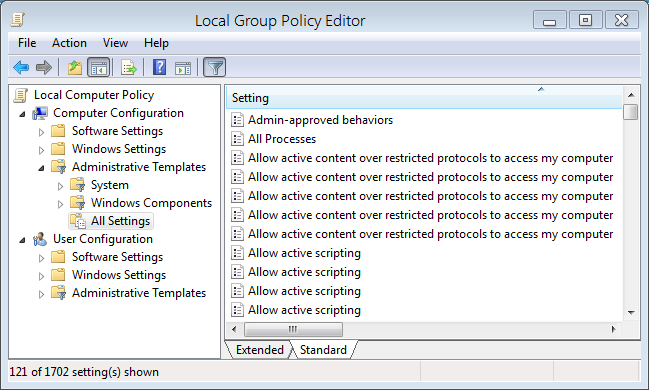
Finally, click OK and then click the Filter icon (it looks like an upside down funnel).

Name:  Capture2.PNG
Views: 52111
Size:  46.4 KB
My System SpecsSystem Spec
06-02-2011  
arlanda


Vista 32


Re: Local Group Policy Editor - Open

Sorry I forgot to mention that I'm on Vista Enterprise 32.

I don't see these two option: Filter and All Settings

Guess I'm out of luck? Thanks.
My System SpecsSystem Spec
06-02-2011  
Brink


Vista x64 Ultimate SP2, Windows 7 Ultimate x64 SP1
Texas, USA


Re: Local Group Policy Editor - Open

Hello Arlanda,

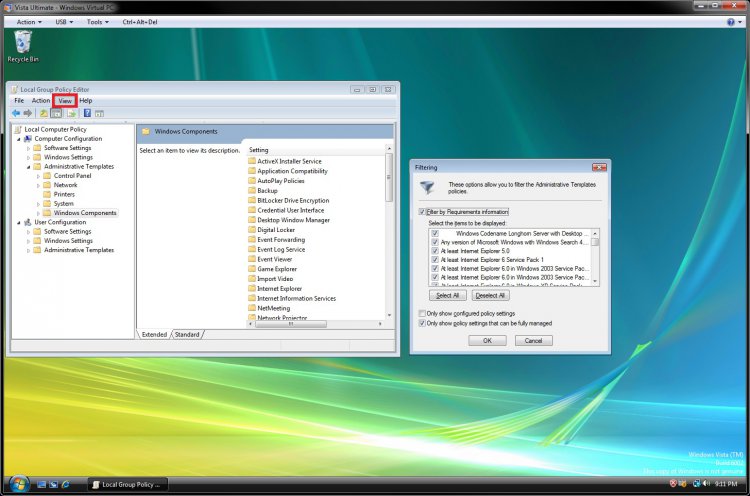
Unfortunately, the All Settings option is only available in Windows 7 and not in Vista. The Filtering option is available in Vista's group policy, but you would need to select a folder in the left pane first, then click on View (menu bar), and click on Filtering first.

vista.jpg

However, if you know what you wanted to look for, we may already know where it is for you and let you know faster.
My System SpecsSystem Spec
06-07-2011  
arlanda


Vista 32


Re: Local Group Policy Editor - Open

I've found it. Thanks!
My System SpecsSystem Spec
Comment

 Local Group Policy Editor - Open problems?


Tutorial Tools


Similar topics to: Local Group Policy Editor - Open
Tutorial Category
Local Security Policy Editor - Open Tutorials
Group Policy Editor HELP :] Vista security
Control Panel - Add Local Group Policy Editor Tutorials
Group Policy Object Editor on Local Computer Vista General
Group Policy Object Editor on Local Computer Vista performance & maintenance


Vista Forums is an independent web site and has not been authorized,
sponsored, or otherwise approved by Microsoft Corporation.
"Windows Vista", the Start Orb, and related materials are trademarks of Microsoft Corp.
© Designer Media Ltd

1 2 3 4 5 6 7 8 9 10 11 12 13 14 15 16 17 18 19 20 21 22 23 24 25 26 27 28 29 30 31 32 33 34 35 36 37 38 39 40 41 42 43 44 45 46 47 48 49 50