
Windows Vista Forums
Vista Forums Home Join Vista Forums Windows 7 Forum Vista Tutorials Tags
Welcome to Windows Vista Forums. Our forum is dedicated to helping you find solutions with any problems, errors or issues you are experiencing with Windows Vista. The Vista forum also covers news and updates and has an extensive Windows Vista tutorial section that covers a wide range of tips and tricks.

Go Back   Vista Forums > Vista Forums > Tutorials

Vista Tutorial - SP2 Disk Cleanup Tool

Comment
 

SP2 Disk Cleanup Tool

How to Use the Vista SP2 Disk Cleanup Tool
Published by Brink
05-27-2009

How to Use the Vista SP2 Disk Cleanup Tool
Information
  This will show you how to run the Vista SP2 Cleanup tool to permanently remove the Vista RTM and SP1 backed up files created during the installion of the Vista SP2 to gain more hard drive space.
WARNING
  Running the Windows Vista Service Pack 2 Disk Clean-up tool permanently removes the ability to uninstall the Vista SP1 and SP2. Do not run this tool unless you have no plans of uninstalling the Vista SP1 or SP2 and just want to save or regain hard drive space. The only option to remove them after using this tool is to do a clean install of Vista.
NOTE
  To see how much space you recover, make a note of how much free space you have on the C:/ drive in Computer before and after you run the SP2 Cleanup Tool.

It appears that most people are gaining on average 1GB of space back afterwards.
RELATED LINKS:


Here's How:
1. Open a elevated command prompt.

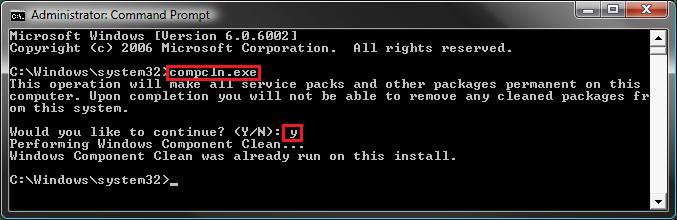
2. In the elevated command prompt, type compcln.exe and then press Enter. (See screenshot below)

3. Type Y when you see Would you like to continue? and press Enter.
NOTE: Tying N will cancel running the Vista SP2 disk cleanup tool. You can also just close the command prompt window to cancel to.
command.jpg
4. It will take a little bit to finish. When it is finished, you will see the Windows Component Clean completed message. (See screenshot above)
NOTE: You will see the Windows Component Clean was already run on this install message instead if you already ran this or installes Vista with a Vista installation disc that included SP2 with it.

5. When it's done, you can close the elevated command prompt.

6. Now, you just need to let all of us know how much space the tool cleared and saved for you.
NOTE: I would happily tell you mine, but I have a Vista installation DVD that already includes the SP1 and SP2, so I have not backup files to clean up.
That's it,
Shawn

Published by
Brink's Avatar
Administrator

Join Date: Apr 2007
Location: Texas, USA
Posts: 25,801
Rep Power: 150
Brink has a reputation beyond reputeBrink has a reputation beyond reputeBrink has a reputation beyond reputeBrink has a reputation beyond reputeBrink has a reputation beyond reputeBrink has a reputation beyond reputeBrink has a reputation beyond reputeBrink has a reputation beyond reputeBrink has a reputation beyond reputeBrink has a reputation beyond reputeBrink has a reputation beyond repute

Tutorial Tools

Applies to
All Vista Versions
64 Bit & 32 Bit

Old 06-02-2009  
kavita
CCNA


Join Date: Apr 2009
Windows 7 7600.16385 64bit


Re: SP2 Disk Cleanup Tool

Wow that's wonderful Shawn.
From where on earth do you get these ideas?

My System SpecsSystem Spec
Old 06-02-2009  
Brink
Administrator


Join Date: Apr 2007
Vista x64 Ultimate SP2, Windows 7 (7600) x64


Re: SP2 Disk Cleanup Tool

You're welcome Kavita. Who said they came from Earth.
My System SpecsSystem Spec
Old 06-05-2009  
beauparc
Member


Join Date: Jan 2008
Home premium 32


Re: SP2 Disk Cleanup Tool

Hi Shawn,

Will running this tool prevent a future upgrading to Windows 7?
My System SpecsSystem Spec
Old 06-05-2009  
Brink
Administrator


Join Date: Apr 2007
Vista x64 Ultimate SP2, Windows 7 (7600) x64


Re: SP2 Disk Cleanup Tool

Hello Beauparc,

No, not at all. You will still be able to upgrade to Windows 7. It's just that you will not be able to ever uninstall SP1 or SP2 afterwards without doing a clean install.
My System SpecsSystem Spec
Old 06-05-2009  
beauparc
Member


Join Date: Jan 2008
Home premium 32


Thanks Shawn; with SPs1 & 2 performing perfectly I can't see any reason for wanting to get rid of them.

I'm off to follow your tutorial.

Thanks again.

Worked a treat
My System SpecsSystem Spec
Old 06-05-2009  
Brink
Administrator


Join Date: Apr 2007
Vista x64 Ultimate SP2, Windows 7 (7600) x64


Re: SP2 Disk Cleanup Tool

You're welcome. How much space did it save you?
My System SpecsSystem Spec
Old 06-05-2009  
beauparc
Member


Join Date: Jan 2008
Home premium 32


Re: SP2 Disk Cleanup Tool

Ah

I never thought of checking before I ran it

You need a smilie for pointing a gun at one's head and pulling the trigger
My System SpecsSystem Spec
Old 06-05-2009  
Brink
Administrator


Join Date: Apr 2007
Vista x64 Ultimate SP2, Windows 7 (7600) x64


Re: SP2 Disk Cleanup Tool

LOL. Sorry.
My System SpecsSystem Spec
Old 06-05-2009  
venom762
Member


Join Date: Jan 2009
Vista Home premium 32bit, SP2


Re: SP2 Disk Cleanup Tool

I didn't save even a GB after.
My System SpecsSystem Spec
Comment

Tutorial Tools


Similar Threads
Tutorial Category
Disk Cleanup General Discussion
Solved Disk Cleanup General Discussion
SP1 Disk Cleanup Tool Tutorials
Help with Disk Cleanup Vista performance & maintenance
Disk Defragmenting and Disk Cleanup Vista hardware & devices


Vista Forums is an independent web site and has not been authorized,
sponsored, or otherwise approved by Microsoft Corporation.
"Windows Vista", the Start Orb, and related materials are trademarks of Microsoft Corp.
© Designer Media Ltd
Tutorial powered by GARS 2.1.8m ©2005-2006

1 2 3 4 5 6 7 8 9 10 11 12 13 14 15 16 17 18 19 20 21 22 23 24 25 26 27 28 29 30 31 32 33 34 35 36 37 38 39 40 41 42 43 44 45 46