
How to Expand the Context (Shortcuts) Menu in Vista
 Information
This will show, when you right click on an item, how to see more options in the context menu.
Here's How:
1. Hold down the shift key when right clicking on files and folders to get the extra context menu options. 
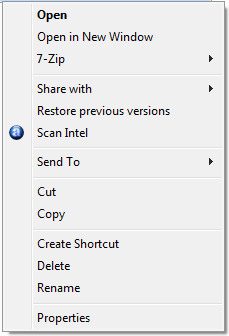
File Before and After Shift key :
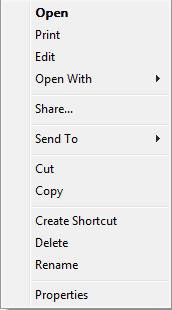
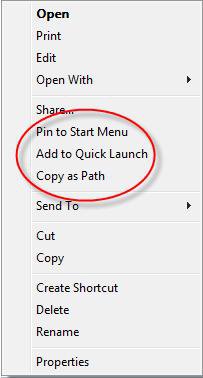
Folder Before and After Shift key :
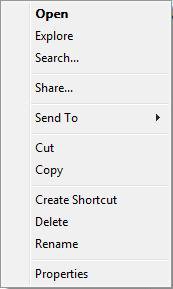
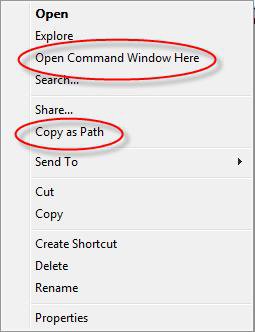
Related Tutorials
- How to Add "COPY TO FOLDER" and "MOVE TO FOLDER" to the Context Menu in Vista
- How to Customize the Context Menu for the Start Menu in Vista
- How to Customize the Send To Context Menu in Vista
- How to Customize the Recycle Bin Context Menu in Vista
- How to Add "Encrypt" and "Decrypt" to the Context Menu in Vista
- How to Add and Remove a "New" Context Menu Item in Vista
- How to Add "Take Ownership" to the Context Menu in Vista
- How to Copy the Full Path of a File or Folder in Vista
- How to Restore the Search Context Menu Item after Installing the Vista SP1
- How to Add "Flip 3D" to the Context Menu in Vista
- How to Use "Open Command Prompt Window Here" in Vista
- How to Restore or Remove "New" from the Context Menu in Vista
- How to Enable or Disable the Context Menu in Vista
- How to Remove or Show Drives in the Vista and Windows 7 "Send To" Context Menu
- How to Add "View and Print File Directory" to the Context Menu in Vista
- How to Add or Remove "Copy as Path" from the Vista Context Menu
- How to Add or Remove "Send To" from the Vista Context Menu
- How to Add or Remove "Turn Aero On or Off" from the Vista Context Menu
- How to Add "System Properties" to Computer Context Menu in Vista
- How to Add "Empty Folder and Subfolders" to the Vista Context Menu
- How to Restore or Remove "Restore Previous Versions" from the Vista Context Menu
- How to Disable or Enable "Context Menus" and "Dragging and Dropping" in the Start Menu
Attachments
Last edited by a moderator:


 . Thanks Again:D