![]() |
![]() | ![]() | ![]() | ![]() | ![]() | ![]() | ![]() |
| Welcome to Windows Vista Forums. Our forum is dedicated to helping you find solutions with any problems, errors or issues you are experiencing with Windows Vista. The Vista forum also covers news and updates and has an extensive Windows Vista tutorial section that covers a wide range of tips and tricks. |
| |||||||
![]() |
| |
Send To Context Menu | ||||||||||||||||||||||||
| ||||||||||||||||||||||||
| | ||||||||||||||||||||||||
| | |
| Vista x64 Ultimate SP2, Windows 7 Ultimate x64 | Re: SendTo context menu Updated 11-22-2007 to include the restore default Send To items. Shawn |
My System Specs![]() |
| | |
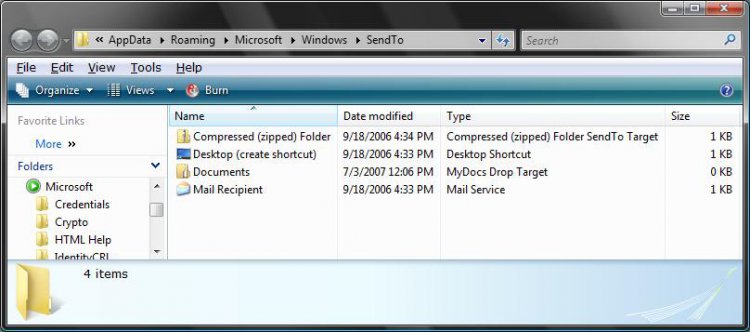
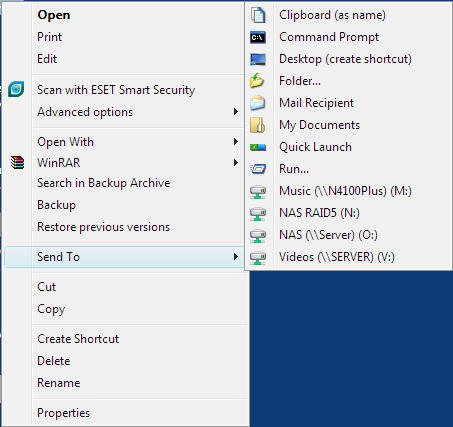
| Visdta Ultimate 32bit | I have checked both my Sent To folders and they do not contain any references to my mapped network drives, however all mapped network drives are appearing in the Send To list. This means if I accidentally hover over the Send To menu so that it expands, Vista interrogates all the network drives which means spinning up all 8 disks in my NAS whcih takes about 30-45 seconds - VERY ANNOYING. Any ideas how I can stop this? Here is a really useful application I have come across that allows you to customise the Send To menu, including adding useful options such as being able to send to the Quick Launch menu. And its FREE! :: gabrieleponti.com :: |
My System Specs![]() |
| | |
| Vista x64 Ultimate SP2, Windows 7 Ultimate x64 | Re: Send To Context Menu Hi Jedinight2002, I suppose that you could remove the ones that you do not plan on using Send To with from the Send To folder. That's a nice free program you ran across. I wish it had some more options though on what it can add. Shawn |
My System Specs![]() |
| | |
| Visdta Ultimate 32bit | Re: Send To Context Menu |
My System Specs![]() |
| | |
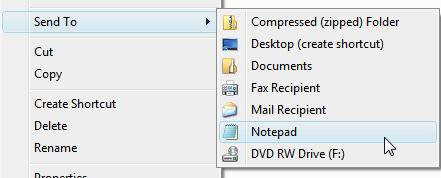
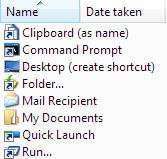
| Vista x64 Ultimate SP2, Windows 7 Ultimate x64 | Re: Send To Context Menu The options in the Send To Menu are not the same as the icons in the send to folder. See attached: This will show you how to remove the drive letters from the Send To context menu. Send To Context Menu - Remove or Show Drive Letters Shawn |
My System Specs![]() |
| | |
| Vista Ultimate x64 | Re: Send To Context Menu Hi, I have followed your tutorial, but the shortcut I have created in the sendto folder still doesn't appear in the context menu. here is what I did. 1. open the run dialog, and type in shell:sendto, and hit enter. (send to folder appears) 2. and as in xp, i right click on the window and bring up the context menu, click "new" and then "shortcut" 3. then I have located an exe (I have tried a folder as well), and finish creating the shortcut. now, i go back to my desktop and pick any file, the shortcut i have just created still does not appear on the send to context menu. any idea? is there still any windows policy which may have an effect? |
My System Specs![]() |
| | |
| Vista x64 Ultimate SP2, Windows 7 Ultimate x64 | Re: Send To Context Menu Hello Dereklio, and welcome to Vista Forums. Did you put the shortcut into the Send To window? You can only use a location (ex: folder) to add to the Send To menu, or a shortcut of an exe file that uses Open With (ex: Notepad). Hope this helps, Shawn |
My System Specs![]() |
| | |
| Vista Ultimate x64 | Re: Send To Context Menu thank you very much for your reply. yes, i did trying both. i right click on the send to windows and use new --> shortcut to create the shortcut. I created the shortcut to Notepad.exe. and then I double click on the shortcut within the send to explorer windows and it does bring up Notepad. I followed the same procedure in winxp and it works fine, the shortcut appears immediately in the context menu, but with my vista installation, it doesn't work as expected. so i wonder if there is any further setting in vista that can prevent it from happening? |
My System Specs![]() |
| | |
| Vista x64 Ultimate SP2, Windows 7 Ultimate x64 | Re: Send To Context Menu Dereklio, What file are you trying to add to the Send To menu? |
My System Specs![]() |
![]() |
| Tutorial Tools | |
| |
Similar Threads | ||||
| Tutorial | Category | |||
| Send To Context Menu - Restore Default Menu Items | Tutorials | |||
| New Context Menu - Restore Default Menu Items | Tutorials | |||
| Send To Context Menu - Remove or Show Drive Letters | Tutorials | |||
| Send To - Add or Remove from Context Menu | Tutorials | |||
| No more "Send to mail recipient" in context menu! | Vista General | |||