
How to Remove or Change the Shortcut Arrow and Name in Vista
 Information
This will show you how to remove, restore, or change the Shortcut Arrow on shortcuts. You will also see how to enable or disable the Shortcut name extension when new shortcuts are created.
 Note
NoteIf you accidentally used a XP method of doing this by removing or renaming the IsShortCut registry, then the shortcuts in Favorite Links, Media Center, and in the Games Explorer disappear or will not work anymore. Vista uses this value to track links, lots of programs and features that use links will not work correctly like the ones above. You can use this program below to fix them by restoring the shortcut arrow, then you can make any changes you like afterwards.
 Warning
Removing the shortcut arrow from shortcut icons can make it hard to tell which files are shortcuts or not. This can lead to you accidentally deleting the actual file instead of just a shortcut to it.
 OPTION ONE
1. If you have not already, click on the Download button below to download the Vista Shortcut Overlay Remover (Vista Shortcut Overlay Manager) program below for the 32-bit or 64-bit Vista you have installed. Save the .zip file to your desktop, extract (drag and drop) the .msi file to your desktop, and install it.
32-bit (x86) Vista

64-bit (x64) Vista
2. Double click on the program's shortcut to run the program.
3. To Change or Remove the Arrow for All Shortcuts
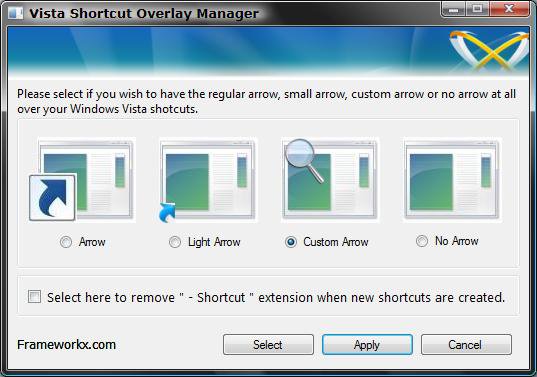
A) Select (dot) the arrow option you want for the shortcut arrow. (See screenshot below)
NOTE: If you selected Custom Arrow, then click on Select to navigate to and choose a ICO (icon) file you have downloaded to use.
4. To Remove the "Shortcut" Name from All Shortcuts
A) Check the box to also remove the - Shortcut name extension for new shortcuts that are created.
5. Click on Apply.
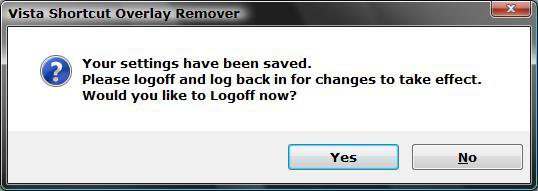
6. Click on Yes to log off to apply the changes. (See screenshot below)
7. Log back on and your done.
OPTION TWO NOTE: This option will allow you to only remove or restore the shortcut arrow on all shortcuts old and new.
1. Click on the Download button below to download the file below.
Remove_Restore_Shortcut_Arrow.zip
2. To Remove the Shortcut Arrow
A) Open the ZIP file (step 1), and extract the Blank.ico file, and either the 32-bit or 64-bit Remove_Shortcut_Arrow.reg file for your Vista version to the desktop.
NOTE: To see if your Vista is a 32-bit or 64-bit version, open the Start Menu and right click on Computer and click on Properties. Under System Type, you will see what version of Vista you have.
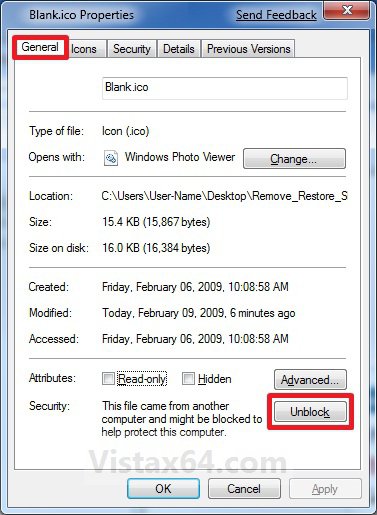
B) Right click on the Blank.ico file and click on Properties.
C) Under the General tab, click on the Unblock button if there. (See screenshot below)
NOTE: If the Unblock button is not there, then the file is already unblocked. Continue on to step D below.
D) Copy and Paste the Blank.ico into the C:\Windows folder, then click on Continue and Continue to approve the copy.
E) Right click on the 32-bit or 64-bit Remove_Shortcut_Arrow.reg file for your Vista version and click on Merge, then click on Continue, Yes, and OK to approve the merge.
F) Go to step 4.
3. To Restore the Shortcut Arrow
A) Open the ZIP file (step 1), and extract the Restore_Shortcut_Arrow.reg file to the desktop.
B) Right click on the Restore_Shortcut_Arrow.reg file and click on Merge, then click on Continue, Yes, and OK to approve the merge.
C) In the C:\Windows folder, right click on the Blank.ico file and click on Delete, Continue, and Continue.
NOTE: This is for when you have used step 2 above to remove the shortcut arrow previously.
4. Log off and log on, or restart the computer to apply.
5. You can now delete the downloaded files on your desktop if you like.
That's it,Shawn
Related Tutorials
- How to Remove the Shortcut Prefix On the Shortcut Name in Vista
- How to Change a Default Open Window Size for a Shortcut in Vista
- How to Create a Keyboard Shortcut for a Program in Vista
- How to Change the Target Path Location of a Shortcut in Vista
- How to Change a Shortcut Folder or File Icon in Vista
- How to Hide or Show Desktop Icon Text in Vista
- How to Hide or Show File Names in Vista
- How to Hide a Folder or Shortcut Icon in Vista
- How to Fix Game Shortcut Links in Vista Games Explorer
Attachments

Last edited:


 thanks for this one,
 )
)

 Ted
Ted
 those arrows!

